phones

Best Speakerphone for Conference Calls

A conference call starts to fail long before anyone drops off the meeting. It usually starts when voices sound distant, side conversations disappear, or the far end keeps asking people to repeat themselves. If you are choosing the best speakerphone for conference calls, the real job is not buying a popular device. It is matching the microphone pickup, speaker output, platform compatibility, and room size to the way your business actually meets.

That matters because a speakerphone that works well on an executive’s desk can struggle badly in a six-person huddle room, and a model that sounds excellent in a small room may fall short in a boardroom with glass walls and a long table. Business buyers need more than a spec sheet. They need a reliable fit that reduces meeting friction, supports standardized deployment, and holds up under daily use.

What makes the best speakerphone for conference calls?

The short answer is clarity, consistency, and compatibility. The longer answer is that the best unit for your environment depends on four practical factors: room size, participant count, connection method, and your conferencing platform.

Microphone performance is usually the first thing to assess. A strong speakerphone should capture voices evenly across the intended pickup range without forcing people to lean in or raise their voices. Echo cancellation and noise reduction are also non-negotiable in business settings, especially in open offices or reflective rooms where HVAC noise, keyboard clicks, and hallway traffic can affect call quality.

Speaker quality matters just as much. If remote participants sound thin or strained, teams tend to increase volume, which can create feedback or listener fatigue. A business-grade speakerphone should deliver clear, natural playback at realistic meeting levels, not just acceptable sound at arm’s length.

Then there is connectivity. USB remains the safest option for predictable performance in dedicated meeting spaces, while Bluetooth can be useful for flexible rooms and hybrid work setups. Some organizations need both. Others need native support for Teams, Zoom, or UC environments to simplify call control and reduce user error. That is where product selection becomes a procurement decision, not just an audio decision.

Start with the room, not the product

The fastest way to choose badly is to shop by brand or price before defining the room. A small personal office, a four-person huddle space, and a medium conference room have very different audio demands.

Personal offices and focus rooms

For one or two users, compact USB or Bluetooth speakerphones often make sense. In these spaces, the priorities are ease of use, reliable pickup at short range, and portability. These models are ideal for hybrid staff who move between home, private offices, and touchdown spaces. They are generally cost-effective and easy to deploy at scale.

The trade-off is coverage. A compact unit may sound excellent for one person but underperform once more people join around a table. If your so-called personal office often becomes an ad hoc meeting spot, size up early rather than replacing hardware later.

Huddle rooms

This is where many businesses get caught out. Huddle spaces look small, so buyers often install entry-level units that are really built for desktops. But huddle rooms usually involve multiple voices, inconsistent seating positions, and mixed laptop use. That means microphone array quality becomes more important than portability.

For these rooms, the best speakerphone for conference calls is often a dedicated business model with wider pickup coverage, stronger echo control, and simple USB connectivity for room PCs or bring-your-own-device setups. If the room is used for Teams or Zoom every day, dedicated platform-certified hardware can reduce support issues and improve the user experience.

Medium conference rooms and boardrooms

Once the room gets larger, standalone speakerphones become more situational. Some premium models can handle medium rooms well, especially if they support expansion microphones or daisy chaining. But there is a limit. If the table is long, seating exceeds six to eight participants, or the room has poor acoustics, an all-in-one speakerphone may not deliver consistent pickup.

At that point, buyers should consider whether a more complete conferencing solution is the better investment. Ceiling microphones, table arrays, or integrated audio-video bars can provide better long-term performance and easier standardization across rooms. The cheapest option upfront is not always the lowest-cost path once user complaints and replacement cycles are factored in.

The features that actually matter

Not every feature on a product page deserves equal attention. Business buyers should focus on the capabilities that affect deployment, usability, and support.

Microphone pickup and voice processing

Look past marketing claims and focus on intended room coverage. Beamforming microphones, full-duplex audio, acoustic echo cancellation, and noise suppression all help maintain natural conversation. Full-duplex is especially important because it allows both sides to speak at once without audio cutting in and out, which makes meetings feel more like real conversation.

USB, Bluetooth, or both

USB offers stability and is easier to support in standardized meeting rooms. Bluetooth adds flexibility for mobile users and temporary spaces. For many organizations, dual connectivity is the right balance because it supports both fixed-room and BYOD workflows. The key is not having more options. It is having the right options for how employees actually connect.

Platform certification

If your company runs Microsoft Teams or Zoom Rooms across multiple spaces, certification matters. It improves interoperability, enables native controls on some devices, and reduces troubleshooting. In mixed-platform environments, broad UC compatibility can be the better choice. There is no universal winner here. It depends on whether your goal is standardization around one platform or flexibility across several.

Battery life and portability

For mobile professionals and shared spaces, battery-powered speakerphones can be useful. For permanent rooms, battery operation is less important than wired reliability. A portable unit is attractive, but if it spends all day in one room, a dedicated wired device is usually the safer business choice.

Manageability and support

This matters more in larger rollouts. If you are deploying across offices, classrooms, or shared meeting spaces, centralized management, firmware updates, and reliable vendor support become part of the buying decision. A device that sounds good but is difficult to maintain can create unnecessary workload for IT teams.

How to compare options without wasting budget

Price matters, but value matters more. The right comparison is not cheapest versus most expensive. It is fitness for purpose versus total cost of ownership.

A lower-priced speakerphone can be a smart buy for desks, remote staff, and low-use rooms. It becomes a poor buy if it fails in a critical client-facing conference room and needs replacement six months later. On the other hand, not every room needs premium enterprise audio. Overspending on simple spaces is just as inefficient as underspending on important ones.

A practical buying approach is to standardize by room type. Choose one model for personal spaces, one for huddle rooms, and another solution tier for larger conference spaces. That reduces training issues, simplifies support, and makes procurement more predictable. For organizations rolling out multiple locations, this approach also helps with quoting, lifecycle planning, and stock consistency.

Common mistakes buyers make

The most common mistake is underestimating room acoustics. Glass walls, hard tables, and open ceilings can make even good hardware sound worse. If a room is acoustically challenging, it may need more than a tabletop speakerphone.

Another mistake is assuming a speakerphone alone will solve every meeting problem. If video, room control, and wireless content sharing are also part of the experience, then the right answer may be a broader collaboration package rather than a single audio device.

Buyers also run into trouble when they ignore user behavior. If staff frequently connect their own laptops, keep setup simple. If the room is dedicated to one platform, certified room hardware is often the smarter path. And if your organization expects growth, choose a solution that can scale rather than one that only fits your current headcount.

When a speakerphone is the right choice – and when it is not

A speakerphone is a strong option when the room is small to medium, the table layout is straightforward, and users want quick deployment without a full AV project. It is also a smart fit for hybrid executives, small teams, and organizations that need dependable audio without overbuilding the room.

It is not always the right answer for larger boardrooms, training spaces, divisible rooms, or environments where audio quality is business-critical. In those cases, integrated conferencing systems often deliver better performance, better control, and better user adoption over time.

That is why experienced buyers assess the room first, then the workflow, then the device. A good product can still be the wrong solution if the deployment context is off.

For businesses buying at scale, the best results usually come from working with a specialist that can align product selection with room type, platform requirements, pricing targets, and deployment support. That is where a supplier like e365 SuperStore can add real value beyond the hardware itself.

The right speakerphone should make meetings easier to run, easier to hear, and easier to trust. If the device disappears into the background and your teams stop thinking about the audio, you made the right call.

NEW Dten available in 55-inch and 75-inch models

DTEN D7X 55-inch and 75-inch models

The all-in-one DTEN D7X transforms every meeting room into a modern workspace. Its powerful deep learning capabilities and AI features enable it to ensure great video collaboration experiences for your team, even without any user intervention. The D7X is also unique because of its enhanced compute capabilities, which enable it to perform multiple tasks at the same time and make sure that they are all run smoothly and efficiently.

With DTEN D7X, you can quickly connect any laptop to a single USB-C cable and start your video meeting. DTEN D7X features upgraded speakers, camera and microphones to create an enterprise ready professional meeting experience. It comes with Zoom and Microsoft Teams (via a free software download) so that you can join Zoom or Microsoft Teams calls on demand.

Listen up. Hear everything crystal clear with the new DTEN D7X 75″, a flexible, interactive display that’s as versatile as it is powerful. With state-of-the-art AI technology, it works with your team to optimize sound so each person can be heard, even in larger rooms like boardrooms. The upgraded speaker system features four times more sound and four new microphones ensure your quieter voices are picked up loud and clear.

The Future of Work

The Future of Work

The Future of Work | Have you got the best videoconferencing solution?
The world has changed. We’ve never used so much video, at home and at work. But in the rush to get teams working remotely, have you ended up with the best solution?

As hybrid work transforms into anywhere work, collaboration and employee experience goals continue to evolve. Work and learning spaces are changing to meet team expectations, and your technology must keep pace, with equal attention given to remote and on-site experiences. In short, we need to make anywhere work more
human-centric.

We have insights into strengthening the human experience in the workplace, including:

  • Our human-centric workplace how-to guide
  • Immersive spaces, platform interoperability, and VR design
  • In-person collaboration and events case study
  • Hybrid learning environments
  • Experience technology that moves the world
  • Technology partner solutions

Latest April Product Releases (Videoconferencing Equipment)

Latest April Product Releases (Videoconferencing Equipment)

Picture of e365 Superstore

e365 Superstore

Latest Product Announcements

The videoconferencing industry has grown exponentially and with numerous tools coming out every month, this will only continue to improve. We have compiled a list of the most useful videoconferencing equipment out there this month. 

Overview

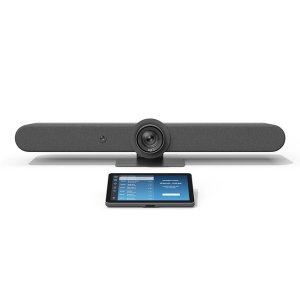
Logitech Rally Bar + TAP IP- Medium- Graphite

Logitech Rally Bar + TAP IP- Medium- Graphite e365 SuperStore are a premier authorised Logitech gold partner with Australian stock and warranty Logitech Rally bar are a Powerful All-in-one Video Conferencing Bar with Brilliant Optics and Automated PTZ. All-in-one Video Bar for Midsize Rooms. Simple to Set and Easy to Use. Only Quality Products. Trusted Australian Vendor. Friendly Customer Service. No Credit Card surcharge. Logitech Tap and Tap IP Compatibility Information  

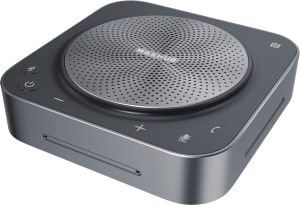
MaxHub Bluetooth Speakerphone UC BM35

MaxHub Bluetooth Speakerphone BM35 Unlock a new level of meeting clarity with the next-generation BM35 speakerphone. Crystal clear audio combines with a powerful pick-range to transform any small to mid-sized meeting space. Break free from the restrictions of wired devices with an agile, flexible solution that adapts as quickly as your team. 

In the home, the business office, or anywhere else, the BM35 is the ultimate part for clear conversations. Comes with 3 year warranty. Amplify Conference Quality with Superior Sound Portability and practicality come together in a powerful audio device, built for better meetings. The BM35 is optimized to keep human voices clear. Capturing every utterance in perfect detail, the BM35 empowers any team.

AVER CAM570 4K DUAL LENS PTZ AUDIO TRACKING CAMERA Stress FREE Installation

AVER CAM570 4K DUAL LENS PTZ AUDIO TRACKING CAMERA AVer CAM570 is a 4K dual lens camera with a 36X Total zoom PTZ camera and a second AI lens with 95˚FOV. Equipped with a built in microphone, CAM570 detects human voices up to 10M and offers audio tracking function. AI technology such as Smart Gallery and gesture control can capture every attendee up-close with premium video quality. 

Built-in Microphone Enables Audio Tracking Easily focus on active speaker with audio tracking mode and presentation mode. The camera will follow the speaker automatically or you can set up a preset point to focus on a specific area. The built in microphone picks up human voices up to 10M without being disturbed by a local speaker.

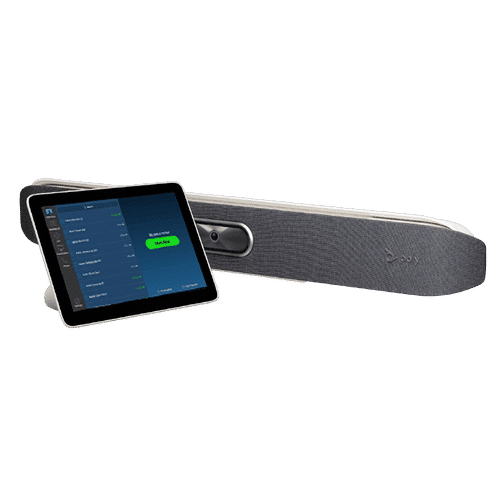
POLY Studio X50 & Poly TC8 4K Video Conf System W 3yr Poly Plus 24x7 Support

Poly studio X50

Poly Studio X50 with touch panel TC8 connects to Microsoft Teams and Zoom The Poly Studio X50 video bar delivers radical simplicity in a small, elegant package. In small- and medium-sized rooms, connect easily with whatever video collaboration software you may use. Experience full boardroom-quality audio, advanced camera capabilities, and quick wireless content—all in one sleek video bar. 

And say goodbye to unnecessary pucks, cords, and cables, along with the PC or Mac to drive the meeting, since the Poly Video OS runs the show. Easy to install, easy to manage. • Ideal for rooms of up to 8 participants • Surround everyone with the rich, legendary sound with stereo speakers that deliver immersive, room-filling audio • Dual monitor support ensures you have the ideal setup for room of many sizes • Be heard clearly with next generation microphone array

DTEN ME 27 All in One Zoom device

DTEN ME 27 All-in-One Personal Collaboration device for Zoom DTEN ME – the ideal solution for working from home Combining the technology in the DTEN ME with loom’s enterprise-quality software delivers the ideal solution for the home office. Simply login with your Zoom user account and create an instant office experience without any additional licenses. 

This solution integrates Zoom Meetings, phone calling, whiteboarding and annotation in a 27 multi-touch display built for the desktop. It is designed to keep your work­space clutter free and organized to deliver a professional meeting experience.

CommBox - Elegance XL Cart

CommBox – Elegance XL Cart Understatedly stylish fixed-height mobile stand with a pen shelf and designer hubless lockable castors. The cart suits CommBox screens up to 110″. Other features include 3″ heavy-duty locking castors and a handy pen and equipment shelf.

Maxhub v6 Collaboration Display - Maxhub C7530

Maxhub C5530

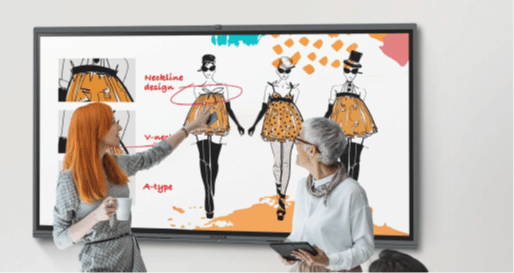
Maxhub v6 Collaboration Display – Maxhub C7530 Maxhub C7530 v6 Classic Series Maxhub C7530 The Maxhub C7530 – Integrating professional video conferencing, seamless screen-sharing, advanced whiteboard technology, and a brilliant audiovisual experience, is the ultimate corporate-collaboration assistant. 

Drive productive teamwork and increase organizational efficiency with this meeting-room must-have. Installation and Integration Australia Wide Total Solution, Minimal Setup – Maxhub C7530 A complete, seamless design fulfills every meeting requirement, including built-in camera, mic, and touch panel. Whether video conferencing or hosting a local discussion, it’s as easy as plugging in your power cable.

Cisco Webex 8875 IP Phone - Corded - Corded - Wi-Fi, Bluetooth - Desktop - Carbon Black - VoIP - IEEE 802.11a/b/g/n/ac - 2 x Network (RJ-45) - PoE Port

Cisco Webex 8875 IP Phone – Corded – Corded – Wi-Fi, Bluetooth – Desktop – Carbon Black – VoIP – IEEE 802.11a/b/g/n/ac – 2 x Network (RJ-45) – PoE Port CP-8875-K9= Webex 8875 IP Phone – Corded – Corded – Wi-Fi, Bluetooth – Desktop – Carbon Black Webex 8875 IP Phone – Corded – Corded – Wi-Fi, Bluetooth – Desktop – Carbon Black – VoIP – IEEE 802.11a/b/g/n/ac – 2 x Network (RJ-45) – PoE Ports Enjoy superior voice communications while retaining the convenience and user-friendliness over Internet Uses VoIP technology to transfer audio signals over the Internet while circumventing high toll charges by telephone companies

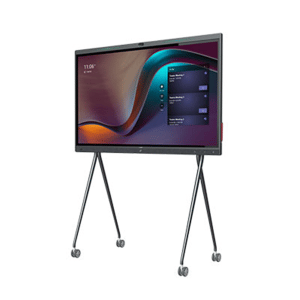
Yealink MeetingBoard 86 inch for MS Teams

Yealink MeetingBoard 86 inch Collaboration Display For Microsoft Teams e365 SuperStore are a premier authorised Yealink Platinum partner with Australian stock and warranty Simple to Set and Easy to Use. Only Quality Products. Trusted Australian Vendor, Many Payment options, Same Day Delivery, Friendly Customer Service. 

No Credit Card surcharge. (stand available separately) Unlock Creative Teamwork The Yealink Meeting Board collaboration display effectively facilitates powerful digital collaboration by combining everything in the room, from the computing unit to a wide 86-inch touchscreen display, 4K camera, microphones arrays, speakers, and built-in Microsoft Teams. The Android 10 OS and an Octa-core high-performance chipset offer maximum performance.

Facebook
Twitter
LinkedIn
Picture of e365 Superstore

e365 Superstore

e365 Superstore are experts in video conferencing equipment. We have completed thousands of projects over the last 25 years and we are passionate about virtual communications. Click here to find out more about our company.

Ultimate guide to Zoom-Microsoft Teams room solution.

Face-to-face interaction is critical in business communications but teams are becoming increasingly dispersed. The Video Conferencing systems on the market now are designed with smaller huddle rooms in mind

Our Team are

  • Highly experienced Unified Communications, Videoconferencing, Collaboration Solutions Specialized
  • Offer a consultative approach
  • Highest product and application knowledge
  • Totally technically proficient
  • Superior level of networking competency, service, support & customer satisfaction

Our Video/Audio/IP telephony/Unified Communications solutions include:

  • Cisco, Logitech, Crestron, Poly, Yealink  Video Conferencing endpoints for Meeting Rooms, Cloud, On-premise and Hybrid Solutions, Microsoft Teams, Zoom, Google meet.
  • Integrate your Boardroom solutions
  • Professional services, Managed Services.
  • Audio Visual solutions (Touch boards, Projectors, Trolleys etc.)

Please let me know if you would like one of our team to discuss with you and  provide the latest Communication solutions you and your organisation.

e365 Distribution October BIG Discounts

e365 Distribution has the latest BYOD Collaboration solutions for your Home Office, Huddle room and meeting rooms

Special pricing  is limited till 31st October

  1. Logitech Tap,Rally
  2. Poly Studio X30-X50
  3. Yealink MVC 800
  4. Cisco Room Kit Mini
  5. Crestron MX150 
  6. Headsets
  7. Smartboards from Hitachi, Maxhub ,Samsung, Commbox, Avocor,NEC,LG,Viewsonic & more
  8. Trolley’s, Home office furniture 
  9. Dten Smartboard & Videoconferencing.


e365 provide a Installation, Support and help desk.

 e365 has the most brands in Australia and most are in stock ready for delivery Australia-Wide

Black Friday sale

Black Friday discounts have started early at e365 Distribution online Collaboration web site www.e365.com.au  

 If you are looking for some big discounts for

  • LED’s screens
  • Smartboards
  • Videoconferencing solutions (Cisco, Poly, Crestron, Zoom, MS Teams )
  • Headsets
  • VoIP phones
  • Cloud Video/Voice services
  • Conference phones
  • Projectors
  • LED trolleys etc.

e365 has the most brands in Australia and most are in stock ready for delivery Australia-Wide

(Black Friday-Special pricing ends close of business 29/11/2019)

eVideo connects Koppen Developments

eVideo connects the latest Cisco Room kit systems for Koppen Constructions. Their staff can now have visual and audio collaboration between North Queensland and Central Queensland offices as well customers.

Sign Up For Our Newsletter to Receive Regular Specials!