Videoconferencing Benefits and Tips
The e365 Team
- 3 Min Read
We provided around 15 x HP Poly Videoconferencing systems with installation and integration for improved meeting audio/video for their Boardrooms and Meeting rooms in their Adelaide and Brisbane offices.The Current instability and conflict in the Middle East (specifically regarding 2025-2026 tensions involving Iran, Israel, and the US) have accelerated AI advanced communication tools.
eVideo Communications & our award-winning eCommerce web site e365 Superstore have been inundated with enquiries since the Gulf war event happened.
Now is the time for Businesses to look at Video conferencing which works to mitigate business travel and improves communications.
With Video conferencing seamless communication between local and global partners locations you are saving time and money. Consider below
Don’t wait until November 28 – Black November has arrived early and your favourite brands and audio visual bundles. We are offering incredible deals
Call us on 1800 111 387
e365 Super Store has announced a new reseller relationship with microphone and professional audio manufacturer Shure.
Effective today, has access to distribute the entire range of Shure products, including microphones, wireless solutions, audio monitoring, loudspeakers and more via the e365 Super Store
Big discount bundles all Video bars and Audio Visual systems at e365 Superstore
Each week we Price Match certain Vendors, end of life products, exclusive bundles,
Our Price Match program, means you won’t pay more for many of well-known brands
Communication – Solutions – Integration
Offices in Gold Coast | Sydney | Brisbane| Melbourne | Canberra | Adelaide| Perth
Click below for the latest offers and discounts
View our latest e365 Superstore newsletter
MeetingBoard C is equipped with a wide-angle 50MP camera (98.2° HFOV), providing the best view of meeting. It makes sure every participant is fully in frame
Heckler Express Rolling Stand . Whether you’re outfitting a single room or deploying at scale, this stand ensures a clean, consistent installation every time.
Engineered for simplicity and performance, the Rolling Stand supports Logitech and other Teams-certified components with precision. Its small footprint base glides easily into place, while the integrated device panel mounts your display, video bar, mini PC, and power components securely. With clean cable routing and a dedicated shelf for your touch controller, this stand is the ultimate solution for rapid, repeatable Teams Rooms deployments in flexible workspaces.
Competitive Prices, Shop Online Now, Great Service, Multiple Locations, Convenient Locations Near You, Next Day Delivery, Unbeatable Prices, View Prices, Deals and Offers
#teams #evideo #e365
Call us on 1800 111 387 for a FREE demonstration or buy on line via the link below
The new ethos is
|
Invest in the right technology for all types of workers
With the rise of hybrid workspaces, employers are shifting to multi-modal workspaces to accommodate how employees move between multiple work sites. A recent survey showed that 89% of businesses plan to invest in technology in next 12-18 months to support a hybrid workforce2.
This includes investing in the right set of hardware such as headsets, monitors and webcams for employees who continue to adopt the hybrid workplace model.
It also includes upgrades to the audio-visual technology in the office to enable seamless video conferencing and team meetings. The idea is to provide a great experience for all attendees – no matter where they are working from. This ensures team members feel included and equal.
For instance, the Video Bars features 4K video technology to cover the full 180-degree field of view to ensure remote and in-office participants have the same experience. The video and audio-conferencing solution is compatible for use with Microsoft Teams and Zoom and is essential in enabling multiple modes of collaboration.
Create dedicated spaces for collaboration
The emphasis on attractive workspaces will be a key factor in driving the return of the workforce to the office. To welcome teams into the office, set up flexible collaboration areas as well as dedicated video rooms for brainstorm sessions, team meetings and workshops with easy-to-use plug-and-play technology. Ensure you stock up on coffees, teas and snacks to enhance the experience.
Provide training on collaboration tools
Many workplaces are now adding more tools to their collaboration stack. To ensure teams get the most value and productivity out of the tools, conduct and record training sessions on how to use both hardware solutions such as plug-and-play video conferencing, and collaboration programs such as Microsoft Teams, Slack, Workplace, Trello and Asana. Ensure each meeting room has clear instructions for how to operate the set up for more seamless meetings and less need for IT support.
by Tom Morgan
The Poly Studio G62 video conferencing system is a modular codec that allows for seamless connection of Poly peripherals and controllers. Compatible products include Poly Studio E60 camera, Poly Studio E360 companion camera, Poly Studio E70 camera, Poly Studio R30 USB video bar, and Poly IP table and ceiling microphones.
e365 SuperStore are a premier authorised Poly Platinum partner with Australian stock and warranty
Simple to Set up and Easy to Use. Only Quality Products. Trusted Australian Vendor, Many Payment options, Same Day Delivery, Friendly Customer Service. No Credit Card surcharge.
by Tom Morgan
by Tom Morgan
Instantly Transform Small Meeting Spaces into Dynamic and Efficient Collaborative Environments for Zoom Rooms and Microsoft Teams Rooms (upcoming) with Easy BYOD.
The Small Room Solution with DTEN Bar and DTEN Mate offers versatility in mounting configurations – above or below a single display or vertically between two displays.
Its unique ability to flip 360 degrees with the same aspect ratio ensures true eye-to-eye level meeting experiences, allowing seamless sharing of both people and content in the same meeting.
by Tom Morgan
e365 SuperStore provides customers with high-quality innovative products at competitive pricing, our e365 professionals are fully trained in the latest collaboration products from leading vendors such as Logitech, HP-Poly, Cisco, Crestron, Yealink, etc as well ad VoIP Phones, Audio Visual solutions, Video-Audio conferencing hardware, Installation and support 24/7 Australia-Wide.
We only use Australian distributors for our products that come with an Australian warranty. Unlike some online websites, WE DO NOT ship products into Australia from overseas to undercut Australian businesses on price and we do not work out of the back of a garage.
This is called “grey marketing”. We have good relationships with all our Australian suppliers who in turn back up their products with local support if required.
Call us on 1800 111 387 0r email us at sales@e365superstore.com.au for a copy of our “Buyer beware Buying online”
by Tom Morgan
Partnership is one eternal truth of the IT channel; another constant is complaining about those partners.
Developing effective business relationships requires give and take. No one can shut their eyes to problems – real or perceived – by upstream or downstream partners.
This is what drove CRN to quiz our readers on their biggest annoyances. We asked resellers to tell us what vendor behaviour aggravates them the most. We asked vendors what they are sick of seeing among channel partners. From taking deals direct to handing leads to other partners to allowing deal registration abuse to continue, there are several thorny issues that stoke partner ire.
This venting makes for interesting reading, of course – who doesn’t enjoy a good moan – but we also hope to provide some constructive takeaways to improve partner engagements in Australia’s IT industry.
Few readers will be surprised which behaviour most irritates IT resellers – vendors going around the channel to supply products and services directly to end user customers and cutting out their partners.
Greg Williams, owner of Lincoln Computer Centre in South Australia, said: “The reseller channel is under increasing threat from the direct sales model where pretty much all vendors think the best way to make a dollar is to go direct to their customers. Trouble is, a lot of customers like middleman support, which is where we value-added resellers come in.”
The business manager of a Perth-based IT service company told us that one famously direct vendor is now a “four-letter word” in his company. He was sick of customers asking him to quote on systems the vendor was “selling retail on their website cheaper than my buy price. Makes me look expensive in other areas and I just don’t need to tolerate it.”
This kind of behaviour can get petty, as the director of a Perth reseller found with an information security company. The vendor “once contacted all clients direct and organised renewal”. The company cancelled all the licences and “no longer gives end user contact info to vendor”.
Consistency is key to effective partnerships. Changing tack every quarter? That’s frustrating. Too many vendor reps, driven by the share price demands of typically US-listed parent companies, change strategy with the passing of the seasons.
This enrages their resellers, who are often independently owned Australian companies that are in it for the long haul – resellers whose customer strategy is measured in years, not months.
Craig Somerville, managing director of Somerville Group in Sydney, said: “The fact will always remain that a vendor is driven by a different set of goals, like growth and revenue, where partners are driven by other factors that may be in conflict with the goals of their vendor partners.
“Each organisation need to make the choices that they believe are best for their business, and they are often in conflict. Sometimes, that is just life and the market will be the judge of the outcomes,” Somerville added.
Pricing is an art form. Too high and no one will buy, too low and the margin evaporates. Prices remain a lever vendors use to drive revenues and to reward partners for getting certified or achieving sales volumes.
But resellers are apt to lose their patience at the first whiff of unfairness in pricing, such as as better pricing for direct staff or for other partners.
Vernon Yates, director of Medical IT in Brisbane, said there was “no reward for loyalty”. He added that customers can still buy the same item from retail outlets at prices less than the price he gets from their primary distributor.
Chris Poulton, director of Calcomp Equipment in north-western Sydney, complained that too often, vendors “change the rules of the game to suit themselves in order to win a bid and cut out the reseller”.
“They claim that the power is out of their hands and the financial terms are dictated by their management overseas. However, on certain government tenders, large vendors can go in under cost price in order to keep out their competition. This is called penetration pricing and very often the IT equipment is being sold into government at below their own import cost. They can then claim a rebate from the parent manufacturer. Resellers can go nowhere near these advantages the large vendors have,” said Poulton.
Deal registration is often held up as a shining example of a vendor protecting their partners. But too often deal reg itself becomes the problem.
Vendors that are perceived to have ignored their own deal registration rules can expect scorn from partners. But often the problems start with the partners themselves when they exploit deal reg systems to shut out competitors.
Like many things in business, if the problem was addressed constructively, it could actually foster greater loyalty. But too often it frays relations.
In a poll of CRN readers, many pointed to deal registration as a key bugbear in channel engagement.
“Deal registration is often broken or manipulated for smaller partners,” one reader said. “It is generally swept under the carpet if you question it. This behaviour is generally not the same for larger partners that have more influence.”
Another told us: “Often we find other channel partners will try and muscle in on opportunities even when they are not active in the account and try to convince vendors that they should be the preferred partner. On other occasions, some channel partners have used deal reg from another customer account to negotiate better pricing from a vendor.”
Sean Boyd, managing director of networking specialists Beachhead Group in Artarmon, Sydney, said: “Some vendors won’t unlock a deal reg even if an end user does not want to deal with the partner who established the deal reg.
“Deal registration is designed to stop drive-by, but in this case it actually encourages it and the vendor claims integrity of the program,” said Boyd.
Favouritism is a risky endeavour (just ask a parent). In the IT channel, vendors that play favourites can seriously ruffle the feathers with the rest of their base.
Sometimes this preference is to do with size – small resellers make up the largest segment of the IT sector, but tier-one IT solution providers are typically highly visible and the most prized.
The managing director of a Perth-headquartered communications provider said: “Over our 17 years in operation, we’ve had experiences with vendors either changing loyalties or outright betrayal in the engagement taking a deal we had worked on for a long period of time and then handing it off to another partner who had contributed nothing at all.”
The general manager of a Brisbane-based reseller said: “Vendors often support platinum partners over partners that have actually generated the interest in the vendor’s solution.
“Most of the major integrators exhibit predatory behaviour and leverage their vendor rebates to drive prices down and win business against smaller partners,” he added.
The director of a Melbourne-based network integrator said his company struggles to compete with the major telcos, which sweeten the deal using their “tech funds”, which customers can spend on their broad catalogue of products and services. This “kills competition”, he said, “and vendors give them the best pricing because they support this anti-competitive behaviour”.
There’s no doubt that certification is important in a complex and highly skilled sector like IT. But can this be too much of a good thing? Yes, according to partners, who bemoan the administrative burden required to work with some vendors.
A solution architect at a major Sydney-based reseller complained about “the excessive amount of training required to be ‘certified’ to sell each vendor, as well as the number of webinars and partner events and enablement sessions”.
“I could spend the majority of my time going to events if I wanted to,”
Like any marriage, resellers and vendors often demand monogamy. And like any marriage, if one party decides to see other people, it can get messy.
Resellers get riled up that vendors want them to only sell that vendor’s products, especially when the vendor will typically have many, many other channel partners themselves.
The director of a Melbourne-based network integrator said: “We often experience different vendors deciding to deal with another much bigger partner if they believe there is even a slightly higher chance of winning a deal – even if it isn’t true, and we have deal reg.”
by Tom Morgan
by Tom Morgan
Create an immersive hybrid meeting experience in any space with the intelligent 360° camera, mic and speaker that gets smarter over time.
Meet the ultimate conference room webcam for hybrid collaboration
Single custom-designed 360° panoramic fisheye camera to eliminate image distortion
Camera view shows optional 360° panoramic view of the room and face-to-face view that auto-focuses on whoever is speaking
Output Resolution: 1080p HD
Field of View: 360
by Tom Morgan
Dual Lens PTZ Video Bar
With a Hybrid 18X Zoom for Medium & Large Rooms
With a streamlined design, dual 4K lenses, seamless lens switching, upgraded audio technology, and simple setup, the VB350 is the ultimate all-in-one solution for next-level video meetings. Level up to premium audio and video by using this powerful new video bar in your mid-to-large conference rooms.
by Tom Morgan
Bring your own meeting, from anywhere, with any device.
Seamless, wireless conferencing for small to medium-sized meeting and conference rooms
by Tom Morgan
ClickShare Bar Pro
Premium video bar for engaging, effortless wireless conferencing
Crystal-clear, high-quality stereo audio*
Advanced AI-powered 4K camera
Wired roomdock for 4K content sharing and alternative connectivity*
Advanced interactivity: touchback, annotation and blackboarding
Carbon-neutral product**
Premium video bar for engaging, effortless wireless conferencing
ClickShare Bar Pro is a premium, carbon-neutral, all-in-one video bar that enables engaging, effortless wireless conferencing in medium-sized meeting rooms with any videoconferencing platform. Thanks to its advanced AV capabilities (dual screen*, 4K content sharing) and interactive features (touchback, annotation, blackboarding), it enables crystal-clear audio, sharp views and enhanced interactivity for meetings where all participants feel heard and seen. This solution offers unparalleled flexibility, allowing IT Managers to easily equip their meeting rooms. Paired with a 5-year warranty, the bar overall reduces the Total Cost of Ownership by consolidating all collaboration, audio and video functionalities into one powerful device.
Help remote employees get the best perspective in every hybrid meeting with Logitech Sight. This AI-powered tabletop camera works hand in hand with Logitech Rally Bar or Rally Bar Mini to capture, identify and present virtual meeting attendees with the best sound and view of the meeting room action.
Compatible with leading video platforms:
Sight helps remote meeting participants see and hear everyone perfectly, so they feel like they’re actually seated at the table rather than sideline observers.
Working together with Rally Bar or Rally Bar Mini at the front of the room, Sight sits on the table and uses audio and video to intelligently detect, frame and present participants around the table.
By integrating with the leading video conferencing platforms like Microsoft Teams, Zoom, and Google Meet, Sight enhances the hybrid meeting experience by providing more dynamic and inclusive views of the meeting room action.
Two viewpoints for better perspective
Compatible with Rally Bar and Rally Bar Mini. Sight works with the front of room camera to detect conversations, capture audio and video, and present the best view of active speakers to remote participants.
Neat Bar Pro is a simple and elegant, compactly designed yet highly capable meeting room device. It’s perfect for bringing superior-quality audio and video to your meeting, huddle or focus rooms for up to ten people. You can mount Neat Bar above or below one or two monitors, and it comes with Neat Pad, our dynamic touch screen, which you can configure as a controller or scheduler.
BYOD conferencing enables the user to host video calls on whatever platform they choose from their laptop. To achieve this they need to access the room audio and video hardware to enable groups to conference with remote participants. Room systems, such as Microsoft Teams Room (MTR) systems allow users access without the need to connect a host computer. However, room solutions tend to be tied in to a single platform such as Teams. Smaller room systems will generally either have a videobar design with integrated camera and microphones onboard. They tend to use an Android operating system. Larger systems include a dedicated Windows room computer such as an Intel NUC. Most of these room solutions do have the option making calls on other conferencing platforms, but only by connecting a wired host computer.
What many users want is the platform agnostic and familiarity of a BYOD solution, without the wires. This is exactly what the new ScreenBeam Conference offers. ScreenBeam Conference is free software solution to users of the ScreenBeam 1100 Plus. It adds wireless connectivity to room cameras, microphones and speakers. Support for native wireless display protocols means users can wirelessly present from any device without having to install and maintain an application, or use a dongle or cable. On Windows devices Screenbeam uses Miracast to connect, on Apple Devices it uses AirPlay. There is also support on Chromebook or from Chrome browsers using GoogleCast. Support for iOS means you can even use an iPad or a mobile phone to host your conference calls.
ScreenBeam brings a whole host of other benefits, aside from getting rid of that cable from the host computer to the conferencing hardware. Wirelessly sharing content into meetings is a breeze with Multi-View enabling up to four users to share content. With the Quick Switch mode enabling you to effortlessly switch the presenter from one user to another.
The benefits of the ScreenBeam 1100 Plus go far beyond the wireless conference feature. For internal meetings and training sessions users can wirelessly share and mark-up content on the room display. They can do so without first downloading an app, or finding the right dongle or cable. ScreenBeam connects simultaneously to both internal and guest networks simultaneously without compromising security. The ScreenBeam 1100 Plus also supports digital signage. Therefore idle displays in conference and other meeting rooms can be employed to transmit employee and guest communications. It does this with integrated HTML-based digital signage capability.
Contact us on 1800 111 387
The all-in-one DTEN D7X transforms every meeting room into a modern workspace. Its powerful deep learning capabilities and AI features enable it to ensure great video collaboration experiences for your team, even without any user intervention. The D7X is also unique because of its enhanced compute capabilities, which enable it to perform multiple tasks at the same time and make sure that they are all run smoothly and efficiently.
With DTEN D7X, you can quickly connect any laptop to a single USB-C cable and start your video meeting. DTEN D7X features upgraded speakers, camera and microphones to create an enterprise ready professional meeting experience. It comes with Zoom and Microsoft Teams (via a free software download) so that you can join Zoom or Microsoft Teams calls on demand.
Listen up. Hear everything crystal clear with the new DTEN D7X 75″, a flexible, interactive display that’s as versatile as it is powerful. With state-of-the-art AI technology, it works with your team to optimize sound so each person can be heard, even in larger rooms like boardrooms. The upgraded speaker system features four times more sound and four new microphones ensure your quieter voices are picked up loud and clear.
The Future of Work | Have you got the best videoconferencing solution?
The world has changed. We’ve never used so much video, at home and at work. But in the rush to get teams working remotely, have you ended up with the best solution?
As hybrid work transforms into anywhere work, collaboration and employee experience goals continue to evolve. Work and learning spaces are changing to meet team expectations, and your technology must keep pace, with equal attention given to remote and on-site experiences. In short, we need to make anywhere work more
human-centric.
We have insights into strengthening the human experience in the workplace, including:
Videoconferencing has transformed over the years and it has now become a need for numerous companies. With the disruption of the pandemic this multiplied the demand for videoconferencing equipment. Currently, there are a large number of employees who still choose to work from home or take part in hybrid work.
The challenge lies in how modern businesses are going to take advantage of this opportunity and support their employees who are based in different locations.
Throughout this article we will cover the essentials in improving your online meeting experience and provide some tips to implement with your team in the next meeting.
Videoconferencing has been around for over 30 plus years and in its infancy videoconferencing systems would cost as much as $250,000 for a room setup. The investment in equipment was rationalised in the same way it is today. Whilst the more obvious benefits of reducing travel, connecting teams and improving collaboration is still pertinent to todays workforce, there are so many more added benefits for a fraction of the price.
This includes providing employees with flexibility, increasing personal productivity and enhancing collaboration. However, there have been only a few articles outlining how to use this technology and maximise the value of your investment in a videoconferencing system.
It’s evident that taking part in a Zoom or Teams meeting can’t be compared to a face-to-face meeting. The environment is completely different with the online environment being more restrictive. However, there are advantages to online meetings that are absent in face to face meetings. According to a recent study teams meeting online are more likely to make definitive decisions and meetings are less likely to sway off in tangents.
This saves time, money and resources as the agenda is followed closely. A drawback from an online meeting is the lack of daydreaming or disconnect opportunities. This is important for inspiring imagination and creating new ideas. Online meetings require focus on the speakers, whilst in person meetings participants feel connected within the same physical environment and feel free to let their mind wander.
The good news is that there are lots of alternatives to get your team back to brainstorming. These include sharing content on screen with apps like miro, allowing each participant to share their content in real time to the chat and many other options. Research has indicated that this will significantly increase memory to what was discussed in the meeting as well as, increasing morale as each participants feels valued.
Maintaining continual attention in normal meetings can be a challenge and in video meetings this can be even harder. Luckily there are a few habits you can start doing to improve your recall and your relationships with your work colleagues.
According to recent research, a key difference between participants with a healthy workplace relationships throughout the pandemic and those that didn’t have this experience, was their focus. By focusing on non verbal cues and body language these participants were able to receive messages much more clearly and truly understand their colleagues.
So it’s important to encourage your team to turn on their cameras and focus on your teams body language and non verbal cues. Although, this can be particularly difficult if the video quality is not clear or the connection to the internet is slow. If you do experience bad internet quality, you can avoid this by attaching your Ethernet cable directly into your router. Another integral part of the online experience is the ability to share information.
So it is recommended that companies and individuals who are working from home or partaking in hybrid work invest in great quality equipment.
Offering hybrid work or work from home options to employees can improve morale and actually enhance productivity. When employees are allowed to work from home they can be more flexible in organising their time and prioritising work. Employee’s that are offered these options also report higher job satisfaction and are less likely to switch job roles.
With increased flexibility employees gain an increase in focus and they are able to prioritise work tasks more easily. It also provides the opportunity to collaborate with individuals across the world and build key relationships. With reduced travel costs and an increase in time productivity significantly increases which accelerates business growth.
It’s clear that communicating online can be challenge and communicating effectively does not come naturally. It takes a conscious effort from all parties to create a great environment that will foster creativity and improve business performance.
A large part of the user experience comes from preparation and setting up your environment. It is important that you set up right by having appropriate lighting through using natural sunlight or a standard desk lamp to start off with before investing in professional lighting equipment.
Alongside this is investing in a professional quality video camera. The camera on your lap-top or mobile won’t provide you with the clarity that you need. This makes a difference in instant communication. If you can read a colleagues body language more clearly or hear the tone of their voice it transforms how a message is received. So make sure you invest in a professional set up.
Ensure your desk has enough space to place a notebook you can write on, as the more contact points users engage in the more points of memory the brain has to recall information from. So don’t forget about writting physical bullet points in every meeting.
That’s a wrap on all the different tools and techniques you can use to improve your experience online from established industry brands and scholarly researchers. Our aim to to improve the videoconferencing experience for companies worldwide and educate users on how to use this technology to gain the most value from your investment.
If you enjoyed this article, Sign up to our blog list below to be notified of any new developments within the videoconferencing industry.
The e365 Industry Blog covers all of the latest trends and developments within the video conferencing Industry. With the industry increasing its technological capabilities, it can be difficult to ascertain the core benefits to users in both the long and short term. Our blog allows users to know in an instant, how this technology will add value to their business and their online relationships. Sign up to our email list below, to be notified when we post our next blog and newsletter.
Experts in Video Conferencing Equipment
With return to work plans always evolving, you need collaboration platforms that are flexible. And, you must provide equitable meeting experiences for everyone, everywhere, regardless of what collaboration tools your teams prefer. Read on to learn how Logitech can help you supercharge the collaboration tools you already have.
You might also need to add virtual collaboration capabilities to meeting spaces that didn’t have them before. Discover how Logitech hardware tools can improve utilization, engagement, and productivity. Add the right remote monitoring and device management platform and you can further enhance the user experience by minimizing issues, monitoring quality, and analyzing meeting usage data.
This guide explores hybrid workplace collaboration tools solutions, including:
Adding Logitech hardware also makes it easy to quickly enhance meeting rooms that were not previously equipped for remote collaboration. Logitech video conferencing solutions let your teams talk, share files and screens, and whiteboard ideas from anywhere. Scaling up your collaboration capabilities is easy since Logitech integrates seamlessly with what you already have in place.
Deploying Logitech hardware solutions helps create a consistent experience across all your meeting spaces, regardless of their size. Whether users walk into a huddle space or a large conference room, the interface to operate the conferencing system will be the same.
Experts in Video Conferencing Equipment
We have many great things at eVideo Communications. We have just completed a project to supply (8 x Logitech Tap Large/Medium/Small bundle with MS Teams plus 8 x Tap Schedulers together with Installation and integration for one of our customers. As you can see below we have installed and setup their system, whilst ensuring all connections are made by using the least amount of cables possible.
So you can keep clean space without sacrificing your video experience. The whole process was undertaken by the team from purchase to delivery and set up. That’s not all, we always ensure that our customers are satisfied so we frequently follow up purchases with a friendly chat with a team member. We believe its imperative to build and maintain strong communication with our customers.
If you have any queries 0r would like to find out more information, please feel free to have a friendly chat with one of our team members.
Huge discounts plus trade in offers, customer specials, & Buy one with extra discount for two specials
Most brands in Australia Videoconferencing, Audio Visual, Headsets, Phones, LED, Touch boards from Logitech , Poly, Yealink, Jabra, Samsung, Benq, Lenovo, HP, Microsoft, Google, NEC, Dell etc
Black Friday coming to e365 Distribution tomorrow !
Huge discounts plus trade in offers, customer specials,& buy one with extra discount for two specials
Most brands in Australia Videoconferencing, Audio Visual, Headsets, Phones, LED, Touch boards from Logitech , Poly, Yealink, Jabra, Samsung, Benq, Lenovo, HP, Microsoft, Google, NEC, Dell etc
Some of the benefits include:
• Capability to drive 3 large screens
• 2 extreme resolution cameras with 16x zoom.
• Neat Audio processing, meaning no background noise and crystal clear audio.

Everything you need to connect Neat Bar to your TV or monitor is in the box, so it’s easy for anyone to install and set up. Just plug in the cables, and Neat Bar will auto-pair with Neat Pad. What’s more, because Neat Bar and Neat Pad have auto flip, they instantly realign your view, regardless of how you mount or position them.

Neat Bar self-activates the moment you walk in the room, immediately turning on your meeting room monitor and checking you into the room. Then with just one tap, you can wirelessly share your screen or start your meeting. It also instinctively frames you perfectly and auto releases the room when you leave.

Neat Bar is incredibly versatile and easy to set up. It comes with everything you need, including Neat Pad, our dynamic controller and scheduler, as well as multiple mounting options. Both Neat Bar and Neat Pad can be connected either wired or wirelessly to your network, so there’s no need to run any cables across the room. Better still, because of Neat Bar’s compact design, it’s easily portable. Meaning you can take it wherever you work. From your remote office to any meeting, huddle, focus or open space.
Neat’s advanced video hardware solutions support both Zoom and Microsoft Teams users for more closely connected, productive and safer hybrid work environments. Neat’s complete portfolio of devices will be certified for both Zoom and Microsoft Teams and will run Zoom and MS Rooms for Android, empowering Neat to further help drive innovation across meeting spaces to address today’s hybrid workplace needs.
As someone who graduated in the midst of the recession, when employers had an infinite number of educated and eager candidates to choose from, I was subjected to countless interviews of all different styles—in an office, at a coffee shop, group interviews, even a scavenger hunt (that’s a whole other blog post). But the most common interviews I encountered were either by phone or video conferencing. And while phone interviews might seem like the less stressful kind, nonverbal communication goes a long way in a video interview, especially in the early stages of the hiring process.

1) Being on the phone gives you a sort of anonymity that can lead to distraction. From checking your email to removing all the gum wrappers from the bottom of your purse, a distracted interview on either side of the table is not beneficial. When you can make eye contact with someone, it’s much easier to capture and keep their attention to show them how qualified you are for the position.
2) Smiling! People don’t want to work with a jerk. So while you may have the best strategy proposition and three years more experience than other applicants, it can be very challenging to convey happiness over the phone without an excessive use of inflection, which in turn makes you sound like a Care Bear. Facial expressions allow you to express interest and understanding of the material being presented in a genuine way that doesn’t come across as overkill.
3) Confidence is key. So maybe you exaggerated a little on the resume that landed you the interview, but you know you’re capable and you can let this interviewer know with your impressive posture. Good posture conveys confidence, so when you’re sitting up straight during that video call, it’s that much easier to show your future employer how poised and proficient you are.
4) You control your environment! No awkward waiting rooms, no fluorescent conference room lighting—with video conferencing, candidates can meet face to face with hiring managers for the first time in a comfort zone. Plus, you can emphasize key traits of your personality that may otherwise go unnoticed. For instance, want to showcase your organizational skills? Set your video call up so your color-coded bookshelf is your backdrop. Did a quick Google search and discovered that you and your possible boss-to-be share a mutual hobby? Prop that guitar up behind you. I’m not saying that you should hang up pennants and stage the background of the call with memorabilia of his or her favourite sports team, but subtle staging can’t hurt!
Video interviews can dramatically enhance the job search from both sides of the table. With a video conferencing expert to learn more about embracing the nonverbal communication. You’ll be more engaging, enlightening and personal than you would be by phone—plus, it gives you another reason to bust out that blazer you got just for interviews. Happy job hunting!
Powerful All-in-one Video Conferencing Bar with Brilliant Optics and Automated PTZ. All-in-one Video Bar for Midsize Rooms. Simple to Set and Easy to Use. Only Quality Products. Respected Logitech Australian partner with Australia-Wide offices. Award winning Customer support & Service.
Anywhere-anytime-any device both cloud based and on premise technology. Video conferencing room solutions that work with most cloud platforms
e365 Australia’s Award winning online business, eVideo Australia’s Fastest Growing Collaboration company Works with all platforms, Meeting space, Anywhere-Anytime-Any device, Mobile cloud
Hate email?
If you’re in the corporate world, chances are you have an affliction like I do. Five hundred emails, 24 hours a day, two means — portable devices and your desktop — to receive them. Email has effectively beaten the telephone as a preferred way to communicate. And if you think I’m exaggerating, consider this: Intel recently noted that in exactly one minute’s time, more than 204 million emails are sent. That means more than 12 billion emails land at their destination within an hour!
Email may currently be our number one means of communication, but it is flawed. The world of email has become impersonal and sometimes even hostile. How many of us have received the dreaded “all caps” emails where you can feel the sender screaming through your screen? Often people seem too comfortable saying things in an email that they would likely never say in person or via live video.
And, while email ensures that we are in constant contact with colleagues and clients, for just some of the reasons I’ve just stated, it doesn’t necessarily mean it is better.
We’re a mobile business force — one that enjoys the comforts of a work-anywhere lifestyle, whether from the train, the back porch, you name it. And our consumer technology like virtual meetings, video conferencing and other telecommuting technology allows us to do this. We also rely heavily on social media platforms — ones with video chats, picture exchanges, and 140 characters that tell the whole story. So while just eight percent of the workforce is using these tools currently, this is the future of collaboration.
We see it every day in the way our future workforce — teenagers — keep in touch. It isn’t through email or voicemail, its Snapchat, Instagram and Whatsapp. The younger generation uses video daily in their communications, suggesting that today’s CIO needs to be thinking about opening up the corporate intranet for such video collaboration that is device and technology agnostic. Not only is it the future, it’s good for business and promotes global teamwork.
As video collaboration becomes more mainstream how global companies connect offices will impact mobility in a whole different way. our government is expected to reduce its travel costs by 50 percent across agencies. Why shouldn’t video conferencing tools encourage enterprises across industries to follow suit? And, while some are currently connecting on devices tethered to their desks, the world is becoming more mobile. Major Telephony companies see the mobile market at 6.4 billion subscribers and 50 percent of those are smart phones. With those numbers only expected to grow, more devices will enter the market with video capability — leaving video as the major contribution to mobile data traffic by 2022.
With most consumers buying mobile devices for their bigger screens and HD video capability how can CIOs replicate quality consumer experiences and ensure employees have what they need to be successful?
They’ve tried. Believe me. But one of the biggest obstacles to integrating an employee’s workflow — and making it more of the consumer experience they desire – is the use of proprietary solutions.
For the last 20 years, we’ve seen different communication channels – everything from telephony and instant messages to the email and voicemail we get today. We’ve made improvements, but we often bind ourselves because of separate platforms that cannot co-exist. Proprietary technology is costly, often not scalable and thus, IT departments cannot make it customized for their needs.
My suggestion? Let’s open it up! Cloud Videoconferencing — offers CIOs and employees an option that appears to be traditional video conferencing without being tethered to a desk or platform.
Phone calls are a thing of the past. And I would wager email is on its heels. We’re on video now. We’re on social media now. It’s a multimedia, multiplatform, multi-device world.
Today is already tomorrow; video and social media use — most prominent already in the consumer industry- – will become as natural as picking up the phone or sending an email thanks to increased use of Cloud Videoconferencing. And that’s good news. Now if you’ll excuse me, I need to respond to the 147 emails I’ve received while writing this…
Integrating video conferencing into your organization is quickly becoming essential. However, a top quality video conferencing system can be expensive. Therefore, in preparation for deciding on a provider, and choosing a plan for your company, it is well advised that you define your video conferencing requirements well before you begin to draft any contracts with vendors.
The following list should help you narrow down which types of video conferencing systems and equipment you should consider adopting when moving forward with your purchase. Make sure you consult both your management and IT departments in order to cover all bases.
There are three broad areas you should take a look at with regards to your video solutions.
The first is business requirements – the direct business goals that video conferencing should be looking to facilitate.
Next, there are functional requirements; specific details such as number or users and/or overall functionality that feed back into the business goals.
The final requirements to consider are technical. This may include any limitations you have in regards to space, systems, and bandwidth. Take advantage of the deep knowledge your IT team has in these areas before moving forward. Then ask yourself the following:
What is your organization looking to achieve with video conferencing solutions?
This is first and foremost the most important question you must ask before going forward with a video conferencing solution. The wider strategy your team outlines will be a fundamental help in determining the type of video conferencing solution you choose.
What is your budget for video conferencing solutions?
Your budget should be determined by assessing how valuable the solution will be to your operations. In addition, look at where the solution will reduce costs and improve productivity i.e. travel costs, scaling knowledge, connecting remote workers etc.
How many users does your video conferencing system expect to support?
Knowing how many users your organization will have can help you with issues such as bandwidth and pricing plans. However, knowing how much you are likely to grow in the future is just as important.
Where will your users be located?
Will your users be based in the main office or will they be remote? Remember to look to align your bring-your-own-device (BYOD) strategy with the solution to make it simpler for remote workers. Also, look at how many meeting rooms you wish to convert into video conferencing suites and, of course, don’t forget to look at all of your office and subsidiary locations.
Do you have in-house IT support or will you need to outsource?
Most vendors should be able to offer you IT support, though this will be at an extra charge. If you are fortunate enough to have onsite IT staff members, they must familiarize themselves with the solution.
Cloud or on premise video conferencing?
It’s not just applications and storage that are offered from the cloud, it is now possible to dispense with expensive video network infrastructure and have video conferencing and calling delivered as a service. This option is by far the most scalable and affordable. In very few cases, organizations prefer to have on premise infrastructure deployed behind firewalls. Therefore, engage with your IT to understand the pros and cons of both environments.
When you are going to implement a video system, follow these questions and assess your business goals to find a video conferencing solution that best suits your company.
At eVideo, we have a complete range of cloud video conferencing services and a portfolio of hardware for meeting rooms systems and software for desktop and mobile devices.
To find out more visit us at www.evideo.com.au or 1800 11 387
Sydney | Melbourne | Gold Coast | Brisbane| Canberra | Adelaide| Perth
If you haven’t been seeing the productivity you want out of your employees and your business as a whole, consider that the layout and design of your office space might be to blame. In recent years, many companies have started trying to innovate their office designs to pursue the look and feel of a modern office.
In many cases, this idea of a ‘modern office’ results in an open concept design where most employees work side by side or across from one another, clustered together in one big main room. Maybe there are a few standalone offices for senior members of the staff, or a few conference rooms for meetings, job interviews and the like. For the most part, though, the office is designed as an open floor plan.
The Problems with the Modern Office Layout
There are two core problems with this kind of office design, and you can solve both of them (at least partially) by investing in huddle room equipment for your business.
The first issue is that open workspaces, while they can drive collaboration and promote a teamwork mentality, can also create loud, distracting environments where very little actual ‘work’ gets done. There is too much chaos and not enough direction.
The second issue, meanwhile, is that the office’s open concept design means that there aren’t many other rooms for team meetings or collaboration sessions. There are a couple of larger conference rooms or boardrooms, but those are intended for more important meetings—not for gatherings of smaller teams or segmented departments.
The Benefits of Using Huddle Room Equipment
Investing in huddle room products is an effective way of reversing these negative impacts of an open concept office. Huddle rooms are smaller rooms in an office space that act as less formal conference rooms. They are maybe the size of a traditional office but come equipped with key electronics and software to allow for video conferencing, Power Point presentations, idea brainstorming and more. Best of all, the size of these rooms makes them perfect for smaller group meetings.
Having huddle room equipment and software in your office helps restore the sense of collaboration often lost amidst the madness of an open floor plan office. When your individual teams can regularly go into smaller rooms to have meetings or conversations, it removes some of the noise and chaos from the central work area. It also keeps the conference rooms and boardrooms open, available for larger gatherings.
Because huddle rooms are smaller than standard conference rooms, they cost less to outfit with key technology and software products. As a result, turning three or four smaller rooms or offices throughout your workspace into huddle rooms might be more affordable than you realise.
At eVideo Communications, we specialise in huddle room equipment and huddle room software in Australia. We can help you design and implement a huddle room strategy in your office. We predict you will start noticing the benefits right away.
To start collaborating with the eVideo team, call us today on 1800 111 387
Face-to-face interaction is critical in business communications but teams are becoming increasingly dispersed. The Video Conferencing systems on the market now are designed with smaller huddle rooms in mind
Our Team are
Our Video/Audio/IP telephony/Unified Communications solutions include:
Please let me know if you would like one of our team to discuss with you and provide the latest Communication solutions you and your organisation.


Enjoy the power of a fully integrated Windows 10 device designed for teams. All-in-one Surface Hub 2S natively runs your must-have Microsoft apps, including Microsoft Edge and Office,2 and your essential business apps. Incredibly high resolution and amazing graphics performance deliver vibrant, crisp, and clear images and video on the thin, light 50” display.
Increase innovation, employees’ skills, and remote teams’ efficiency with a culture of collaboration. Create it with flexible workspaces and the right technology.
Microsoft accessories for Surface Hub 2
Built to enhance your Surface Hub 2S experience, camera and pen are included in every box, and help your teams best express themselves.
Choose from a stand or wall mount (not included).
Pricing based on Microsoft registration agreement
Logitech Rally Bar
Powerful All-in-one Video Conferencing bar with Brilliant Optics and Automated PTZ.
All-in-one Video bar for Midsize Rooms. Simple to Set and Easy to Use.
Only Quality Products from e365. Award winning Logitech Australian partner with Australia-Wide offices.
Award winning Customer support & Service. No Credit Card surcharge.
We Specialize in Both Cloud-Based and On-Premise Technologies.
*Subject to conditions and vendors.
Video Conferencing and high-impact audio-visual technology is the Answer.
Today’s organizations thrive in a creative, agile and responsive working environment, where people want to engage with each other in real time – wherever they are.
Our forward thinking customers require not only specific technology, but innovation, transformation and a cultural shift towards a new way of delivering, and interacting with, information.
Implementing this type of environment can prove to be challenging due to the complexity and financial requirements of a flexible Workspace.
Business Benefit
Working environments are no longer standalone rooms with simple display screens or a flipchart. They are areas where we collaborate to create an environment where people can deliver more value to the business.
Business benefits include tangible cost savings, savings in time and office space, along with increased engagement. Video Conferencing and VCaaS (Cloud) reduces complexity of multi-manufacturer video equipment and make booking a VC as easy as a meeting, driving utilization.
Today we demand interaction and collaboration tools that engage with our customers, staff, partners etc. that provides a multi-layered experience and brand awareness.
Boardroom Management, potentially linked to room integration, automates the environment for whatever type of meeting is taking place.
Tangible Savings
We help you transform your business through the implementation of innovative audio-visual and video solutions with the ability to achieve tangible cost savings or drive customer engagement.
Virtual teams enable collaborative working, increasing the efficiency of your business and reducing the time to market.
More and more businesses are using digital signage as part of their communications and information strategy. Deployed in prominent areas such as receptions, staff restaurants, office spaces, digital signage enables engaging, dynamic and tailored content.
Video Walls and large format screens are becoming common, centrally controlled and distributed across a geographically dispersed estate.
Our Capability
Our team works closely with customers to design and implement a variety of technology solutions, including:
We are leading the way in providing a focus on design, implementation and management of Video Conferencing and high-impact audio-visual technology throughout Australia and Globally enabling our customers to be ahead of their competitors.
We’ve been named the Premier Partner of Yealink –
Tom Morgan CEO and Managing Director has recently signed an agreement with Yealink a leading Telecom-Unified communications global organisation to become premier partners in business.
Our partnership with Yealink allows eVideo Communications to be a leader Australia-wide and Global advanced features of Yealink’s industry-leading technologies.
eVideo Communications offers our customers a wide range of products. We are a professional organisation that can provide installation and consultation of our products.
eVideo Communications has been in business for over 23 years offering products and solutions to our customers.
Channel manager of Yealink, Brandon Zhou is most happy to be part of this agreement
Incorporating voice, video, chat, mobility so you can collaborate better
Collaboration creates a unified workspace by integrating data, IP communications and collaboration products and applications into a single, unified system.
Zoom, Microsoft Teams, Webex Collaboration platforms remove complexity by simplifying the architecture to a standards based IP platform. Integrating Voice, Data, Video and Applications into a single platform provides customers with seamless, end-to-end communications which will enable your business to communicate more efficiently and provide a better service to your customers
Connect co-workers, partners, vendors, and customers with the information and expertise they need
Access and share video on the desktop, on the road, and on-demand, as easily as making a phone call
Facilitate better team interactions, dynamically bringing together individuals, virtual workgroups, and teams
Make mobile devices extensions of the corporate network so mobile workers can be productive anywhere
Innovate across the value chain by integrating collaboration and communications into applications and business processes
Cost-effective, secure and scale-able conferencing with high quality voice and video
Proactively connect people with the information, expertise, and support they need
Run voice, data and video communications over a single, converged network
View real-time presence information and communicate using email, instant messaging, and voice mail or unified messaging
Leverage your smartphone to become an extension of the enterprise network
Adjust your camera appropriately, try to fill the screen as much as possible with people rather than with the table, chairs, walls or the floor
Place the microphone in the centre of the group, preferably on a soft surface, eg mouse mat or thick book; this will help absorb some surface noise.
Avoid tapping on the microphone and rustling papers near the microphone – this noise will be very loud at the remote site(s). (This also applies for tapping pens on desks, rattling cups and saucers and chairs bumping into table).
Avoid covering the microphone with documents, laptop covers etc – this will mute the sound and remote site(s) will not hear speaker.
Mute the microphone before moving it so that the remote site(s) doesn’t hear you moving it.
Speak in your normal voice without shouting and use natural gestures.
There is no such thing as a private conversation during videoconferencing – the microphone is very sensitive and will pick up any whispering so avoid any side conversation and ensure that only one person speaks at any one time.
Press mute button if you require privacy.
If more than three people in meeting, nominate a lead person to manage the videoconference. This lead person should control the camera, microphone and ensure smooth running of the videoconference
Once connection has been made lead person should Introduce themselves and ask remote site(s) if they can see and hear you.
Confirm that you can hear and see remote site(s).
On commencement of videoconferencing meeting all participants should be asked to introduce themselves – if participants are unknown to each other, then it is helpful to raise your hand during your introduction so that remote site can recognize who is speaking.
Sometimes there may be a slight delay between site(s), consider pausing briefly for others to answer you or to make comments
As with any meeting, try to limit side conversations and ensure that only one person speaks at any one time
During multipoint calls, lead person should ask sites to select mute when not speaking.
During multipoint calls, lead person should ensure that all sites are given the opportunity to participate or ask questions before moving on to each agenda item. This will ensure involvement of all sites.
Arrive promptly for videoconference meetings. Doors opening and closing and chairs being moved once meeting has started is distracting.
If you have to leave the meeting, ask the lead person to announce that you are leaving.
If point to point call, agree beforehand who is making the call and likewise at end of meeting agree who will be hanging up the call.
Video conferencing has come of age and is used in every industry. Recent developments in mobile devices and wireless networks have propelled further interest in being able to video information anytime, from anywhere. Generic applications of video conferencing are too numerous to mention. Any department of any organization where meetings take place—finance, engineering, human resources, manufacturing, marketing, product development, sales, training—is an appropriate place to use video conferencing to:
• Connect dispersed staff without travel
• Bring in remote experts for consultation or training
• Interview job candidates or witnesses
• Make a presentation to a vendor or customer
• View data and presentations on an on-demand or real-time basis
• Receive information at any time or place
The use of video conferencing has the potential to increase productivity and efficiency by reducing unproductive travel time, preventing meeting delays, creating shorter and more structured meetings and allowing for greater reach of a message. Video conferencing also allows for an increased number of participants. It is often difficult to get information to everyone at the same time, but with video conferencing, all individuals who need data can get the information when it is easiest for them.
The initial perceived and quantifiable benefit of video conferencing was reduction in travel costs. Initially, many organizations paid for the deployment of video conferencing with the reduction in travel budgets. While travel savings have been a recognizable benefit of video conferencing, there are many more qualitative benefits. Three
other major benefits of video conferencing are increased productivity and efficiency, improved management communications and enhanced business opportunities.
• Reduced travel risk
• Reduced unproductive travel time
• Prevented meeting delays
• Shorter meetings
• Structured meetings
• Larger participation
• Optimize attendance
• Immediate information exchange
• Faster response
• Access to experts
• Time-share scarce talent
• Quicker decisions
• More interface at all levels
• Increased flexibility
• Customer service
• Competitive advantage
The top four applications in which video conferencing is used are:
• Management meetings
• Sales and marketing meetings
• Engineering, manufacturing, or production
• Training
This does not preclude other groups from using the technology (i.e., the HR department, the legal department, finance, etc.), but studies conducted by Telemanagement Resources International Inc. (TRI) have shown that the primary reasons that firms install video conferencing relate to the top four applications noted above.
Video conferencing has also been used for a variety of other applications, including product demonstrations to new customers, “town hall” type meetings and HR training. Given the longevity of video conferencing usage, all industries have developed useful applications for video conferencing. It is no longer a matter of if you will use video conferencing; it is only a matter of when.
Video conferencing provides tangible benefits to any organization. Devices that can handle video now range from handheld devices (i.e., phones and tablets) to high-end conference rooms. The technology is easier to use, cost is no longer an issue and connectivity happens almost anywhere. Video conferencing improves the way we work and provides us more time to spend with our family and friends.
e365 Distribution has the latest BYOD Collaboration solutions for your Home Office, Huddle room and meeting rooms
Special pricing is limited till 31st October
e365 provide a Installation, Support and help desk.
e365 has the most brands in Australia and most are in stock ready for delivery Australia-Wide
Black Friday discounts have started early at e365 Distribution online Collaboration web site www.e365.com.au
If you are looking for some big discounts for
e365 has the most brands in Australia and most are in stock ready for delivery Australia-Wide
(Black Friday-Special pricing ends close of business 29/11/2019)
eVideo connects the latest Cisco Room kit systems for Koppen Constructions. Their staff can now have visual and audio collaboration between North Queensland and Central Queensland offices as well customers.
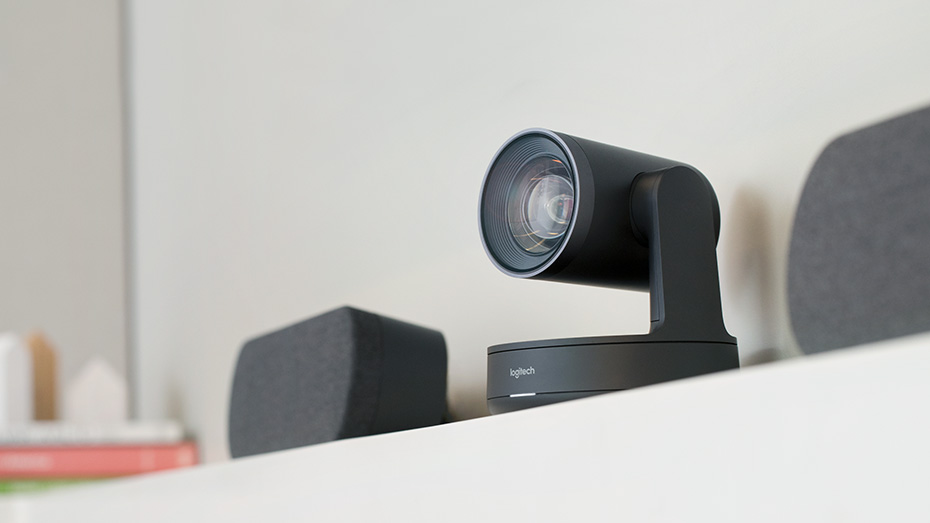
Logitech® Rally offers an Ultra-HD imaging system, delivering brilliantly sharp video, outstanding color, and exceptional optical accuracy at resolutions up to 4K. The modular audio system brings crisp, clear audio and unmatched voice clarity to the table. Rally comes standard with one speaker and one mic pod for medium and large sized meeting rooms. For larger spaces with 14 participants or more, Rally Plus offers two mic pods and two speakers for greater versatility out of the box
Rally’s modular audio components mean that speakers and mic pods can be placed wherever they are needed, achieving full audio coverage in your meeting space. Rally supports up to seven mic pods in total, helping you create the perfect audio configuration for your space. Rally features RightSense™ proactive technologies, which make better meetings easy and automatic. RightSight™ auto-frames participants no matter their distance from the lens, RightLight™ prioritizes faces over environment to render natural-looking skin tones, while RightSound™ enhances vocal clarity by suppressing background noise, auto-leveling
voices, and focusing on active speakers. RightSense is compatible with most any video conferencing application that works with USB devices, including Google® Hangouts™ Meet, Microsoft® Skype® for Business and Teams, and Zoom. Elegantly designed with premium finishes, thoughtful cable management, and modular audio, Rally integrates beautifully into any room design.
LOGITECH RALLY Includes:
Logitech Rally Ultra HD Camera
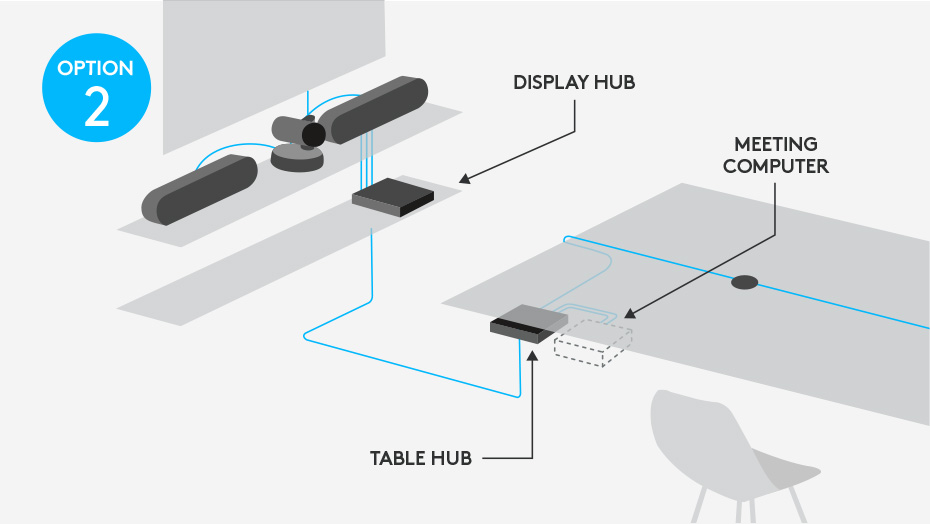
Table Hub
Display Hub
Mic Pod
Speaker
Remote Control
Optional Mounting Kit Available
LOGITECH RALLY PLUS Includes:
Logitech Rally Ultra HD Camera
Table Hub
Display Hub
2 x Mic Pod
2 x Speaker
Remote Control
Optional Mounting Kit Available
Logitech Rally Accessories DATA SHEET
We can also include full installation with integration (To be quoted), national Help desk, certified Logitech technical support Australia-Wide with 21 years Collaboration experience.
.
Logitech Rally delivers studio-quality video, unmatched voice clarity, and RightSense® automation for better meetings with video conferencing applications that work with USB devices, including Google Hangouts Meet, Microsoft Skype® for Business, Microsoft Teams, and Zoom. With modular audio, thoughtful cable management and premium finishes, Rally integrates beautifully into medium and larger rooms.
With an Ultra-HD imaging system, Rally delivers brilliantly sharp video, outstanding color, and exceptional optical accuracy at resolutions up to 4K. Logitech RightLight™technology optimizes light balance to emphasize faces and render natural-looking skin tones, even in dim or backlit conditions.
Crystal-clear audio is essential for world-class video conferencing, and Rally excels in delivering sound thats natural, crisp, and highly intelligible. Logitech RightSound™ enhances voice clarity by suppressing background noise, auto-leveling voices, and focusing on active speakers. Exquisitely sensitive mic pods ensure that everyone in the meeting can be clearly heard while stand-alone speakers fill larger rooms with rich, life-like sound.
Every component in the Rally system features premium industrial design suitable for any professional setting. Even as Rally helps everyone look and sound great during video meetings, each part of the system looks great in its own right. The premium PTZ camera at the core of the system is elegantly finished in matte black with slate gray metal trim, complemented by sleekly designed audio components and accessories that look great in any room.
ENHANCED USER EXPERIENCE


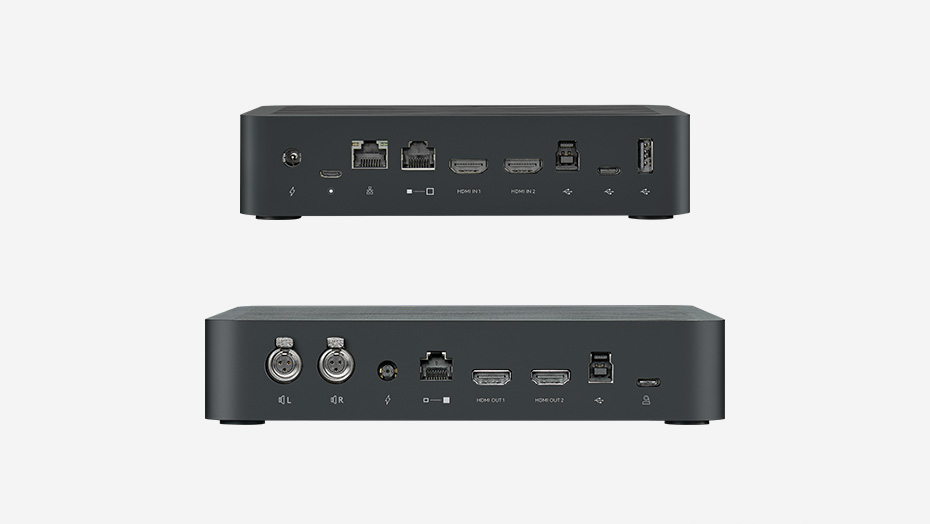
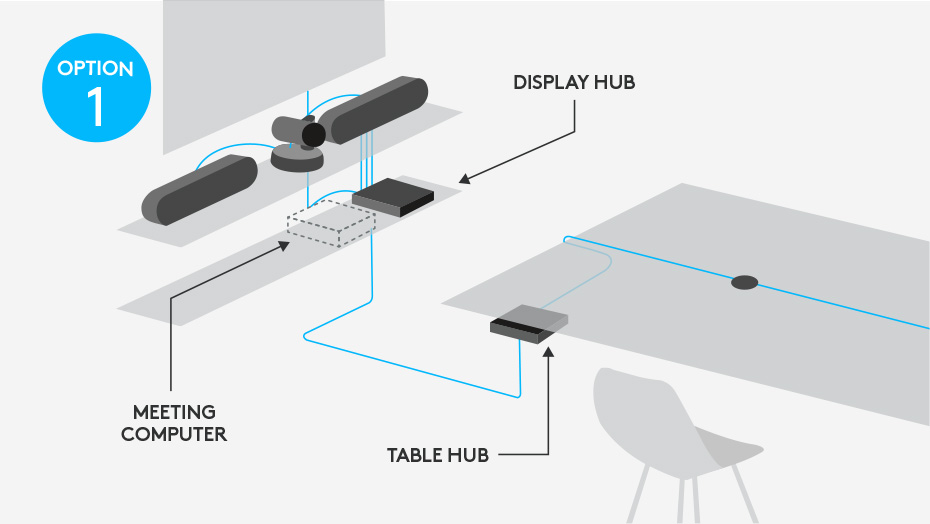
With a Display Hub and Table Hub to keep cables neat and organized, Rally components and the meeting computer remain securely out of sight. Connected by a single CAT6 cable, both hubs feature a full complement of connections so you can locate the meeting computer near the display or at the table. An HDMI input on the Table Hub eliminates the need for extra-cost cable extenders and makes wired content sharing easy.

Poly-exclusive innovations such as NoiseBlock and Acoustic Fence ensure minimal audio distractions such as background noise and side conversations while stereo audio provides a premium in-room experience at a distance.
The G7500 incorporates an interface that is intuitive and easy to navigate, and a deployment-friendly architecture makes it simple and cost-effective to install. The G7500 is intended for users including but not limited to business leaders, IT and facilities managers, AV specialists and healthcare professionals.
Support for industry standards gives G7500 the flexibility to connect to any cloud-based video platform or ecosystem (such as Zoom, Cisco Webex, GoToMeeting, Microsoft Teams and Skype for Business) through Polycom’s RealConnect Service


Share wireless content in 4K, with crisp detail never seen before integrated into a meeting room Video system.
With legendary Poly audio, people hear every aspect of the sound within the meeting. With noise cancellation built-in, audio distractions like background noise and side conversations are a thing of the past.
G7500 is deployment friendly too, with an intuitive user interface and flexible set-up that increases adoption and utilisation. Backwards compatibility with legacy Polycom peripherals means there is no need to rip and replace when deploying the Poly G7500.
The Poly G7500 puts 4K collaboration into the centre of the experience, with customisable user interfaces for both touch and non-touch sensitive displays. The Poly G7500 also includes annotation and whiteboarding features that can be captured and shared from the system. By combining high quality video conferencing and wireless content sharing in one solution, the Poly G7500 enables multiple meeting participants to share their content from any device they choose, making meetings far more productive than ever before.
“The advancements and capabilities of the G7500 will dramatically improve the quality of our surgical education and training program. With 4K resolution, we are one step closer to viewing the procedure as though it’s through the surgeon’s eyes.”
– Professor Dr. Wilko Grolman, an otolaryngologist based in the Netherlands
Poly G7500 Video Conferencing – DATA SHEET