logitech

LOGITECH RALLY BAR + Tap IP & SAMSUNG 65″ DISPLAY only $7,499

LOGITECH RALLY BAR + Tap IP & SAMSUNG 65″ DISPLAY  only $7,499


LOGITECH RALLY BAR + Tap IP & SAMSUNG 65″ DISPLAY is a Powerful All-in-one Video Conferencing Bar with Brilliant Optics and Automated PTZ. All-in-one Video Bar for Midsize Rooms. Simple to Set and Easy to Use. Only Quality Products. Trusted Australian Vendor. Friendly Customer Service. No Credit Card surcharge.


Black November Discounts best early deals in Australia at e365 Super Store

Black November Discounts best early deals in Australia at e365 Super Store

Don’t wait until November 28 – Black November has arrived early and your favourite brands and audio visual bundles. We are offering incredible deals
Call us on 1800 111 387

Vendors and Distributors are allowing Non qualified dealers to sell their Audio Visual equipment with no ability

  • Distributors provide a product ( Monthly) feed to resellers without any care, no regard re any product knowledge or ability to demonstrate or provide product training.
  • Who cares they say ! As long as the boxes move from the warehouse
  • Most do not have the ability to provide professional installation of Audio Visual equipment (Audio Visual, Touch boards, Videoconferencing etc) Australia wide
  • No real care as long as they get their numbers for the Vendors.
  • No ability to be able to provide after sale support.

Would you have a Doctor or Lawyer who was unqualified.

The new ethos is

If you can spell the brand (AV equipment) you can sell it

Logitech Rally Board 65

Logitech Rally Board 65

Crystal clear video, powerful audio, and AI-driven features in a 65-inch touchscreen.

🌟 Loaded with AI-powered video and audio: RightSight 2 and RightSound 2
🌟Deploy in Android, PC, or BYOD mode with Microsoft, Zoom, and Google Workspace
🌟4K video, 115-degree FOV
🌟6 beamforming mics and additional tweeters
🌟Embedded sensors provide room health and energy insights
🌟Remotely configure and manage with Logitech Sync
🌟Made with up to 41% next-life plastics, low-carbon aluminum, recycled fabrics, and FSC-certified packaging

eVideo can help you drive teamwork and collaboration from the office to the home office and everywhere in between.

 Invest in the right technology for all types of workers

With the rise of hybrid workspaces, employers are shifting to multi-modal workspaces to accommodate how employees move between multiple work sites. A recent survey showed that 89% of businesses plan to invest in technology in next 12-18 months to support a hybrid workforce2.

This includes investing in the right set of hardware such as headsets, monitors and webcams for employees who continue to adopt the hybrid workplace model.

It also includes upgrades to the audio-visual technology in the office to enable seamless video conferencing and team meetings. The idea is to provide a great experience for all attendees – no matter where they are working from. This ensures team members feel included and equal.

For instance, the Video Bars features 4K video technology to cover the full 180-degree field of view to ensure remote and in-office participants have the same experience. The video and audio-conferencing solution is compatible for use with Microsoft Teams and Zoom and is essential in enabling multiple modes of collaboration.

Create dedicated spaces for collaboration

The emphasis on attractive workspaces will be a key factor in driving the return of the workforce to the office. To welcome teams into the office, set up flexible collaboration areas as well as dedicated video rooms for brainstorm sessions, team meetings and workshops with easy-to-use plug-and-play technology. Ensure you stock up on coffees, teas and snacks to enhance the experience.

Provide training on collaboration tools

Many workplaces are now adding more tools to their collaboration stack. To ensure teams get the most value and productivity out of the tools, conduct and record training sessions on how to use both hardware solutions such as plug-and-play video conferencing, and collaboration programs such as Microsoft Teams, Slack, Workplace, Trello and Asana. Ensure each meeting room has clear instructions for how to operate the set up for more seamless meetings and less need for IT support.

Why do Some Organisations Still Struggle to Implement Video Conferencing???

Video Conferencing Transcends Industry and Business Size

Video conferencing tends to be equally important across every sector that can support hybrid work. Whether a business is small or a large corporation appears to have little bearing on whether or not they use a video conferencing technology. Cost appears to be the only real distinction, as 83% of organisations with more than 250 employees are likely to purchase video calling tools versus roughly 27% of small businesses meetings

We at eVideo communications have 26 Years’ experience in implementing Videoconferencing throughout Australia.

Call us on 1800 111 387 to discuss your needs

eVideo Corporate Overview 2024-2025

e365 SuperStore Mega Sale March 2024

e365 SuperStore Mega Sale March 2024

Videoconferencing bundles with Australia – Wide stress FREE Installation and support e365 is one of Australia’s largest online retailers that services both domestic and international customers. We have a huge variety of audio visual products, video conferencing and video conferencing accessories online to date.

Building-hybrid-workplace-interoperability-in-2024


Videobars Offer Simplified Conferencing Solution

AI and Other Features

A video bar has the same goal as any hybrid conferencing solution: Enable all participants to see and be seen and hear and be heard. Thus, most manufacturers and videoconferencing experts agree that video and audio quality is top of mind. It is also important to remember that size matters.

“Room aesthetics play a part, but ultimately a video bar has to deliver in terms of visual and audio performance, “A high-capacity lens, powerful speakers, and mics are needed for larger rooms.”

“The choice depends on the specific needs of the user and the meeting space, “Larger video bars may offer better audio quality and wider camera coverage, suitable for big conference rooms. Smaller ones are ideal for personal use or small meeting spaces and huddle rooms where portability and space-saving are priorities.”

“AI can enable features like auto-framing, voice tracking, noise reduction, and lighting adjustment, significantly improving the overall meeting experience.”

While ensuring that an inclusive conferencing space is established via the technology within the video bar, it is also important to consider the size of the room and where the video bar will be installed—not simply the location in the room, but if it will be attached to a display or rest on a tabletop—because mounting options become pivotal at that point.

Barco Gen CX BYOD seamless wireless conferencing solution with Logitech-Yealink-Poly Discounted ends Feb 29TH

Barco Gen CX BYOD seamless wireless conferencing solution with Logitech-Yealink-Poly Discounted ends Feb 29TH

Bring your own meeting, from anywhere, with any device.

Seamless, wireless conferencing for small to medium-sized meeting and conference rooms

Logitech Sight AI powered table top camera

Logitech Sight AI powered table top camera The AI powered table top camera

Help remote employees get the best perspective in every hybrid meeting with Logitech Sight. This AI-powered tabletop camera works hand in hand with Logitech Rally Bar or Rally Bar Mini to capture, identify and present virtual meeting attendees with the best sound and view of the meeting room action.

Compatible with leading video platforms:

Sight helps remote meeting participants see and hear everyone perfectly, so they feel like they’re actually seated at the table rather than sideline observers.

Working together with Rally Bar or Rally Bar Mini at the front of the room, Sight sits on the table and uses audio and video to intelligently detect, frame and present participants around the table.

By integrating with the leading video conferencing platforms like Microsoft Teams, Zoom, and Google Meet, Sight enhances the hybrid meeting experience by providing more dynamic and inclusive views of the meeting room action.

Two viewpoints for better perspective
Compatible with Rally Bar and Rally Bar Mini. Sight works with the front of room camera to detect conversations, capture audio and video, and present the best view of active speakers to remote participants.

The Future of Work

The Future of Work

The Future of Work | Have you got the best videoconferencing solution?
The world has changed. We’ve never used so much video, at home and at work. But in the rush to get teams working remotely, have you ended up with the best solution?

As hybrid work transforms into anywhere work, collaboration and employee experience goals continue to evolve. Work and learning spaces are changing to meet team expectations, and your technology must keep pace, with equal attention given to remote and on-site experiences. In short, we need to make anywhere work more
human-centric.

We have insights into strengthening the human experience in the workplace, including:

  • Our human-centric workplace how-to guide
  • Immersive spaces, platform interoperability, and VR design
  • In-person collaboration and events case study
  • Hybrid learning environments
  • Experience technology that moves the world
  • Technology partner solutions

Meetings Made easy with eVideo Communications and Logitech

Find out How Logitech is Enhancing Collaboration Online

Picture of E365 Team

E365 Team

Experts in Video Conferencing Equipment

Keep and Enhance the Collaboration Tools You Prefer with Logitech

With return to work plans always evolving, you need collaboration platforms that are flexible. And, you must provide equitable meeting experiences for everyone, everywhere, regardless of what collaboration tools your teams prefer. Read on to learn how Logitech can help you supercharge the collaboration tools you already have.

How Logitech Enhances Your Collaboration Tools

You might also need to add virtual collaboration capabilities to meeting spaces that didn’t have them before. Discover how Logitech hardware tools can improve utilization, engagement, and productivity. Add the right remote monitoring and device management platform and you can further enhance the user experience by minimizing issues, monitoring quality, and analyzing meeting usage data.

This guide explores hybrid workplace collaboration tools solutions, including:

  • How Logitech hardware, including cameras, speakers, and microphones can pair with any collaboration platform you are using to upgrade your collaboration spaces.
  • Working with existing tools such as Microsoft Teams, Webex by Cisco, Zoom and Google Workspace
  • Adding the right remote monitoring and device management platform to further enhance the user experience by minimizing issues, monitoring quality, and analyzing meeting usage data.

Adding Logitech hardware also makes it easy to quickly enhance meeting rooms that were not previously equipped for remote collaboration. Logitech video conferencing solutions let your teams talk, share files and screens, and whiteboard ideas from anywhere. Scaling up your collaboration capabilities is easy since Logitech integrates seamlessly with what you already have in place.

Deploying Logitech hardware solutions helps create a consistent experience across all your meeting spaces, regardless of their size. Whether users walk into a huddle space or a large conference room, the interface to operate the conferencing system will be the same.

Many great things at eVideo Communications 2022

Our Latest Success Stories from the E365 Team

Picture of E365 Team

E365 Team

Experts in Video Conferencing Equipment

Our Latest Project

We have many great things at eVideo Communications. We have just completed a project to supply (8 x Logitech Tap Large/Medium/Small bundle with MS Teams plus 8 x Tap Schedulers together with Installation and integration for one of our customers. As you can see below we have installed and setup their system, whilst ensuring all connections are made by using the least amount of cables possible. 

So you can keep clean space without sacrificing your video experience. The whole process was undertaken by the team from purchase to delivery and set up. That’s not all, we always ensure that our customers are satisfied so we frequently follow up purchases with a friendly chat with a team member. We believe its imperative to build and maintain strong communication with our customers.


If you have any queries 0r would like to find out more information, please feel free to have a friendly chat with one of our team members. 

Black Friday Discounts from e365 Distribution Australia’s leader in Online Retail ,Cloud video conferencing and Collaboration solutions

Huge discounts plus trade in offers, customer specials, & Buy one with extra discount for two specials

Most brands in Australia Videoconferencing, Audio Visual, Headsets, Phones, LED, Touch boards from Logitech , Poly, Yealink, Jabra, Samsung, Benq, Lenovo, HP, Microsoft, Google, NEC, Dell etc


Black Friday coming to e365 Distribution tomorrow !
Huge discounts plus trade in offers, customer specials,& buy one with extra discount for two specials
Most brands in Australia Videoconferencing, Audio Visual, Headsets, Phones, LED, Touch boards from Logitech , Poly, Yealink, Jabra, Samsung, Benq, Lenovo, HP, Microsoft, Google, NEC, Dell etc

Phone interviews are the worst: Embracing the Video Interview

Nonverbal communication is the combination of all the things you say when you’re not actually speaking words. Things like your gestures, facial expressions, posture and tone of voice often say more than an entire paragraph of sentences. The nonverbal cues you pick up on in a video conferencing interview versus a phone interview can mean the difference between a job offer and another Friday night spent sending out resumes.I can remember several phone interviews in which the recruiter or hiring manager would ask a question, I would eloquently answer with a complete and succinct thought, there would be a longer-than-comfortable pause and then I’d start rambling. I totally voided the carefully crafted response I had just delivered all because I wasn’t sure if the interviewee was expecting more, taking notes or had been bored into a coma by my response.When interviewing over video, you easily alleviate miscommunications like that. Here are the top reasons nonverbal communication in a video interview trumps phone interviews and some tips for making a great impression over video:

1) Being on the phone gives you a sort of anonymity that can lead to distraction. From checking your email to removing all the gum wrappers from the bottom of your purse, a distracted interview on either side of the table is not beneficial. When you can make eye contact with someone, it’s much easier to capture and keep their attention to show them how qualified you are for the position.

2) Smiling! People don’t want to work with a jerk. So while you may have the best strategy proposition and three years more experience than other applicants, it can be very challenging to convey happiness over the phone without an excessive use of inflection, which in turn makes you sound like a Care Bear. Facial expressions allow you to express interest and understanding of the material being presented in a genuine way that doesn’t come across as overkill.

video interviews

3) Confidence is key. So maybe you exaggerated a little on the resume that landed you the interview, but you know you’re capable and you can let this interviewer know with your impressive posture. Good posture conveys confidence, so when you’re sitting up straight during that video call, it’s that much easier to show your future employer how poised and proficient you are.

4) You control your environment! No awkward waiting rooms, no fluorescent conference room lighting—with video conferencing, candidates can meet face to face with hiring managers for the first time in a comfort zone. Plus, you can emphasize key traits of your personality that may otherwise go unnoticed. For instance, want to showcase your organizational skills? Set your video call up so your color-coded bookshelf is your backdrop. Did a quick Google search and discovered that you and your possible boss-to-be share a mutual hobby? Prop that guitar up behind you. I’m not saying that you should hang up pennants and stage the background of the call with memorabilia of his or her favourite sports team, but subtle staging can’t hurt!

Video interviews can dramatically enhance the job search from both sides of the table. With a video conferencing expert to learn more about embracing the nonverbal communication. You’ll be more engaging, enlightening and personal than you would be by phone—plus, it gives you another reason to bust out that blazer you got just for interviews. Happy job hunting!

Logitech Rally Bar

Powerful All-in-one Video Conferencing Bar with Brilliant Optics and Automated PTZ. All-in-one Video Bar for Midsize Rooms. Simple to Set and Easy to Use. Only Quality Products. Respected  Logitech Australian partner with Australia-Wide offices. Award winning Customer support & Service.

Anywhere-anytime-any device both cloud based and on premise technology. Video conferencing room solutions that work with most cloud platforms

e365 Australia’s Award winning online business, eVideo Australia’s Fastest Growing Collaboration company Works with all platforms, Meeting space, Anywhere-Anytime-Any device, Mobile cloud

Don’t Email me, Video Me!

Hate email?

If you’re in the corporate world, chances are you have an affliction like I do. Five hundred emails, 24 hours a day, two means — portable devices and your desktop — to receive them. Email has effectively beaten the telephone as a preferred way to communicate. And if you think I’m exaggerating, consider this: Intel recently noted that in exactly one minute’s time, more than 204 million emails are sent. That means more than 12 billion emails land at their destination within an hour!

Email may currently be our number one means of communication, but it is flawed. The world of email has become impersonal and sometimes even hostile. How many of us have received the dreaded “all caps” emails where you can feel the sender screaming through your screen? Often people seem too comfortable saying things in an email that they would likely never say in person or via live video.

And, while email ensures that we are in constant contact with colleagues and clients, for just some of the reasons I’ve just stated, it doesn’t necessarily mean it is better.

We’re a mobile business force — one that enjoys the comforts of a work-anywhere lifestyle, whether from the train, the back porch, you name it. And our consumer technology like virtual meetings, video conferencing and other telecommuting technology allows us to do this. We also rely heavily on social media platforms — ones with video chats, picture exchanges, and 140 characters that tell the whole story. So while just eight percent of the workforce is using these tools currently, this is the future of collaboration.

We see it every day in the way our future workforce — teenagers — keep in touch. It isn’t through email or voicemail, its Snapchat, Instagram and Whatsapp. The younger generation uses video daily in their communications, suggesting that today’s CIO needs to be thinking about opening up the corporate intranet for such video collaboration that is device and technology agnostic. Not only is it the future, it’s good for business and promotes global teamwork.

As video collaboration becomes more mainstream how global companies connect offices will impact mobility in a whole different way.  our government is expected to reduce its travel costs by 50 percent across agencies. Why shouldn’t video conferencing tools encourage enterprises across industries to follow suit? And, while some are currently connecting on devices tethered to their desks, the world is becoming more mobile. Major Telephony companies see the mobile market at 6.4 billion subscribers and 50 percent of those are smart phones. With those numbers only expected to grow, more devices will enter the market with video capability — leaving video as the major contribution to mobile data traffic by 2022.

With most consumers buying mobile devices for their bigger screens and HD video capability how can CIOs replicate quality consumer experiences and ensure employees have what they need to be successful?

They’ve tried. Believe me. But one of the biggest obstacles to integrating an employee’s workflow — and making it more of the consumer experience they desire – is the use of proprietary solutions.

For the last 20 years, we’ve seen different communication channels – everything from telephony and instant messages to the email and voicemail we get today. We’ve made improvements, but we often bind ourselves because of separate platforms that cannot co-exist. Proprietary technology is costly, often not scalable and thus, IT departments cannot make it customized for their needs.

My suggestion? Let’s open it up! Cloud Videoconferencing — offers CIOs and employees an option that appears to be traditional video conferencing without being tethered to a desk or platform.

Phone calls are a thing of the past. And I would wager email is on its heels. We’re on video now. We’re on social media now. It’s a multimedia, multiplatform, multi-device world.

Today is already tomorrow; video and social media use — most prominent already in the consumer industry- – will become as natural as picking up the phone or sending an email thanks to increased use of Cloud Videoconferencing. And that’s good news. Now if you’ll excuse me, I need to respond to the 147 emails I’ve received while writing this…


Determine Your Video Conferencing Requirements with These Questions

logo

Integrating video conferencing into your organization is quickly becoming essential. However, a top quality video conferencing system can be expensive. Therefore, in preparation for deciding on a provider, and choosing a plan for your company, it is well advised that you define your video conferencing requirements well before you begin to draft any contracts with vendors.

The following list should help you narrow down which types of video conferencing systems and equipment you should consider adopting when moving forward with your purchase. Make sure you consult both your management and IT departments in order to cover all bases.

There are three broad areas you should take a look at with regards to your video solutions.

The first is business requirements – the direct business goals that video conferencing should be looking to facilitate.
Next, there are functional requirements; specific details such as number or users and/or overall functionality that feed back into the business goals.
The final requirements to consider are technical. This may include any limitations you have in regards to space, systems, and bandwidth. Take advantage of the deep knowledge your IT team has in these areas before moving forward. Then ask yourself the following:
What is your organization looking to achieve with video conferencing solutions?

This is first and foremost the most important question you must ask before going forward with a video conferencing solution. The wider strategy your team outlines will be a fundamental help in determining the type of video conferencing solution you choose.

What is your budget for video conferencing solutions?

Your budget should be determined by assessing how valuable the solution will be to your operations. In addition, look at where the solution will reduce costs and improve productivity i.e. travel costs, scaling knowledge, connecting remote workers etc.

How many users does your video conferencing system expect to support?

Knowing how many users your organization will have can help you with issues such as bandwidth and pricing plans. However, knowing how much you are likely to grow in the future is just as important.

Where will your users be located?

Will your users be based in the main office or will they be remote? Remember to look to align your bring-your-own-device (BYOD) strategy with the solution to make it simpler for remote workers. Also, look at how many meeting rooms you wish to convert into video conferencing suites and, of course, don’t forget to look at all of your office and subsidiary locations.

Do you have in-house IT support or will you need to outsource?

Most vendors should be able to offer you IT support, though this will be at an extra charge. If you are fortunate enough to have onsite IT staff members, they must familiarize themselves with the solution.

Cloud or on premise video conferencing?

It’s not just applications and storage that are offered from the cloud, it is now possible to dispense with expensive video network infrastructure and have video conferencing and calling delivered as a service. This option is by far the most scalable and affordable. In very few cases, organizations prefer to have on premise infrastructure deployed behind firewalls. Therefore, engage with your IT to understand the pros and cons of both environments.
When you are going to implement a video system, follow these questions and assess your business goals to find a video conferencing solution that best suits your company.

At eVideo, we have a complete range of cloud video conferencing services and a portfolio of hardware for meeting rooms systems and software for desktop and mobile devices.

To find out more visit us at www.evideo.com.au   or 1800 11 387

Sydney | Melbourne | Gold Coast | Brisbane| Canberra | Adelaide| Perth


Huddle Rooms and Cloud Videoconferencing

Make Your Business More Productive, with Huddle Room Equipment, Products and Software

If you haven’t been seeing the productivity you want out of your employees and your business as a whole, consider that the layout and design of your office space might be to blame. In recent years, many companies have started trying to innovate their office designs to pursue the look and feel of a modern office.

In many cases, this idea of a ‘modern office’ results in an open concept design where most employees work side by side or across from one another, clustered together in one big main room. Maybe there are a few standalone offices for senior members of the staff, or a few conference rooms for meetings, job interviews and the like. For the most part, though, the office is designed as an open floor plan.

The Problems with the Modern Office Layout

There are two core problems with this kind of office design, and you can solve both of them (at least partially) by investing in huddle room equipment for your business.

The first issue is that open workspaces, while they can drive collaboration and promote a teamwork mentality, can also create loud, distracting environments where very little actual ‘work’ gets done. There is too much chaos and not enough direction.

The second issue, meanwhile, is that the office’s open concept design means that there aren’t many other rooms for team meetings or collaboration sessions. There are a couple of larger conference rooms or boardrooms, but those are intended for more important meetings—not for gatherings of smaller teams or segmented departments.

huddleroom1

The Benefits of Using Huddle Room Equipment

Investing in huddle room products is an effective way of reversing these negative impacts of an open concept office. Huddle rooms are smaller rooms in an office space that act as less formal conference rooms. They are maybe the size of a traditional office but come equipped with key electronics and software to allow for video conferencing, Power Point presentations, idea brainstorming and more. Best of all, the size of these rooms makes them perfect for smaller group meetings.

Having huddle room equipment and software in your office helps restore the sense of collaboration often lost amidst the madness of an open floor plan office. When your individual teams can regularly go into smaller rooms to have meetings or conversations, it removes some of the noise and chaos from the central work area. It also keeps the conference rooms and boardrooms open, available for larger gatherings.

Because huddle rooms are smaller than standard conference rooms, they cost less to outfit with key technology and software products. As a result, turning three or four smaller rooms or offices throughout your workspace into huddle rooms might be more affordable than you realise.

At eVideo Communications, we specialise in huddle room equipment and huddle room software in Australia. We can help you design and implement a huddle room strategy in your office. We predict you will start noticing the benefits right away.

To start collaborating with the eVideo team, call us today on 1800 111 387

Ultimate guide to Zoom-Microsoft Teams room solution.

Face-to-face interaction is critical in business communications but teams are becoming increasingly dispersed. The Video Conferencing systems on the market now are designed with smaller huddle rooms in mind

Our Team are

  • Highly experienced Unified Communications, Videoconferencing, Collaboration Solutions Specialized
  • Offer a consultative approach
  • Highest product and application knowledge
  • Totally technically proficient
  • Superior level of networking competency, service, support & customer satisfaction

Our Video/Audio/IP telephony/Unified Communications solutions include:

  • Cisco, Logitech, Crestron, Poly, Yealink  Video Conferencing endpoints for Meeting Rooms, Cloud, On-premise and Hybrid Solutions, Microsoft Teams, Zoom, Google meet.
  • Integrate your Boardroom solutions
  • Professional services, Managed Services.
  • Audio Visual solutions (Touch boards, Projectors, Trolleys etc.)

Please let me know if you would like one of our team to discuss with you and  provide the latest Communication solutions you and your organisation.

Order on line from e365 Distribution the Logitech Rally Bar

Logitech Rally Bar

Powerful All-in-one Video Conferencing bar with Brilliant Optics and Automated PTZ.

All-in-one Video bar for Midsize Rooms. Simple to Set and Easy to Use.

Only Quality Products from e365. Award winning Logitech Australian partner with Australia-Wide offices.

Award winning Customer support & Service. No Credit Card surcharge.

We Specialize in Both Cloud-Based and On-Premise Technologies.

  •  24/7 Help Desk *     Maintenance and support options
  •  Australia-Wide installations  Onsite support & Training *
  •  Offices in Sydney-Melbourne-Brisbane-Gold Coast-Perth-Adelaide-Canberra.
  •  Free demonstrations & Trials * Video chat consultancy
  •  Customer Promotions & Loyalty Program
  •  Special discounts for Health, Education, Government & Non for profit.

*Subject to conditions and vendors.


What is a MUST to include Todays latest Visual technology.

eVideo communications 

Video Conferencing and high-impact audio-visual technology is the Answer.

Today’s organizations thrive in a creative, agile and responsive working environment, where people want to engage with each other in real time – wherever they are.

Our forward thinking customers require not only specific technology, but innovation, transformation and a cultural shift towards a new way of delivering, and interacting with, information.

Implementing this type of environment can prove to be challenging due to the complexity and financial requirements of a flexible Workspace.

Business Benefit

Working environments are no longer standalone rooms with simple display screens or a flipchart. They are areas where we collaborate to create an environment where people can deliver more value to the business.

Business benefits include tangible cost savings, savings in time and office space, along with increased engagement. Video Conferencing and VCaaS (Cloud) reduces complexity of multi-manufacturer video equipment and make booking a VC as easy as a meeting, driving utilization.

Today we demand interaction and collaboration tools that engage with our customers, staff, partners etc. that provides a multi-layered experience and brand awareness.

Boardroom Management, potentially linked to room integration, automates the environment for whatever type of meeting is taking place.

Tangible Savings

We help you transform your business through the implementation of innovative audio-visual and video solutions with the ability to achieve tangible cost savings or drive customer engagement.

Virtual teams enable collaborative working, increasing the efficiency of your business and reducing the time to market.

More and more businesses are using digital signage as part of their communications and information strategy. Deployed in prominent areas such as receptions, staff restaurants, office spaces, digital signage enables engaging, dynamic and tailored content.

Video Walls and large format screens are becoming common, centrally controlled and distributed across a geographically dispersed estate.

Our Capability

Our team works closely with customers to design and implement a variety of technology solutions, including:

  • Video Conferencing – Our Professional Services team of consultants, project managers, engineers and support operatives integrate existing Videoconferencing or deploy additional endpoints.
  • VCaaS – Hosted Virtual Meeting Rooms provide access video endpoints, along with software based systems such as Microsoft Lync, to a single Video meeting room. Additionally we provide concierge service and video eCare helpdesk to assist with setup, activation and troubleshooting.
  • Audio – Boardrooms, Meeting Rooms, Huddle rooms, Executive offices.
  • Digital Signage – Enabling the projection of brand messaging, information and targeted adverts using a series of media displays or video walls;
  • Control Systems – Including LCD displays, projectors, videoconferencing systems, lighting.
  • Display – Projectors, LCD, LED and plasma displays can be used in a wide range of environments, from corporate board rooms, meeting rooms, command and control centers;


We are leading the way in  providing a focus on design, implementation and management of Video Conferencing and high-impact audio-visual technology throughout Australia and Globally enabling our customers to be ahead of their competitors.


Latest Home Office-Meeting Room Collaboration bundles

Home Office-Meeting Room Collaboration solution
Samsung FLIP 55” touch screen with Logitech RALLY BAR MINI White BUNDLE Special pricing ends soon.

Save $$$ on this Bundle    We can supply and Install Australia-Wide.

https://www.e365.com.au/product/samsung-flip-55-with-logitech-rally-bar-mini-white-and-1x-logi-tv-mount-for-video-barbundle/


What is Collaboration Zoom ?? Microsoft Teams ??

What is Collaboration?

Incorporating voice, video, chat, mobility so you can collaborate better

Collaboration creates a unified workspace by integrating data, IP communications and collaboration products and applications into a single, unified system.

Zoom,  Microsoft Teams, Webex  Collaboration platforms remove complexity by simplifying the architecture to a standards based IP platform. Integrating Voice, Data, Video and Applications into a single platform provides customers with seamless, end-to-end communications which will enable your business to communicate more efficiently and provide a better service to your customers

eVideo can design, deploy and manage everything for you

Connect co-workers, partners, vendors, and customers with the information and expertise they need

Access and share video on the desktop, on the road, and on-demand, as easily as making a phone call

Facilitate better team interactions, dynamically bringing together individuals, virtual workgroups, and teams

Make mobile devices extensions of the corporate network so mobile workers can be productive anywhere

Innovate across the value chain by integrating collaboration and communications into applications and business processes

You can do so much with a collaboration solution

Conferencing

Cost-effective, secure and scale-able conferencing with high quality voice and video

Customer Care

Proactively connect people with the information, expertise, and support they need

Simplify

Run voice, data and video communications over a single, converged network

Messaging

View real-time presence information and communicate using email, instant messaging, and voice mail or unified messaging

Mobile Applications

Leverage your smartphone to become an extension of the enterprise network


e365 Distribution October BIG Discounts

e365 Distribution has the latest BYOD Collaboration solutions for your Home Office, Huddle room and meeting rooms

Special pricing  is limited till 31st October

  1. Logitech Tap,Rally
  2. Poly Studio X30-X50
  3. Yealink MVC 800
  4. Cisco Room Kit Mini
  5. Crestron MX150 
  6. Headsets
  7. Smartboards from Hitachi, Maxhub ,Samsung, Commbox, Avocor,NEC,LG,Viewsonic & more
  8. Trolley’s, Home office furniture 
  9. Dten Smartboard & Videoconferencing.


e365 provide a Installation, Support and help desk.

 e365 has the most brands in Australia and most are in stock ready for delivery Australia-Wide

Black Friday sale

Black Friday discounts have started early at e365 Distribution online Collaboration web site www.e365.com.au  

 If you are looking for some big discounts for

  • LED’s screens
  • Smartboards
  • Videoconferencing solutions (Cisco, Poly, Crestron, Zoom, MS Teams )
  • Headsets
  • VoIP phones
  • Cloud Video/Voice services
  • Conference phones
  • Projectors
  • LED trolleys etc.

e365 has the most brands in Australia and most are in stock ready for delivery Australia-Wide

(Black Friday-Special pricing ends close of business 29/11/2019)

eVideo connects Koppen Developments

eVideo connects the latest Cisco Room kit systems for Koppen Constructions. Their staff can now have visual and audio collaboration between North Queensland and Central Queensland offices as well customers.

Logitech Rally delivers studio-quality video, unmatched voice clarity, and RightSense® automation for better meetings with video conferencing.

Logitech Rally – Smarter Meetings Automatically


Logitech® Rally offers an Ultra-HD imaging system, delivering brilliantly sharp video, outstanding color, and exceptional optical accuracy at resolutions up to 4K. The modular audio system brings crisp, clear audio and unmatched voice clarity to the table. Rally comes standard with one speaker and one mic pod for medium and large sized meeting rooms. For larger spaces with 14 participants or more, Rally Plus offers two mic pods and two speakers for greater versatility out of the box

Rally’s modular audio components mean that speakers and mic pods can be placed wherever they are needed, achieving full audio coverage in your meeting space. Rally supports up to seven mic pods in total, helping you create the perfect audio configuration for your space. Rally features RightSense™ proactive technologies, which make better meetings easy and automatic. RightSight™ auto-frames participants no matter their distance from the lens, RightLight™ prioritizes faces over environment to render natural-looking skin tones, while RightSound™ enhances vocal clarity by suppressing background noise, auto-leveling
voices, and focusing on active speakers. RightSense is compatible with most any video conferencing application that works with USB devices, including Google® Hangouts™ Meet, Microsoft® Skype® for Business and Teams, and Zoom. Elegantly designed with premium finishes, thoughtful cable management, and modular audio, Rally integrates beautifully into any room design.

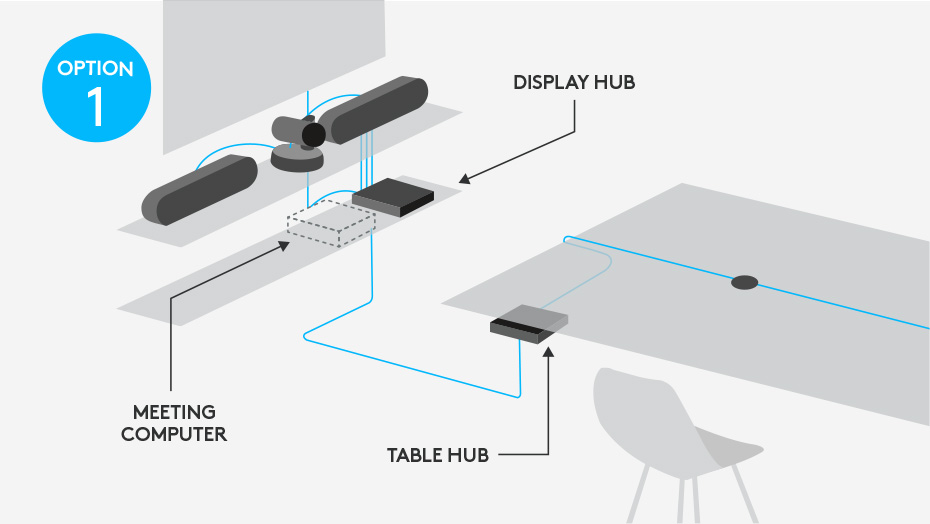
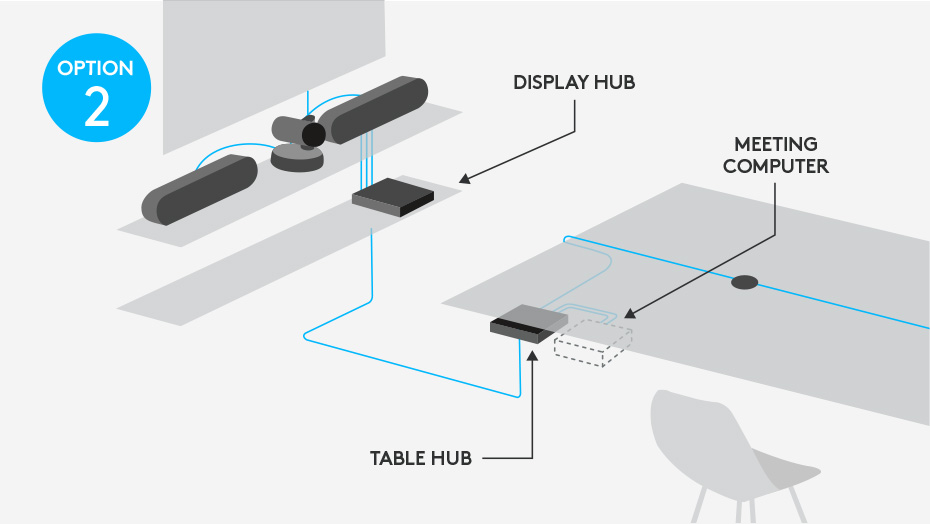
LOGITECH RALLY Includes:

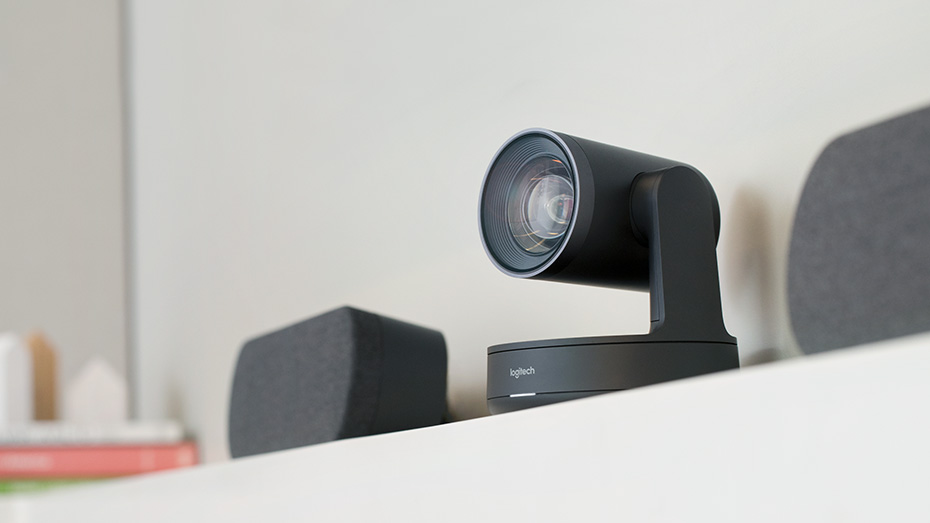
Logitech Rally Ultra HD Camera
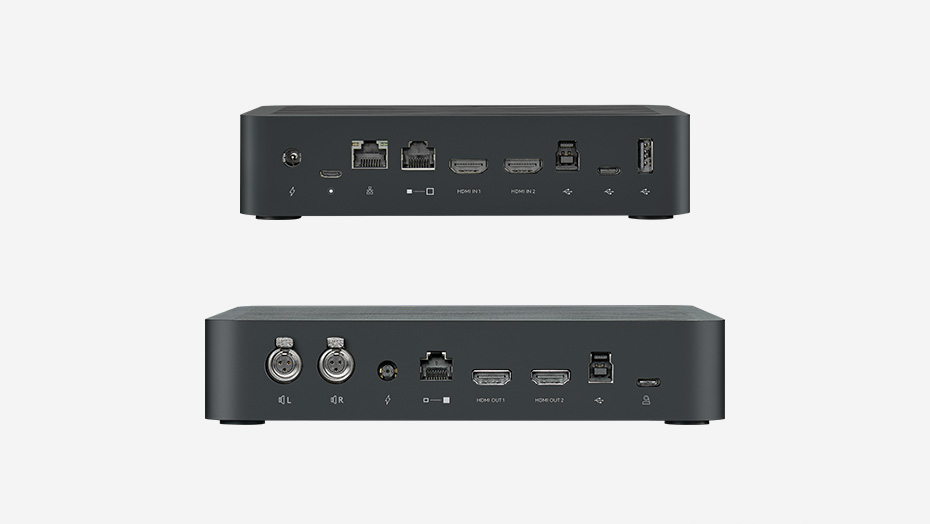
Table Hub
Display Hub
Mic Pod
Speaker
Remote Control

Optional Mounting Kit Available

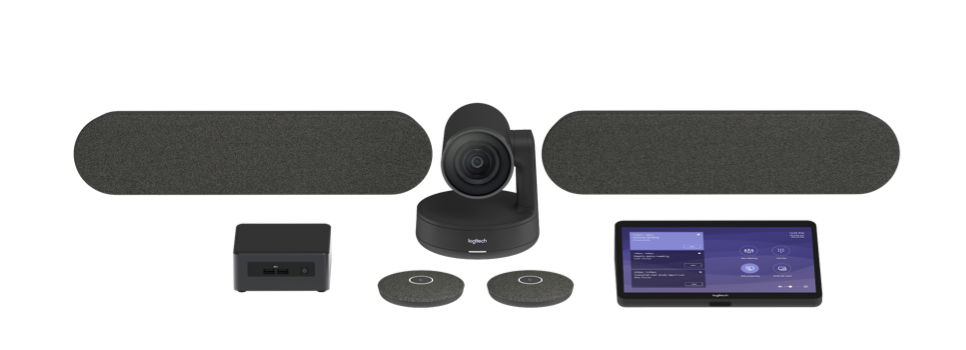
LOGITECH RALLY  PLUS Includes:

Logitech Rally Ultra HD Camera
Table Hub
Display Hub
2 x Mic Pod
2 x Speaker
Remote Control

Optional Mounting Kit Available

Logitech Rally DATA SHEET

Logitech Rally Accessories DATA SHEET

We can also include full installation with integration (To be quoted), national Help desk, certified Logitech technical support Australia-Wide with 21 years Collaboration experience.

.

Premium Ultra-HD Conference Cam system with automatic camera control

  • RightSense™ technology automates a better user experience
  • Modular audio for full coverage of medium to very large rooms
  • Premium components and sleek industrial design

ALL TOGETHER NOW

Logitech Rally delivers studio-quality video, unmatched voice clarity, and RightSense® automation for better meetings with video conferencing applications that work with USB devices, including Google Hangouts Meet, Microsoft Skype® for Business, Microsoft Teams, and Zoom. With modular audio, thoughtful cable management and premium finishes, Rally integrates beautifully into medium and larger rooms.

With an Ultra-HD imaging system, Rally delivers brilliantly sharp video, outstanding color, and exceptional optical accuracy at resolutions up to 4K. Logitech RightLight™technology optimizes light balance to emphasize faces and render natural-looking skin tones, even in dim or backlit conditions.

ADVANCED MODULAR AUDIO

Crystal-clear audio is essential for world-class video conferencing, and Rally excels in delivering sound that’s natural, crisp, and highly intelligible. Logitech RightSound™ enhances voice clarity by suppressing background noise, auto-leveling voices, and focusing on active speakers. Exquisitely sensitive mic pods ensure that everyone in the meeting can be clearly heard while stand-alone speakers fill larger rooms with rich, life-like sound.


SLEEK INDUSTRIAL DESIGN

Every component in the Rally system features premium industrial design suitable for any professional setting. Even as Rally helps everyone look and sound great during video meetings, each part of the system looks great in its own right. The premium PTZ camera at the core of the system is elegantly finished in matte black with slate gray metal trim, complemented by sleekly designed audio components and accessories that look great in any room.


ENHANCED USER EXPERIENCE


Logitech RightSense is a suite of technologies built into Rally that automate a better user experience. RightSight perfectly auto-frames participants no matter their distance from the lens. RightLight prioritizes faces over environment to render natural-looking skin tones while RightSound™ enhances vocal clarity by suppressing background noise, auto-leveling voices, and focusing on active speakers to support better meetings —automatically!


LOGITECH TAP – For Microsoft Teams Rooms

Advancement in Meeting Room Environments – For Teamwork in Meeting Rooms!

Tap couples the purpose-built utility and robust build quality of a meeting room touch control panel Logitech Tap – Streamlines and simplifies the deployment and use of video conferencing in any meeting room.with the affordability and flexibility of a tablet. It delivers one-touch video calling and simplicity for users in an IT-friendly design ideal for deployment at scale.
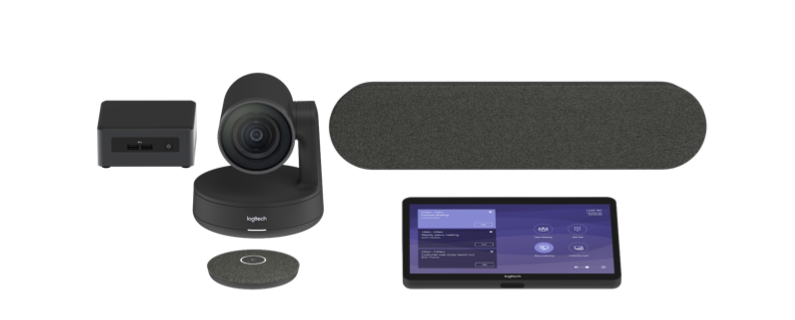
Featuring a 10.1-inch touchscreen, HDMI input for content sharing, and robust cable retention, Logitech Tap is designed and engineered for reliable convenience in the meeting room. A range of table, riser and wall mounts offer tremendous placement flexibility, while in-wall rated cabling enables topologies and room layouts that please the eye as well as IT.

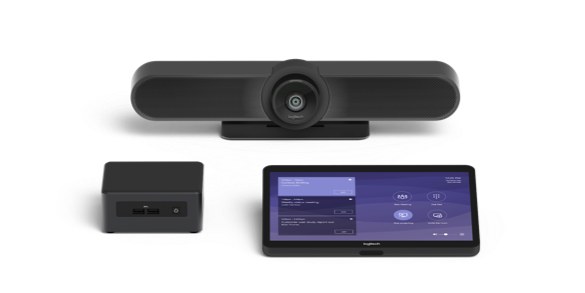
Logitech Room Solution Packages for Teams Rooms include all necessary components in one package, Including:

Logitech Tap touch controller

Logitech conference cam system

Small form factor computer pre-installed with Teams Rooms.


Choose from our Small Medium and Large Bundles to suit your requirements


Shop Now

Logitech Large Room Solution for Microsoft Teams Rooms

Logitech Medium Room Solution for Microsoft Teams Rooms

Logitech Small Room Solution for Microsoft Teams Rooms

Sign Up For Our Newsletter to Receive Regular Specials!