headsets

Choosing an Office Headset for Teams Calls

A poor headset is rarely just a personal annoyance. On a busy Microsoft Teams call, it becomes background noise for customers, repeated questions for colleagues, and a distraction that slows decisions. The right office headset for teams calls gives every user a clearer voice, a more consistent experience, and fewer support issues across the workday.

For IT and procurement teams, the buying decision is not simply wired versus wireless. It is about matching microphone performance, wearing style, connection type, certification, and management capability to the way each team actually works. A headset that suits a quiet finance office may be a poor fit for a contact center, shared workspace, or home-based sales team.

Start with the calls your team actually makes

The best headset specification starts with environment and call pattern. Staff who take occasional internal calls from assigned desks have different needs than people spending six hours a day in customer meetings. Standardizing on one model can simplify purchasing and support, but it should not mean forcing every user into the same compromise.

Consider the places where calls happen. An open-plan office needs stronger microphone noise reduction than a private office. A hybrid employee may need Bluetooth flexibility for a laptop and mobile phone. Contact center and reception teams often benefit from a wired USB headset because it is dependable, always charged, and simple to replace between shifts.

Also look at the communication platform. A headset built for Microsoft Teams should provide reliable call control, clear status feedback, and consistent behavior when users join meetings, answer calls, or mute themselves. Teams-certified models are designed to work with the platform’s calling features and commonly include a dedicated Teams button for notifications or meeting access. Certification reduces compatibility uncertainty, particularly when buying at scale.

How to choose an office headset for Teams calls

Put microphone quality ahead of speaker specifications

Buyers often compare audio output first, yet the microphone has a greater effect on how professional a caller sounds. Look for models with multi-microphone arrays, noise-canceling boom microphones, and voice-focused processing. These features help reduce the impact of nearby conversations, keyboard noise, air conditioning, and general office activity.

There is a trade-off. The strongest noise-filtering microphones can make a voice sound slightly more processed in very loud spaces. For most business environments, that is preferable to allowing office noise into a client conversation. For executives or content-heavy roles where natural vocal tone matters, test a shortlist in the real environment before committing to a fleet purchase.

A boom microphone remains the most dependable option for people who speak frequently on calls. Its position close to the mouth provides a more consistent signal than compact earbuds or headsets with hidden microphones. Discreet designs may suit occasional users, but they are not always the best choice for all-day business communication.

Choose a wearing style people will keep using

A technically excellent headset delivers little value if employees leave it in a drawer. Comfort is central for teams that spend long periods on Teams calls. Weight, clamping force, earpad material, headband adjustment, and heat buildup all affect acceptance.

Mono headsets leave one ear open to the room, making them useful for reception desks, office administrators, and workers who need awareness of colleagues nearby. Stereo headsets improve concentration and are usually the stronger choice for focused work, busy offices, and frequent video meetings. Some users prefer an on-ear design for a lighter feel, while others need over-ear cushions for better passive noise isolation.

For larger deployments, avoid treating comfort as an abstract product claim. Let representative users trial the preferred models, including people who wear glasses, move between calls and desk work, or use headsets for several hours at a time. A small trial can prevent an expensive standardization mistake.

Select the connection for the workspace, not the marketing claim

Wired USB headsets remain a highly practical business option. They are plug-and-play, do not depend on battery management, and can provide consistent call controls on shared or fixed workstations. USB-A remains common in established desktop fleets, while USB-C is increasingly standard on newer laptops and docking stations. Confirm connector requirements before ordering.

Wireless Bluetooth headsets offer greater mobility and a cleaner desk setup. They are well suited to executives, sales staff, hybrid workers, and employees who move between a laptop, mobile phone, and office. A dedicated USB Bluetooth adapter can deliver more dependable call control and range than relying on a computer’s built-in Bluetooth, especially in dense office environments.

Battery life deserves a realistic assessment. Manufacturer figures are useful, but a full day of calls, active noise cancellation, and frequent device switching can reduce runtime. Charging stands make sense for assigned desks and executive users because they encourage predictable charging while presenting a more organized workstation. For shared spaces, wired units may still be the more operationally reliable choice.

Do not confuse active noise cancellation with microphone noise reduction

These technologies solve different problems. Active noise cancellation, often called ANC, reduces what the wearer hears. It can make it easier to focus in open offices, on commutes, or in a home workspace with background distractions. It does not necessarily improve how the wearer sounds to others.

Microphone noise cancellation reduces what call participants hear from the user’s environment. For Teams calls, this is usually the higher-priority feature. The most effective headset for a busy employee may include both: ANC for the wearer’s concentration and a noise-canceling microphone for clear outgoing audio.

Verify Teams certification and call controls

A headset can connect to a computer and still provide a frustrating Teams experience. Native call controls matter because they reduce missed calls, accidental mutes, and user confusion. Look for dependable answer/end controls, mute functions with clear visual or audible feedback, and a Teams button where the workflow supports it.

Teams certification also matters when rolling out equipment across a mixed Windows and Mac environment. Confirm the chosen model’s support for your operating systems, preferred Teams client, and any security or device-management standards. This is particularly valuable for organizations with limited internal support resources or multiple sites.

Plan the deployment, not just the purchase

The headset is only one part of a reliable collaboration environment. A strong rollout includes standard models by user type, compatible adapters and charging accessories, a replacement process, and clear guidance on firmware updates. These details determine whether a deployment remains easy to support six months later.

For example, a practical standard may include a wired USB headset for fixed desk and shared-desk users, a wireless stereo model for managers and hybrid professionals, and a premium ANC option for executives or high-noise roles. This gives employees appropriate choice without creating an unmanageable catalog of different devices.

Centralized headset management can be worthwhile for larger fleets. Supported management platforms can help IT teams review firmware status, apply updates, monitor device inventory, and configure settings consistently. It depends on the headset brand and organization size, but the operational benefit becomes clearer when hundreds of devices are in service.

Commercial buyers should also account for warranty terms, availability of replacement cushions or charging bases, and ongoing stock continuity. A low initial price is less compelling if the model is discontinued quickly or accessories become difficult to source. Established business headset ranges generally provide a more stable path for standardization than consumer-focused products.

Build a short, testable shortlist

Before ordering in volume, compare two or three models against the conditions that matter most. Run test calls in the open office, from a home workspace, and near the typical background noise sources. Check how easily users can answer, mute, and switch between devices. Ask whether the headset remains comfortable after a full morning of meetings, not just a five-minute demo.

Procurement should evaluate the total deployment cost as well: headset price, adapters, charging accessories, management needs, replacement parts, and support time. The lowest-cost model can create higher costs if call quality disappoints users or IT has to troubleshoot inconsistent connectivity.

For organizations purchasing across offices, classrooms, service desks, or hybrid teams, specialist advice can shorten the selection process. e365 SuperStore can help buyers compare professional headset options alongside the wider Teams workspace, including conference cameras, speakerphones, room devices, and installation requirements.

The most effective choice is the one employees can wear comfortably, IT can support confidently, and customers can hear clearly. Start with real user roles and real workspaces, then choose a Teams-certified headset range that makes every call feel more controlled and professional.

Latest April Product Releases (Videoconferencing Equipment)

Latest April Product Releases (Videoconferencing Equipment)

Picture of e365 Superstore

e365 Superstore

Latest Product Announcements

The videoconferencing industry has grown exponentially and with numerous tools coming out every month, this will only continue to improve. We have compiled a list of the most useful videoconferencing equipment out there this month. 

Overview

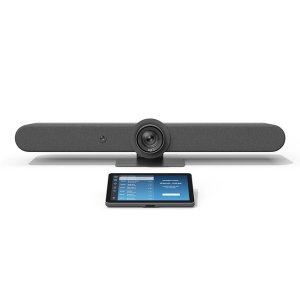
Logitech Rally Bar + TAP IP- Medium- Graphite

Logitech Rally Bar + TAP IP- Medium- Graphite e365 SuperStore are a premier authorised Logitech gold partner with Australian stock and warranty Logitech Rally bar are a Powerful All-in-one Video Conferencing Bar with Brilliant Optics and Automated PTZ. All-in-one Video Bar for Midsize Rooms. Simple to Set and Easy to Use. Only Quality Products. Trusted Australian Vendor. Friendly Customer Service. No Credit Card surcharge. Logitech Tap and Tap IP Compatibility Information  

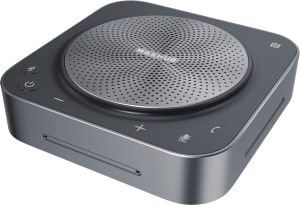
MaxHub Bluetooth Speakerphone UC BM35

MaxHub Bluetooth Speakerphone BM35 Unlock a new level of meeting clarity with the next-generation BM35 speakerphone. Crystal clear audio combines with a powerful pick-range to transform any small to mid-sized meeting space. Break free from the restrictions of wired devices with an agile, flexible solution that adapts as quickly as your team. 

In the home, the business office, or anywhere else, the BM35 is the ultimate part for clear conversations. Comes with 3 year warranty. Amplify Conference Quality with Superior Sound Portability and practicality come together in a powerful audio device, built for better meetings. The BM35 is optimized to keep human voices clear. Capturing every utterance in perfect detail, the BM35 empowers any team.

AVER CAM570 4K DUAL LENS PTZ AUDIO TRACKING CAMERA Stress FREE Installation

AVER CAM570 4K DUAL LENS PTZ AUDIO TRACKING CAMERA AVer CAM570 is a 4K dual lens camera with a 36X Total zoom PTZ camera and a second AI lens with 95˚FOV. Equipped with a built in microphone, CAM570 detects human voices up to 10M and offers audio tracking function. AI technology such as Smart Gallery and gesture control can capture every attendee up-close with premium video quality. 

Built-in Microphone Enables Audio Tracking Easily focus on active speaker with audio tracking mode and presentation mode. The camera will follow the speaker automatically or you can set up a preset point to focus on a specific area. The built in microphone picks up human voices up to 10M without being disturbed by a local speaker.

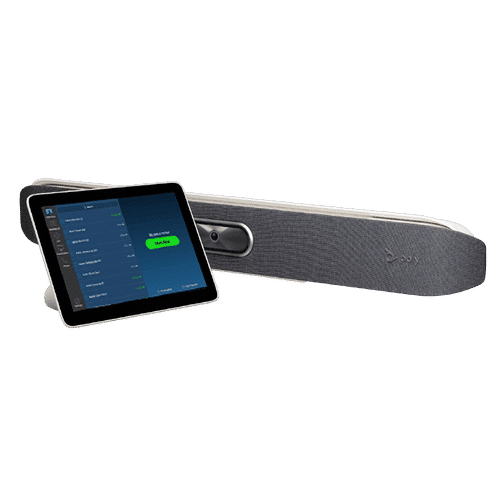
POLY Studio X50 & Poly TC8 4K Video Conf System W 3yr Poly Plus 24x7 Support

Poly studio X50

Poly Studio X50 with touch panel TC8 connects to Microsoft Teams and Zoom The Poly Studio X50 video bar delivers radical simplicity in a small, elegant package. In small- and medium-sized rooms, connect easily with whatever video collaboration software you may use. Experience full boardroom-quality audio, advanced camera capabilities, and quick wireless content—all in one sleek video bar. 

And say goodbye to unnecessary pucks, cords, and cables, along with the PC or Mac to drive the meeting, since the Poly Video OS runs the show. Easy to install, easy to manage. • Ideal for rooms of up to 8 participants • Surround everyone with the rich, legendary sound with stereo speakers that deliver immersive, room-filling audio • Dual monitor support ensures you have the ideal setup for room of many sizes • Be heard clearly with next generation microphone array

DTEN ME 27 All in One Zoom device

DTEN ME 27 All-in-One Personal Collaboration device for Zoom DTEN ME – the ideal solution for working from home Combining the technology in the DTEN ME with loom’s enterprise-quality software delivers the ideal solution for the home office. Simply login with your Zoom user account and create an instant office experience without any additional licenses. 

This solution integrates Zoom Meetings, phone calling, whiteboarding and annotation in a 27 multi-touch display built for the desktop. It is designed to keep your work­space clutter free and organized to deliver a professional meeting experience.

CommBox - Elegance XL Cart

CommBox – Elegance XL Cart Understatedly stylish fixed-height mobile stand with a pen shelf and designer hubless lockable castors. The cart suits CommBox screens up to 110″. Other features include 3″ heavy-duty locking castors and a handy pen and equipment shelf.

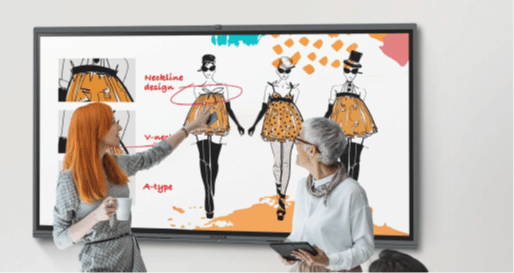
Maxhub v6 Collaboration Display - Maxhub C7530

Maxhub C5530

Maxhub v6 Collaboration Display – Maxhub C7530 Maxhub C7530 v6 Classic Series Maxhub C7530 The Maxhub C7530 – Integrating professional video conferencing, seamless screen-sharing, advanced whiteboard technology, and a brilliant audiovisual experience, is the ultimate corporate-collaboration assistant. 

Drive productive teamwork and increase organizational efficiency with this meeting-room must-have. Installation and Integration Australia Wide Total Solution, Minimal Setup – Maxhub C7530 A complete, seamless design fulfills every meeting requirement, including built-in camera, mic, and touch panel. Whether video conferencing or hosting a local discussion, it’s as easy as plugging in your power cable.

Cisco Webex 8875 IP Phone - Corded - Corded - Wi-Fi, Bluetooth - Desktop - Carbon Black - VoIP - IEEE 802.11a/b/g/n/ac - 2 x Network (RJ-45) - PoE Port

Cisco Webex 8875 IP Phone – Corded – Corded – Wi-Fi, Bluetooth – Desktop – Carbon Black – VoIP – IEEE 802.11a/b/g/n/ac – 2 x Network (RJ-45) – PoE Port CP-8875-K9= Webex 8875 IP Phone – Corded – Corded – Wi-Fi, Bluetooth – Desktop – Carbon Black Webex 8875 IP Phone – Corded – Corded – Wi-Fi, Bluetooth – Desktop – Carbon Black – VoIP – IEEE 802.11a/b/g/n/ac – 2 x Network (RJ-45) – PoE Ports Enjoy superior voice communications while retaining the convenience and user-friendliness over Internet Uses VoIP technology to transfer audio signals over the Internet while circumventing high toll charges by telephone companies

Yealink MeetingBoard 86 inch for MS Teams

Yealink MeetingBoard 86 inch Collaboration Display For Microsoft Teams e365 SuperStore are a premier authorised Yealink Platinum partner with Australian stock and warranty Simple to Set and Easy to Use. Only Quality Products. Trusted Australian Vendor, Many Payment options, Same Day Delivery, Friendly Customer Service. 

No Credit Card surcharge. (stand available separately) Unlock Creative Teamwork The Yealink Meeting Board collaboration display effectively facilitates powerful digital collaboration by combining everything in the room, from the computing unit to a wide 86-inch touchscreen display, 4K camera, microphones arrays, speakers, and built-in Microsoft Teams. The Android 10 OS and an Octa-core high-performance chipset offer maximum performance.

Facebook
Twitter
LinkedIn
Picture of e365 Superstore

e365 Superstore

e365 Superstore are experts in video conferencing equipment. We have completed thousands of projects over the last 25 years and we are passionate about virtual communications. Click here to find out more about our company.

Ultimate guide to Zoom-Microsoft Teams room solution.

Face-to-face interaction is critical in business communications but teams are becoming increasingly dispersed. The Video Conferencing systems on the market now are designed with smaller huddle rooms in mind

Our Team are

  • Highly experienced Unified Communications, Videoconferencing, Collaboration Solutions Specialized
  • Offer a consultative approach
  • Highest product and application knowledge
  • Totally technically proficient
  • Superior level of networking competency, service, support & customer satisfaction

Our Video/Audio/IP telephony/Unified Communications solutions include:

  • Cisco, Logitech, Crestron, Poly, Yealink  Video Conferencing endpoints for Meeting Rooms, Cloud, On-premise and Hybrid Solutions, Microsoft Teams, Zoom, Google meet.
  • Integrate your Boardroom solutions
  • Professional services, Managed Services.
  • Audio Visual solutions (Touch boards, Projectors, Trolleys etc.)

Please let me know if you would like one of our team to discuss with you and  provide the latest Communication solutions you and your organisation.

Business Benefits of Video Conferencing

Video conferencing has come of age and is used in every industry. Recent developments in mobile devices and wireless networks have propelled further interest in being able to video information anytime, from anywhere. Generic applications of video conferencing are too numerous to mention. Any department of any organization where meetings take place—finance, engineering, human resources, manufacturing, marketing, product development, sales, training—is an appropriate place to use video conferencing to:

• Connect dispersed staff without travel
• Bring in remote experts for consultation or training
• Interview job candidates or witnesses
• Make a presentation to a vendor or customer
• View data and presentations on an on-demand or real-time basis
• Receive information at any time or place


The use of video conferencing has the potential to increase productivity and efficiency by reducing unproductive travel time, preventing meeting delays, creating shorter and more structured meetings and allowing for greater reach of a message. Video conferencing also allows for an increased number of participants. It is often difficult to get information to everyone at the same time, but with video conferencing, all individuals who need data can get the information when it is easiest for them.

BENEFITS:

The initial perceived and quantifiable benefit of video conferencing was reduction in travel costs. Initially, many organizations paid for the deployment of video conferencing with the reduction in travel budgets. While travel savings have been a recognizable benefit of video conferencing, there are many more qualitative benefits. Three
other major benefits of video conferencing are increased productivity and efficiency, improved management communications and enhanced business opportunities.

INCREASED PRODUCTIVITY AND EFFICIENCY

• Reduced travel risk
• Reduced unproductive travel time
• Prevented meeting delays
• Shorter meetings
• Structured meetings
• Larger participation
• Optimize attendance
• Immediate information exchange
• Faster response
• Access to experts
• Time-share scarce talent
• Quicker decisions

IMPROVED MANAGEMENT COMMUNICATIONS

• More interface at all levels
• Increased flexibility


ENHANCED BUSINESS OPPORTUNITIES

• Customer service
• Competitive advantage


Generic Applications

The top four applications in which video conferencing is used are:

• Management meetings
• Sales and marketing meetings
• Engineering, manufacturing, or production
• Training

This does not preclude other groups from using the technology (i.e., the HR department, the legal department, finance, etc.), but studies conducted by Telemanagement Resources International Inc. (TRI) have shown that the primary reasons that firms install video conferencing relate to the top four applications noted above.

Video conferencing has also been used for a variety of other applications, including product demonstrations to new customers, “town hall” type meetings and HR training. Given the longevity of video conferencing usage, all industries have developed useful applications for video conferencing. It is no longer a matter of if you will use video conferencing; it is only a matter of when.


Conclusion

Video conferencing provides tangible benefits to any organization. Devices that can handle video now range from handheld devices (i.e., phones and tablets) to high-end conference rooms. The technology is easier to use, cost is no longer an issue and connectivity happens almost anywhere. Video conferencing improves the way we work and provides us more time to spend with our family and friends.


e365 Distribution October BIG Discounts

e365 Distribution has the latest BYOD Collaboration solutions for your Home Office, Huddle room and meeting rooms

Special pricing  is limited till 31st October

  1. Logitech Tap,Rally
  2. Poly Studio X30-X50
  3. Yealink MVC 800
  4. Cisco Room Kit Mini
  5. Crestron MX150 
  6. Headsets
  7. Smartboards from Hitachi, Maxhub ,Samsung, Commbox, Avocor,NEC,LG,Viewsonic & more
  8. Trolley’s, Home office furniture 
  9. Dten Smartboard & Videoconferencing.


e365 provide a Installation, Support and help desk.

 e365 has the most brands in Australia and most are in stock ready for delivery Australia-Wide

Black Friday sale

Black Friday discounts have started early at e365 Distribution online Collaboration web site www.e365.com.au  

 If you are looking for some big discounts for

  • LED’s screens
  • Smartboards
  • Videoconferencing solutions (Cisco, Poly, Crestron, Zoom, MS Teams )
  • Headsets
  • VoIP phones
  • Cloud Video/Voice services
  • Conference phones
  • Projectors
  • LED trolleys etc.

e365 has the most brands in Australia and most are in stock ready for delivery Australia-Wide

(Black Friday-Special pricing ends close of business 29/11/2019)

eVideo connects Koppen Developments

eVideo connects the latest Cisco Room kit systems for Koppen Constructions. Their staff can now have visual and audio collaboration between North Queensland and Central Queensland offices as well customers.

Sign Up For Our Newsletter to Receive Regular Specials!