conferencing

Best Small Conference Room Camera Guide

A small conference room camera can make or break the meeting experience faster than most teams expect. In a huddle room or compact meeting space, every flaw gets amplified – cropped faces, harsh backlight, poor framing, muddy audio pickup, and awkward laptop-based workarounds all show up immediately. That is why buyers who treat small rooms like an afterthought often end up replacing hardware sooner than planned.

For IT teams, facilities managers, and procurement leads, the real job is not just buying a camera. It is choosing a room-ready device that fits the space, works with your platform standard, supports reliable deployment, and does not create extra support tickets six months later. In small rooms, the right specification matters more than the biggest specification.

What matters most in a small conference room camera

The first thing to get right is field of view. Small rooms usually place participants closer to the display and camera, so a narrow lens can leave people at the edges cut off. A wider field of view is often the safer choice, but wider is not always better. If the room is very tight, an ultra-wide image can introduce distortion and make participants look farther away than they are. The best result usually comes from a camera that can capture the whole table naturally without making the room feel empty.

Framing intelligence is the next major factor. Auto-framing, speaker tracking, and group framing are no longer enterprise-only features. In compact meeting spaces, these tools help maintain a professional image without asking staff to adjust the camera before every call. That said, not every AI feature performs equally well. Some systems are excellent at keeping a group centered, while others jump too often or crop unpredictably when people move. If meeting flow matters, stable framing is more valuable than flashy camera behavior.

Resolution also needs a practical lens. Yes, 4K sounds better on paper than 1080p. But in a small conference room camera, image processing, low-light performance, and lens quality often matter more than the headline resolution. A strong 1080p business camera can outperform a cheaper 4K model in real meeting conditions. Buyers comparing options should look beyond spec-sheet marketing and focus on how the camera handles faces, room lighting, and motion.

Small conference room camera vs consumer webcam

This is where many budgets drift in the wrong direction. A premium webcam may seem like a smart low-cost option for a small room, especially for teams trying to move quickly. But most consumer webcams are designed for one person at a desk, not for three to six people around a table.

A dedicated small conference room camera typically gives you wider room coverage, better mounting flexibility, stronger image tuning for shared spaces, and more reliable compatibility with room systems and USB peripherals. It is also more likely to support centralized management, firmware updates, and long-term vendor support. Those details matter when you are standardizing across multiple rooms or planning a refresh cycle.

The trade-off is price. A business-class room camera costs more upfront than a webcam. But if you are equipping meeting spaces that clients, staff, or executives use daily, the lower-cost option often becomes the more expensive one after replacements, add-on accessories, and lost meeting quality are factored in.

Room size is only part of the buying decision

Small room does not mean simple room. Two rooms with the same dimensions can need very different camera setups depending on layout, table depth, glass walls, lighting direction, and display placement. A narrow room with people seated close together has different requirements than a square room with flexible seating.

Mounting position has a direct effect on camera performance. If the camera sits too high, faces can look unnatural. If it sits too low, you get poor eye-line and blocked views when laptops are open. In many rooms, the best result comes from placing the camera at display height with a lens wide enough to cover the full seating position without forcing digital correction.

Lighting is another overlooked issue. Small meeting rooms often have strong overhead lights, windows behind participants, or mixed lighting temperatures. A camera with weak exposure handling will struggle in these conditions. This is why business buyers should prioritize cameras built for conference spaces rather than home-office use.

Audio and video should be planned together

Many buyers start with the camera and treat audio as a separate decision. In small rooms, that can be a mistake. A great image does not save a meeting if far-end participants cannot hear clearly.

Some small conference room camera solutions include integrated microphones and speaker capability, which can work well in compact spaces with limited seating. These all-in-one devices are attractive because they reduce cable clutter and simplify installation. They are often the fastest path to a clean huddle room setup.

But integrated audio is not always enough. If the room has hard surfaces, glass walls, HVAC noise, or participants sitting farther from the front of the room, a separate speakerphone or a more advanced conferencing bar may be the better choice. The key is to assess the room as a communication environment, not just a screen-and-camera setup.

Platform compatibility is non-negotiable

One of the most common buying mistakes is choosing a camera first and checking platform support later. That creates friction during rollout, especially in environments standardizing on Microsoft Teams, Zoom, or a mixed UC estate.

A small conference room camera should fit your meeting workflow, not force staff into workarounds. Some models are ideal for USB bring-your-own-device rooms. Others are designed to integrate with dedicated room systems, touch controllers, and appliance-based conferencing kits. Neither approach is universally better. It depends on how your users actually join meetings and how much IT control you need.

If your business is deploying multiple rooms, consistency matters. Standardizing on compatible hardware can reduce training time, support complexity, and spare unit planning. For procurement teams, that usually delivers more value than chasing the cheapest one-off deal.

Features worth paying for – and features you may not need

There are a few features that usually justify the spend. Wide-angle coverage, dependable auto-framing, strong low-light performance, business-grade mounting, and remote management are all worthwhile in professional environments. If the room hosts external clients or regular executive meetings, image quality and ease of use deserve even more weight.

On the other hand, not every advanced feature is essential. In a truly small room with stable seating, you may not need aggressive speaker tracking or multi-camera intelligence. If the room is used for short internal catchups, a simpler fixed camera with good optics may be the smarter investment.

This is where commercial buying experience matters. The goal is not to over-spec the room. It is to buy the right level of performance for the actual use case while protecting reliability and user adoption.

Deployment and support should influence the shortlist

Conference technology does not live or fail on day one. It proves itself after repeated use, firmware cycles, staff changes, and room booking pressure. That is why serious buyers should consider supportability before making a final decision.

Ask practical questions. Can your team manage updates easily? Is the device supported by a recognized commercial brand? Are replacement accessories available? Will it integrate with the displays, room PCs, speakerphones, or control systems already in your environment? Those answers often separate the right purchase from the merely convenient one.

For organizations buying at scale, there is also a commercial advantage in working with a specialist supplier that understands room types, platform compatibility, and rollout requirements. A retailer like e365 SuperStore brings value when the brief goes beyond a single camera and into multi-room consistency, installation, technical guidance, and sharper commercial pricing.

How to narrow your options quickly

If you need to move fast, start with the room itself. Count typical participants, confirm table depth, check the display location, and identify your primary platform. Then decide whether you want a USB camera, an all-in-one video bar, or a camera that forms part of a dedicated room system.

From there, balance three things: image coverage, audio performance, and deployment simplicity. If one of those is weak, the room experience suffers. The best buying decisions usually come from accepting that small rooms are high-visibility spaces. They may be smaller than boardrooms, but they are often used more often and by more teams.

A well-chosen small conference room camera should feel invisible in use. People walk in, start the meeting, look natural on screen, and get on with work. That is the benchmark worth buying for – not the flashiest spec, but the setup that keeps meetings professional, repeatable, and easy to support.

The Future of Work | Have you got the best videoconferencing solution?

The world has changed. We’ve never used so much video, at home and at work. But in the rush to get teams working remotely, have you ended up with the best solution?


As hybrid work transforms into anywhere work, collaboration and employee experience goals continue to evolve. Work and learning spaces are changing to meet team expectations, and your technology must keep pace, with equal attention given to remote and on-site experiences. In short, we need to make anywhere work more human-centric.
Call us on 1800 111 387

eVideo Communications provides premium, tailored audio-visual and video conferencing solutions

eVideo Communications provides premium, tailored audio-visual and video conferencing solutions Australia-wide. Backed by over 27 years of industry experience.

Conference room with a large promotional overlay reading "Australia's Top-Rated Solution for the Anywhere Workplace" and contact info, plus a video-call screen on the wall and people around the table.
Australia-wide AV installation, testing, and training handled by certified local experts.
Managed Services & Support: 24/7 help desk, network troubleshooting, and equipment maintenance contracts to ensure zero downtime
Call us on 1800 111 387
https://www.evideo.com.au

eVideo is Australia’s leading video conferencing and Audio-Visual provider

eVideo is Australia’s leading video conferencing and Audio-Visual provider, offering installation, ongoing technical support and integration Australia wide.


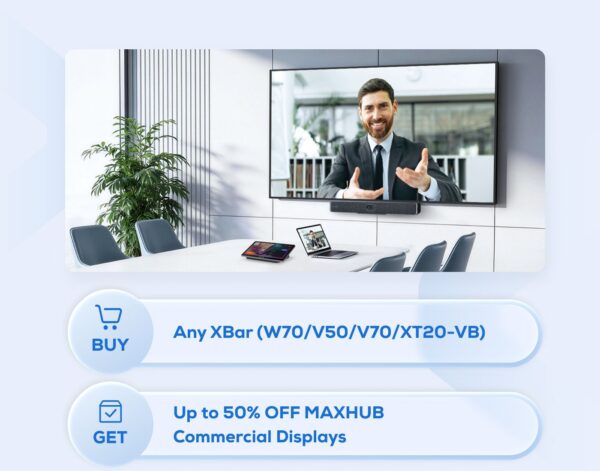
Maxhub Special Bundles for EOFY with up to 50% Discounts on Commercial displays.

Maxhub Special Bundles for EOFY with up to 50% Discounts on Commercial displays.

Call us on 1800 111 387 for a FREE demonstration, Quote or buy on line


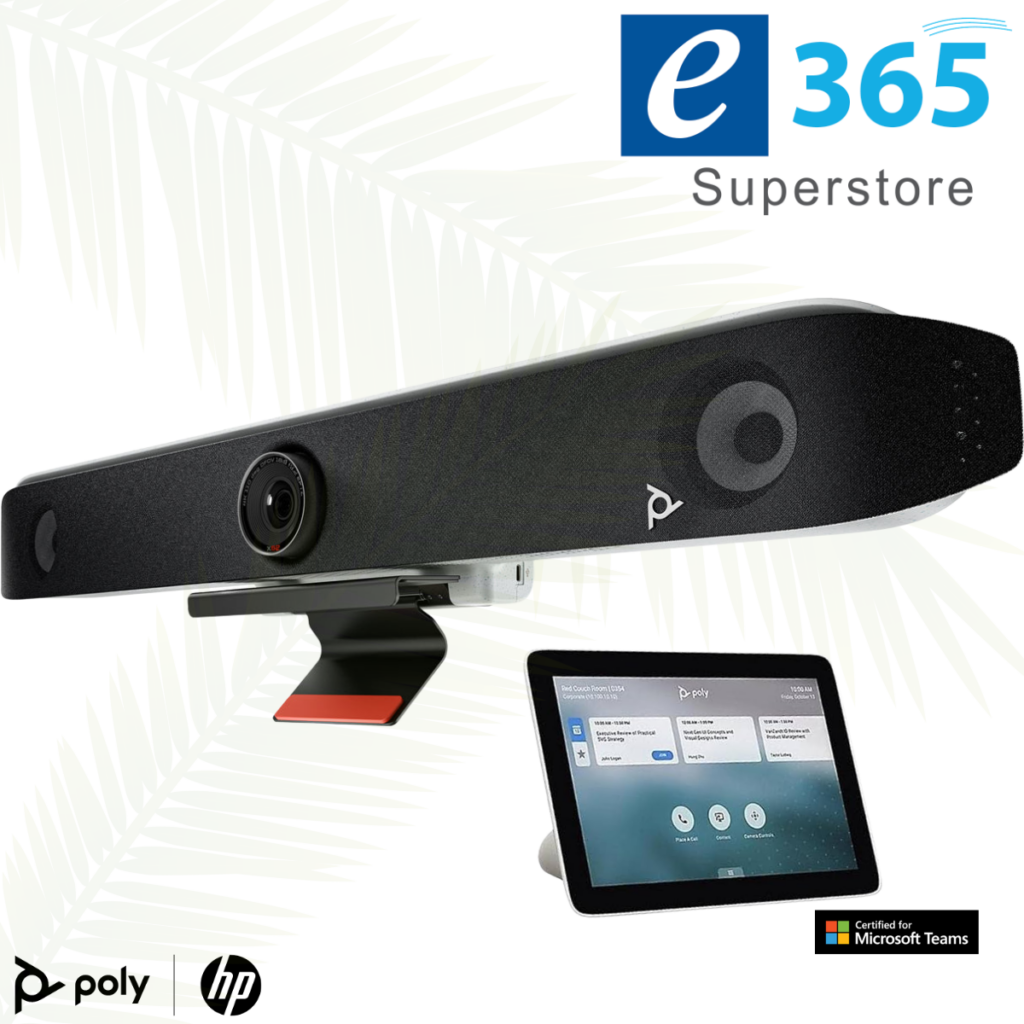
HP Poly Studio Videoconferencing solutions First Buy “up to 50% off” for your first room with HP Poly.

HP Poly Studio Videoconferencing solutions First Buy “up to 50% off” for your first room with HP Poly.

Note Valid till June 30 2026 for the v12 – v52 – v72 – x32 – x52 – x72 systems
Call us on 1800 111 387 for a FREE demonstration, Quote or buy on line


LOGITECH RALLY BAR + Tap IP & SAMSUNG 65″ DISPLAY only $7,499

LOGITECH RALLY BAR + Tap IP & SAMSUNG 65″ DISPLAY  only $7,499


LOGITECH RALLY BAR + Tap IP & SAMSUNG 65″ DISPLAY is a Powerful All-in-one Video Conferencing Bar with Brilliant Optics and Automated PTZ. All-in-one Video Bar for Midsize Rooms. Simple to Set and Easy to Use. Only Quality Products. Trusted Australian Vendor. Friendly Customer Service. No Credit Card surcharge.


Crestron UC-B31-T with Jabra® PanaCast 50 Video Bar

Crestron UC-B31-T with Jabra® PanaCast 50 Video Bar

The UC-B31-T Crestron Flex tabletop conferencing system provides a small room video conference solution for use with Microsoft Teams® Rooms software. It supports single or dual video displays1 (not included) and features a tabletop touch screen, Jabra® PanaCast 50 video bar, UC bracket assembly, PoE injector, and cables.

MaxHub XT20-VB Kit Teams Room Bundle

MaxHub XT20-VB Kit Teams Room Bundle

A complete Teams Rooms kit with mini-PC, touch console, and 100MP dual-lens videobar for small to medium meeting spaces.

A MICROSOFT TEAMS ROOMS KIT WITH 11.6″ TOUCH PANEL AND 12TH GEN INTEL CORE I5 MINI-PC

A PLUG-AND-PLAY TEAMS USB VIDEOBAR WITH A 100MP DUAL-LENS CAMERA SYSTEM

The MAXHUB XBar U50 is a USB mode dual-camera Videobar designed for small to medium rooms and BYOD scenarios. With 100MP dual cameras, 12 beam-forming microphones, Al-enhanced audio, and FlexMount for easy installation, it offers plug-and-play conferencing without fixed systems for ultimate flexibility.

NEW at e365 Superstore Barco ClickShare Hub Pro + Huddly® C1™ room system

NEW at e365 Superstore Barco ClickShare Hub Pro + Huddly® C1™ room system

Barco ClickShare Hub Pro + Huddly® C1™ room system
Microsoft Teams Room bundle for enhanced collaboration in small-to-medium-sized meeting rooms.
• Wireless presentation: 4K content sharing with 2 next-gen ClickShare Buttons with USB-C DisplayPort™
• Built on the Microsoft Device Ecosystem platform (MDEP)
• Dual display support
• Huddly AI-driven video bar that scales from standalone to multi-camera
Call us on 1800 111 387 for a FREE demonstration, Quote or buy on line via the link below

HP POLY | VIDEO NEXT GEN TRADE UP to 50% off

HP POLY | VIDEO NEXT GEN TRADE UP to 50% off

Up to 50% Off Meeting Room Refresh when you Trade IN and purchase a Poly v12,v52,V72,X32,X52 and X72 Videoconferencing systems

Trade in valid when you buy 5 rooms or more in a single PO

Validity Until – End of April,2026

What Customers are saying about us

What Customers are saying about us

So good after 27 Years with the many recent kind comments from our customers. Service is everything


  • Great Service….Keep up the great Work.


  • Just friendly acknowledgement Very impressed so far!!!


  • Yes it all went well. Both the guys who came out ask a lot of questions to get it perfect which is good as I can tell they take pride in delivering to a high standard. Feel free to pass that onto them if you can. Much appreciated.

The new Poly G7500 Video Conferencing and Collaboration system

Maximises your Investment in Meeting Room Technology

The Poly G7500, with easy deployment that works with legacy Polycom systems.

  • H.265 codec support greatly reduces the bandwidth needed for video calls, and makes next-gen experiences such as 4K video work flawlessly even in locations with bandwidth limitations.
  • Adoption is easy and training needs are minimal thanks to the intuitive touch interface.
  • Standard ethernet cables can be used to connect table and ceiling microphones for easy and cost-effective long cable runs in larger rooms
  • Rest APIs offer scalability, security and more customization for room control, along with support for command-line APIs for backwards compatibility.
  • Supports legacy Polycom interfaces for camera and microphones and re-use of existing peripherals for more cost-effective deployments.


Poly-exclusive innovations such as NoiseBlock and Acoustic Fence ensure minimal audio distractions such as background noise and side conversations while stereo audio provides a premium in-room experience at a distance.

The G7500 incorporates an interface that is intuitive and easy to navigate, and a deployment-friendly architecture makes it simple and cost-effective to install. The G7500 is intended for users including but not limited to business leaders, IT and facilities managers, AV specialists and healthcare professionals.

Support for industry standards gives G7500 the flexibility to connect to any cloud-based video platform or ecosystem (such as Zoom, Cisco Webex, GoToMeeting, Microsoft Teams and Skype for Business) through Polycom’s RealConnect Service

Poly G7500, Video Conferencing and Collaboration system puts content at the centre with the highest quality available today for remote video and content communications.

Share wireless content in 4K, with crisp detail never seen before integrated into a meeting room Video system.

  • Easy wireless content sharing for every meeting, whether local content or in a video call.
  • Anyone can share content without special apps or tools
  • Two content streams can be shared at once
  • Content annotation and digital whiteboarding make it easy to mark up documents, make notes and save it all when done to avoid losing key points.

Rich Audio

With legendary Poly audio, people hear every aspect of the sound within the meeting. With noise cancellation built-in, audio distractions like background noise and side conversations are a thing of the past.

  • Ultra HD delivers rich meeting experiences and new applications with super-high resolution.
  • 4K video works flawlessly even in rooms with limited bandwidth.
  • NoiseBlock and Acoustic Fence technology keep audio distraction, such as background noise and side conversations, at a minimum.

G7500 is deployment friendly too, with an intuitive user interface and flexible set-up that increases adoption and utilisation. Backwards compatibility with legacy Polycom peripherals means there is no need to rip and replace when deploying the Poly G7500.

The Poly G7500 puts 4K collaboration into the centre of the experience, with customisable user interfaces for both touch and non-touch sensitive displays. The Poly G7500 also includes annotation and whiteboarding features that can be captured and shared from the system. By combining high quality video conferencing and wireless content sharing in one solution, the Poly G7500 enables multiple meeting participants to share their content from any device they choose, making meetings far more productive than ever before.

“The advancements and capabilities of the G7500 will dramatically improve the quality of our surgical education and training program. With 4K resolution, we are one step closer to viewing the procedure as though it’s through the surgeon’s eyes.”

– Professor Dr. Wilko Grolman, an otolaryngologist based in the Netherlands

Poly G7500 Video Conferencing – DATA SHEET


Sign Up For Our Newsletter to Receive Regular Specials!