Logitech

Logitech Rally Board 65

Logitech Rally Board 65

Crystal clear video, powerful audio, and AI-driven features in a 65-inch touchscreen.

🌟 Loaded with AI-powered video and audio: RightSight 2 and RightSound 2
🌟Deploy in Android, PC, or BYOD mode with Microsoft, Zoom, and Google Workspace
🌟4K video, 115-degree FOV
🌟6 beamforming mics and additional tweeters
🌟Embedded sensors provide room health and energy insights
🌟Remotely configure and manage with Logitech Sync
🌟Made with up to 41% next-life plastics, low-carbon aluminum, recycled fabrics, and FSC-certified packaging

Logitech Sight AI powered table top camera

Logitech Sight AI powered table top camera The AI powered table top camera

Help remote employees get the best perspective in every hybrid meeting with Logitech Sight. This AI-powered tabletop camera works hand in hand with Logitech Rally Bar or Rally Bar Mini to capture, identify and present virtual meeting attendees with the best sound and view of the meeting room action.

Compatible with leading video platforms:

Sight helps remote meeting participants see and hear everyone perfectly, so they feel like they’re actually seated at the table rather than sideline observers.

Working together with Rally Bar or Rally Bar Mini at the front of the room, Sight sits on the table and uses audio and video to intelligently detect, frame and present participants around the table.

By integrating with the leading video conferencing platforms like Microsoft Teams, Zoom, and Google Meet, Sight enhances the hybrid meeting experience by providing more dynamic and inclusive views of the meeting room action.

Two viewpoints for better perspective
Compatible with Rally Bar and Rally Bar Mini. Sight works with the front of room camera to detect conversations, capture audio and video, and present the best view of active speakers to remote participants.

NEW Dten available in 55-inch and 75-inch models

DTEN D7X 55-inch and 75-inch models

The all-in-one DTEN D7X transforms every meeting room into a modern workspace. Its powerful deep learning capabilities and AI features enable it to ensure great video collaboration experiences for your team, even without any user intervention. The D7X is also unique because of its enhanced compute capabilities, which enable it to perform multiple tasks at the same time and make sure that they are all run smoothly and efficiently.

With DTEN D7X, you can quickly connect any laptop to a single USB-C cable and start your video meeting. DTEN D7X features upgraded speakers, camera and microphones to create an enterprise ready professional meeting experience. It comes with Zoom and Microsoft Teams (via a free software download) so that you can join Zoom or Microsoft Teams calls on demand.

Listen up. Hear everything crystal clear with the new DTEN D7X 75″, a flexible, interactive display that’s as versatile as it is powerful. With state-of-the-art AI technology, it works with your team to optimize sound so each person can be heard, even in larger rooms like boardrooms. The upgraded speaker system features four times more sound and four new microphones ensure your quieter voices are picked up loud and clear.

The Future of Work

The Future of Work

The Future of Work | Have you got the best videoconferencing solution?
The world has changed. We’ve never used so much video, at home and at work. But in the rush to get teams working remotely, have you ended up with the best solution?

As hybrid work transforms into anywhere work, collaboration and employee experience goals continue to evolve. Work and learning spaces are changing to meet team expectations, and your technology must keep pace, with equal attention given to remote and on-site experiences. In short, we need to make anywhere work more
human-centric.

We have insights into strengthening the human experience in the workplace, including:

  • Our human-centric workplace how-to guide
  • Immersive spaces, platform interoperability, and VR design
  • In-person collaboration and events case study
  • Hybrid learning environments
  • Experience technology that moves the world
  • Technology partner solutions

Latest April Product Releases (Videoconferencing Equipment)

Latest April Product Releases (Videoconferencing Equipment)

Picture of e365 Superstore

e365 Superstore

Latest Product Announcements

The videoconferencing industry has grown exponentially and with numerous tools coming out every month, this will only continue to improve. We have compiled a list of the most useful videoconferencing equipment out there this month. 

Overview

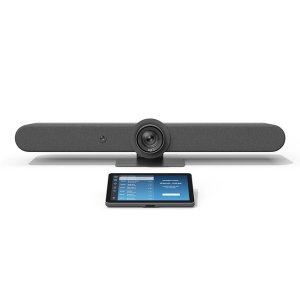
Logitech Rally Bar + TAP IP- Medium- Graphite

Logitech Rally Bar + TAP IP- Medium- Graphite e365 SuperStore are a premier authorised Logitech gold partner with Australian stock and warranty Logitech Rally bar are a Powerful All-in-one Video Conferencing Bar with Brilliant Optics and Automated PTZ. All-in-one Video Bar for Midsize Rooms. Simple to Set and Easy to Use. Only Quality Products. Trusted Australian Vendor. Friendly Customer Service. No Credit Card surcharge. Logitech Tap and Tap IP Compatibility Information  

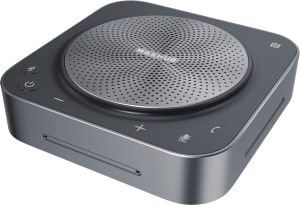
MaxHub Bluetooth Speakerphone UC BM35

MaxHub Bluetooth Speakerphone BM35 Unlock a new level of meeting clarity with the next-generation BM35 speakerphone. Crystal clear audio combines with a powerful pick-range to transform any small to mid-sized meeting space. Break free from the restrictions of wired devices with an agile, flexible solution that adapts as quickly as your team. 

In the home, the business office, or anywhere else, the BM35 is the ultimate part for clear conversations. Comes with 3 year warranty. Amplify Conference Quality with Superior Sound Portability and practicality come together in a powerful audio device, built for better meetings. The BM35 is optimized to keep human voices clear. Capturing every utterance in perfect detail, the BM35 empowers any team.

AVER CAM570 4K DUAL LENS PTZ AUDIO TRACKING CAMERA Stress FREE Installation

AVER CAM570 4K DUAL LENS PTZ AUDIO TRACKING CAMERA AVer CAM570 is a 4K dual lens camera with a 36X Total zoom PTZ camera and a second AI lens with 95˚FOV. Equipped with a built in microphone, CAM570 detects human voices up to 10M and offers audio tracking function. AI technology such as Smart Gallery and gesture control can capture every attendee up-close with premium video quality. 

Built-in Microphone Enables Audio Tracking Easily focus on active speaker with audio tracking mode and presentation mode. The camera will follow the speaker automatically or you can set up a preset point to focus on a specific area. The built in microphone picks up human voices up to 10M without being disturbed by a local speaker.

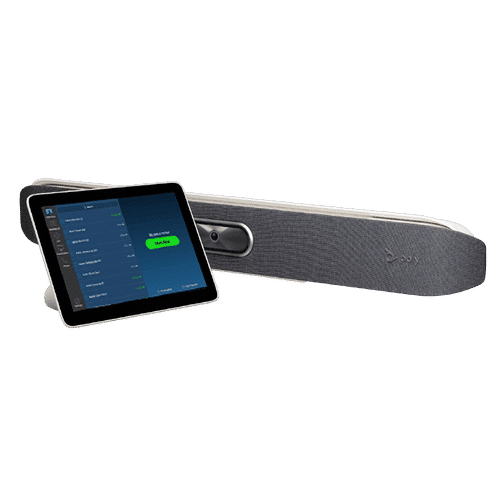
POLY Studio X50 & Poly TC8 4K Video Conf System W 3yr Poly Plus 24x7 Support

Poly studio X50

Poly Studio X50 with touch panel TC8 connects to Microsoft Teams and Zoom The Poly Studio X50 video bar delivers radical simplicity in a small, elegant package. In small- and medium-sized rooms, connect easily with whatever video collaboration software you may use. Experience full boardroom-quality audio, advanced camera capabilities, and quick wireless content—all in one sleek video bar. 

And say goodbye to unnecessary pucks, cords, and cables, along with the PC or Mac to drive the meeting, since the Poly Video OS runs the show. Easy to install, easy to manage. • Ideal for rooms of up to 8 participants • Surround everyone with the rich, legendary sound with stereo speakers that deliver immersive, room-filling audio • Dual monitor support ensures you have the ideal setup for room of many sizes • Be heard clearly with next generation microphone array

DTEN ME 27 All in One Zoom device

DTEN ME 27 All-in-One Personal Collaboration device for Zoom DTEN ME – the ideal solution for working from home Combining the technology in the DTEN ME with loom’s enterprise-quality software delivers the ideal solution for the home office. Simply login with your Zoom user account and create an instant office experience without any additional licenses. 

This solution integrates Zoom Meetings, phone calling, whiteboarding and annotation in a 27 multi-touch display built for the desktop. It is designed to keep your work­space clutter free and organized to deliver a professional meeting experience.

CommBox - Elegance XL Cart

CommBox – Elegance XL Cart Understatedly stylish fixed-height mobile stand with a pen shelf and designer hubless lockable castors. The cart suits CommBox screens up to 110″. Other features include 3″ heavy-duty locking castors and a handy pen and equipment shelf.

Maxhub v6 Collaboration Display - Maxhub C7530

Maxhub C5530

Maxhub v6 Collaboration Display – Maxhub C7530 Maxhub C7530 v6 Classic Series Maxhub C7530 The Maxhub C7530 – Integrating professional video conferencing, seamless screen-sharing, advanced whiteboard technology, and a brilliant audiovisual experience, is the ultimate corporate-collaboration assistant. 

Drive productive teamwork and increase organizational efficiency with this meeting-room must-have. Installation and Integration Australia Wide Total Solution, Minimal Setup – Maxhub C7530 A complete, seamless design fulfills every meeting requirement, including built-in camera, mic, and touch panel. Whether video conferencing or hosting a local discussion, it’s as easy as plugging in your power cable.

Cisco Webex 8875 IP Phone - Corded - Corded - Wi-Fi, Bluetooth - Desktop - Carbon Black - VoIP - IEEE 802.11a/b/g/n/ac - 2 x Network (RJ-45) - PoE Port

Cisco Webex 8875 IP Phone – Corded – Corded – Wi-Fi, Bluetooth – Desktop – Carbon Black – VoIP – IEEE 802.11a/b/g/n/ac – 2 x Network (RJ-45) – PoE Port CP-8875-K9= Webex 8875 IP Phone – Corded – Corded – Wi-Fi, Bluetooth – Desktop – Carbon Black Webex 8875 IP Phone – Corded – Corded – Wi-Fi, Bluetooth – Desktop – Carbon Black – VoIP – IEEE 802.11a/b/g/n/ac – 2 x Network (RJ-45) – PoE Ports Enjoy superior voice communications while retaining the convenience and user-friendliness over Internet Uses VoIP technology to transfer audio signals over the Internet while circumventing high toll charges by telephone companies

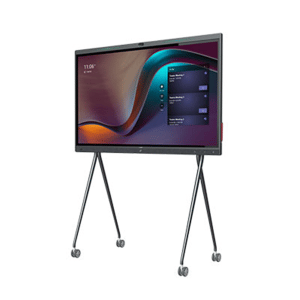
Yealink MeetingBoard 86 inch for MS Teams

Yealink MeetingBoard 86 inch Collaboration Display For Microsoft Teams e365 SuperStore are a premier authorised Yealink Platinum partner with Australian stock and warranty Simple to Set and Easy to Use. Only Quality Products. Trusted Australian Vendor, Many Payment options, Same Day Delivery, Friendly Customer Service. 

No Credit Card surcharge. (stand available separately) Unlock Creative Teamwork The Yealink Meeting Board collaboration display effectively facilitates powerful digital collaboration by combining everything in the room, from the computing unit to a wide 86-inch touchscreen display, 4K camera, microphones arrays, speakers, and built-in Microsoft Teams. The Android 10 OS and an Octa-core high-performance chipset offer maximum performance.

Facebook
Twitter
LinkedIn
Picture of e365 Superstore

e365 Superstore

e365 Superstore are experts in video conferencing equipment. We have completed thousands of projects over the last 25 years and we are passionate about virtual communications. Click here to find out more about our company.

Videoconferencing Benefits and Tips

Videoconferencing Benefits and Tips

Picture of The e365 Team

The e365 Team

Benefits of Videoconferencing

Videoconferencing has transformed over the years and it has now become a need for numerous companies. With the disruption of the pandemic this multiplied the demand for videoconferencing equipment. Currently, there are a large number of employees who still choose to work from home or take part in hybrid work.

The challenge lies in how modern businesses are going to take advantage of this opportunity and support their employees who are based in different locations.

Throughout this article we will cover the essentials in improving your online meeting experience and provide some tips to implement with your team in the next meeting.

Table of Contents

Overview

Videoconferencing has been around for over 30 plus years and in its infancy videoconferencing systems would cost as much as $250,000 for a room setup. The investment in equipment was rationalised in the same way it is today. Whilst the more obvious benefits of reducing travel, connecting teams and improving collaboration is still pertinent to todays workforce, there are so many more added benefits for a fraction of the price.

This includes providing employees with flexibility, increasing personal productivity and enhancing collaboration. However, there have been only a  few articles outlining how to use this technology and maximise the value of your investment in a videoconferencing system.

How to Improve Your Experience

It’s evident that taking part in a Zoom or Teams meeting can’t be compared to a face-to-face meeting. The environment is completely different with the online environment being more restrictive. However, there are advantages to online meetings that are absent in face to face meetings. According to a recent study teams meeting online are more likely to make definitive decisions and meetings are less likely to sway off in tangents. 

This saves time, money and resources as the agenda is followed closely. A drawback from an online meeting is the lack of daydreaming or disconnect opportunities. This is important for inspiring imagination and creating new ideas. Online meetings require focus on the speakers, whilst in person meetings participants feel connected within the same physical environment and feel free to let their mind wander. 

The good news is that there are lots of alternatives to get your team back to brainstorming. These include sharing content on screen with apps like miro, allowing each participant to share their content in real time to the chat and many other options. Research has indicated that this will significantly increase memory to what was discussed in the meeting as well as, increasing morale as each participants feels valued.

Best Practice for eMeetings

Maintaining continual attention in normal meetings can be a challenge and in video meetings this can be even harder. Luckily there are a few habits you can start doing to improve your recall and your relationships with your work colleagues.

According to recent research, a key difference between participants with a healthy workplace relationships throughout the pandemic and those that didn’t have this experience, was their focus. By focusing on non verbal cues and body language these participants were able to receive messages much more clearly and truly understand their colleagues.

So it’s important to encourage your team to turn on their cameras and focus on your teams body language and non verbal cues. Although, this can be particularly difficult if the video quality is not clear or the connection to the internet is slow. If you do experience bad internet quality, you can avoid this by attaching your Ethernet cable directly into your router. Another integral part of the online experience is the ability to share information.

So it is recommended that companies and individuals who are working from home or partaking in hybrid work invest in great quality equipment.

Is Videoconferencing Important?

Offering hybrid work or work from home options to employees can improve morale and actually enhance productivity. When employees are allowed to work from home they can be more flexible in organising their time and prioritising work. Employee’s that are offered these options also report higher job satisfaction and are less likely to switch job roles. 

With increased flexibility employees gain an increase in focus and they are able to prioritise work tasks more easily. It also provides the opportunity to collaborate with individuals across the world and build key relationships. With reduced travel costs and an increase in time productivity significantly increases which accelerates business growth.

It’s clear that communicating online can be challenge and communicating effectively does not come naturally. It takes a conscious effort from all parties to create a great environment that will foster creativity and improve business performance. 

Setting Up Your Space

A large part of the user experience comes from preparation and setting up your environment. It is important that you set up right by having appropriate lighting through using natural sunlight or a standard desk lamp to start off with before investing in professional lighting equipment. 

Alongside this is investing in a professional quality video camera. The camera on your lap-top or mobile won’t provide you with the clarity that you need. This makes a difference in instant communication. If you can read a colleagues body language more clearly or hear the tone of their voice it transforms how a message is received. So make sure you invest in a professional set up. 

Ensure your desk has enough space to place a notebook you can write on, as the more contact points users engage in the more points of memory the brain has to recall information from. So don’t forget about writting physical bullet points in every meeting.

Summary

That’s a wrap on all the different tools and techniques you can use to improve your experience online from established industry brands and scholarly researchers. Our aim to to improve the videoconferencing experience for companies worldwide and educate users on how to use this technology to gain the most value from your investment.

If you enjoyed this article, Sign up to our blog list below to be notified of any new developments within the videoconferencing industry.

Picture of e365 Team

e365 Team

The e365 Industry Blog covers all of the latest trends and developments within the video conferencing Industry. With the industry increasing its technological capabilities, it can be difficult to ascertain the core benefits to users in both the long and short term. Our blog allows users to know in an instant, how this technology will add value to their business and their online relationships. Sign up to our email list below, to be notified when we post our next blog and newsletter. 

Don’t Email me, Video Me!

Hate email?

If you’re in the corporate world, chances are you have an affliction like I do. Five hundred emails, 24 hours a day, two means — portable devices and your desktop — to receive them. Email has effectively beaten the telephone as a preferred way to communicate. And if you think I’m exaggerating, consider this: Intel recently noted that in exactly one minute’s time, more than 204 million emails are sent. That means more than 12 billion emails land at their destination within an hour!

Email may currently be our number one means of communication, but it is flawed. The world of email has become impersonal and sometimes even hostile. How many of us have received the dreaded “all caps” emails where you can feel the sender screaming through your screen? Often people seem too comfortable saying things in an email that they would likely never say in person or via live video.

And, while email ensures that we are in constant contact with colleagues and clients, for just some of the reasons I’ve just stated, it doesn’t necessarily mean it is better.

We’re a mobile business force — one that enjoys the comforts of a work-anywhere lifestyle, whether from the train, the back porch, you name it. And our consumer technology like virtual meetings, video conferencing and other telecommuting technology allows us to do this. We also rely heavily on social media platforms — ones with video chats, picture exchanges, and 140 characters that tell the whole story. So while just eight percent of the workforce is using these tools currently, this is the future of collaboration.

We see it every day in the way our future workforce — teenagers — keep in touch. It isn’t through email or voicemail, its Snapchat, Instagram and Whatsapp. The younger generation uses video daily in their communications, suggesting that today’s CIO needs to be thinking about opening up the corporate intranet for such video collaboration that is device and technology agnostic. Not only is it the future, it’s good for business and promotes global teamwork.

As video collaboration becomes more mainstream how global companies connect offices will impact mobility in a whole different way.  our government is expected to reduce its travel costs by 50 percent across agencies. Why shouldn’t video conferencing tools encourage enterprises across industries to follow suit? And, while some are currently connecting on devices tethered to their desks, the world is becoming more mobile. Major Telephony companies see the mobile market at 6.4 billion subscribers and 50 percent of those are smart phones. With those numbers only expected to grow, more devices will enter the market with video capability — leaving video as the major contribution to mobile data traffic by 2022.

With most consumers buying mobile devices for their bigger screens and HD video capability how can CIOs replicate quality consumer experiences and ensure employees have what they need to be successful?

They’ve tried. Believe me. But one of the biggest obstacles to integrating an employee’s workflow — and making it more of the consumer experience they desire – is the use of proprietary solutions.

For the last 20 years, we’ve seen different communication channels – everything from telephony and instant messages to the email and voicemail we get today. We’ve made improvements, but we often bind ourselves because of separate platforms that cannot co-exist. Proprietary technology is costly, often not scalable and thus, IT departments cannot make it customized for their needs.

My suggestion? Let’s open it up! Cloud Videoconferencing — offers CIOs and employees an option that appears to be traditional video conferencing without being tethered to a desk or platform.

Phone calls are a thing of the past. And I would wager email is on its heels. We’re on video now. We’re on social media now. It’s a multimedia, multiplatform, multi-device world.

Today is already tomorrow; video and social media use — most prominent already in the consumer industry- – will become as natural as picking up the phone or sending an email thanks to increased use of Cloud Videoconferencing. And that’s good news. Now if you’ll excuse me, I need to respond to the 147 emails I’ve received while writing this…


Determine Your Video Conferencing Requirements with These Questions

logo

Integrating video conferencing into your organization is quickly becoming essential. However, a top quality video conferencing system can be expensive. Therefore, in preparation for deciding on a provider, and choosing a plan for your company, it is well advised that you define your video conferencing requirements well before you begin to draft any contracts with vendors.

The following list should help you narrow down which types of video conferencing systems and equipment you should consider adopting when moving forward with your purchase. Make sure you consult both your management and IT departments in order to cover all bases.

There are three broad areas you should take a look at with regards to your video solutions.

The first is business requirements – the direct business goals that video conferencing should be looking to facilitate.
Next, there are functional requirements; specific details such as number or users and/or overall functionality that feed back into the business goals.
The final requirements to consider are technical. This may include any limitations you have in regards to space, systems, and bandwidth. Take advantage of the deep knowledge your IT team has in these areas before moving forward. Then ask yourself the following:
What is your organization looking to achieve with video conferencing solutions?

This is first and foremost the most important question you must ask before going forward with a video conferencing solution. The wider strategy your team outlines will be a fundamental help in determining the type of video conferencing solution you choose.

What is your budget for video conferencing solutions?

Your budget should be determined by assessing how valuable the solution will be to your operations. In addition, look at where the solution will reduce costs and improve productivity i.e. travel costs, scaling knowledge, connecting remote workers etc.

How many users does your video conferencing system expect to support?

Knowing how many users your organization will have can help you with issues such as bandwidth and pricing plans. However, knowing how much you are likely to grow in the future is just as important.

Where will your users be located?

Will your users be based in the main office or will they be remote? Remember to look to align your bring-your-own-device (BYOD) strategy with the solution to make it simpler for remote workers. Also, look at how many meeting rooms you wish to convert into video conferencing suites and, of course, don’t forget to look at all of your office and subsidiary locations.

Do you have in-house IT support or will you need to outsource?

Most vendors should be able to offer you IT support, though this will be at an extra charge. If you are fortunate enough to have onsite IT staff members, they must familiarize themselves with the solution.

Cloud or on premise video conferencing?

It’s not just applications and storage that are offered from the cloud, it is now possible to dispense with expensive video network infrastructure and have video conferencing and calling delivered as a service. This option is by far the most scalable and affordable. In very few cases, organizations prefer to have on premise infrastructure deployed behind firewalls. Therefore, engage with your IT to understand the pros and cons of both environments.
When you are going to implement a video system, follow these questions and assess your business goals to find a video conferencing solution that best suits your company.

At eVideo, we have a complete range of cloud video conferencing services and a portfolio of hardware for meeting rooms systems and software for desktop and mobile devices.

To find out more visit us at www.evideo.com.au   or 1800 11 387

Sydney | Melbourne | Gold Coast | Brisbane| Canberra | Adelaide| Perth


Huddle Rooms and Cloud Videoconferencing

Make Your Business More Productive, with Huddle Room Equipment, Products and Software

If you haven’t been seeing the productivity you want out of your employees and your business as a whole, consider that the layout and design of your office space might be to blame. In recent years, many companies have started trying to innovate their office designs to pursue the look and feel of a modern office.

In many cases, this idea of a ‘modern office’ results in an open concept design where most employees work side by side or across from one another, clustered together in one big main room. Maybe there are a few standalone offices for senior members of the staff, or a few conference rooms for meetings, job interviews and the like. For the most part, though, the office is designed as an open floor plan.

The Problems with the Modern Office Layout

There are two core problems with this kind of office design, and you can solve both of them (at least partially) by investing in huddle room equipment for your business.

The first issue is that open workspaces, while they can drive collaboration and promote a teamwork mentality, can also create loud, distracting environments where very little actual ‘work’ gets done. There is too much chaos and not enough direction.

The second issue, meanwhile, is that the office’s open concept design means that there aren’t many other rooms for team meetings or collaboration sessions. There are a couple of larger conference rooms or boardrooms, but those are intended for more important meetings—not for gatherings of smaller teams or segmented departments.

huddleroom1

The Benefits of Using Huddle Room Equipment

Investing in huddle room products is an effective way of reversing these negative impacts of an open concept office. Huddle rooms are smaller rooms in an office space that act as less formal conference rooms. They are maybe the size of a traditional office but come equipped with key electronics and software to allow for video conferencing, Power Point presentations, idea brainstorming and more. Best of all, the size of these rooms makes them perfect for smaller group meetings.

Having huddle room equipment and software in your office helps restore the sense of collaboration often lost amidst the madness of an open floor plan office. When your individual teams can regularly go into smaller rooms to have meetings or conversations, it removes some of the noise and chaos from the central work area. It also keeps the conference rooms and boardrooms open, available for larger gatherings.

Because huddle rooms are smaller than standard conference rooms, they cost less to outfit with key technology and software products. As a result, turning three or four smaller rooms or offices throughout your workspace into huddle rooms might be more affordable than you realise.

At eVideo Communications, we specialise in huddle room equipment and huddle room software in Australia. We can help you design and implement a huddle room strategy in your office. We predict you will start noticing the benefits right away.

To start collaborating with the eVideo team, call us today on 1800 111 387

Ultimate guide to Zoom-Microsoft Teams room solution.

Face-to-face interaction is critical in business communications but teams are becoming increasingly dispersed. The Video Conferencing systems on the market now are designed with smaller huddle rooms in mind

Our Team are

  • Highly experienced Unified Communications, Videoconferencing, Collaboration Solutions Specialized
  • Offer a consultative approach
  • Highest product and application knowledge
  • Totally technically proficient
  • Superior level of networking competency, service, support & customer satisfaction

Our Video/Audio/IP telephony/Unified Communications solutions include:

  • Cisco, Logitech, Crestron, Poly, Yealink  Video Conferencing endpoints for Meeting Rooms, Cloud, On-premise and Hybrid Solutions, Microsoft Teams, Zoom, Google meet.
  • Integrate your Boardroom solutions
  • Professional services, Managed Services.
  • Audio Visual solutions (Touch boards, Projectors, Trolleys etc.)

Please let me know if you would like one of our team to discuss with you and  provide the latest Communication solutions you and your organisation.

Order on line from e365 Distribution the Logitech Rally Bar

Logitech Rally Bar

Powerful All-in-one Video Conferencing bar with Brilliant Optics and Automated PTZ.

All-in-one Video bar for Midsize Rooms. Simple to Set and Easy to Use.

Only Quality Products from e365. Award winning Logitech Australian partner with Australia-Wide offices.

Award winning Customer support & Service. No Credit Card surcharge.

We Specialize in Both Cloud-Based and On-Premise Technologies.

  •  24/7 Help Desk *     Maintenance and support options
  •  Australia-Wide installations  Onsite support & Training *
  •  Offices in Sydney-Melbourne-Brisbane-Gold Coast-Perth-Adelaide-Canberra.
  •  Free demonstrations & Trials * Video chat consultancy
  •  Customer Promotions & Loyalty Program
  •  Special discounts for Health, Education, Government & Non for profit.

*Subject to conditions and vendors.


What is a MUST to include Todays latest Visual technology.

eVideo communications 

Video Conferencing and high-impact audio-visual technology is the Answer.

Today’s organizations thrive in a creative, agile and responsive working environment, where people want to engage with each other in real time – wherever they are.

Our forward thinking customers require not only specific technology, but innovation, transformation and a cultural shift towards a new way of delivering, and interacting with, information.

Implementing this type of environment can prove to be challenging due to the complexity and financial requirements of a flexible Workspace.

Business Benefit

Working environments are no longer standalone rooms with simple display screens or a flipchart. They are areas where we collaborate to create an environment where people can deliver more value to the business.

Business benefits include tangible cost savings, savings in time and office space, along with increased engagement. Video Conferencing and VCaaS (Cloud) reduces complexity of multi-manufacturer video equipment and make booking a VC as easy as a meeting, driving utilization.

Today we demand interaction and collaboration tools that engage with our customers, staff, partners etc. that provides a multi-layered experience and brand awareness.

Boardroom Management, potentially linked to room integration, automates the environment for whatever type of meeting is taking place.

Tangible Savings

We help you transform your business through the implementation of innovative audio-visual and video solutions with the ability to achieve tangible cost savings or drive customer engagement.

Virtual teams enable collaborative working, increasing the efficiency of your business and reducing the time to market.

More and more businesses are using digital signage as part of their communications and information strategy. Deployed in prominent areas such as receptions, staff restaurants, office spaces, digital signage enables engaging, dynamic and tailored content.

Video Walls and large format screens are becoming common, centrally controlled and distributed across a geographically dispersed estate.

Our Capability

Our team works closely with customers to design and implement a variety of technology solutions, including:

  • Video Conferencing – Our Professional Services team of consultants, project managers, engineers and support operatives integrate existing Videoconferencing or deploy additional endpoints.
  • VCaaS – Hosted Virtual Meeting Rooms provide access video endpoints, along with software based systems such as Microsoft Lync, to a single Video meeting room. Additionally we provide concierge service and video eCare helpdesk to assist with setup, activation and troubleshooting.
  • Audio – Boardrooms, Meeting Rooms, Huddle rooms, Executive offices.
  • Digital Signage – Enabling the projection of brand messaging, information and targeted adverts using a series of media displays or video walls;
  • Control Systems – Including LCD displays, projectors, videoconferencing systems, lighting.
  • Display – Projectors, LCD, LED and plasma displays can be used in a wide range of environments, from corporate board rooms, meeting rooms, command and control centers;


We are leading the way in  providing a focus on design, implementation and management of Video Conferencing and high-impact audio-visual technology throughout Australia and Globally enabling our customers to be ahead of their competitors.


Latest Home Office-Meeting Room Collaboration bundles

Home Office-Meeting Room Collaboration solution
Samsung FLIP 55” touch screen with Logitech RALLY BAR MINI White BUNDLE Special pricing ends soon.

Save $$$ on this Bundle    We can supply and Install Australia-Wide.

https://www.e365.com.au/product/samsung-flip-55-with-logitech-rally-bar-mini-white-and-1x-logi-tv-mount-for-video-barbundle/


Sign Up For Our Newsletter to Receive Regular Specials!