


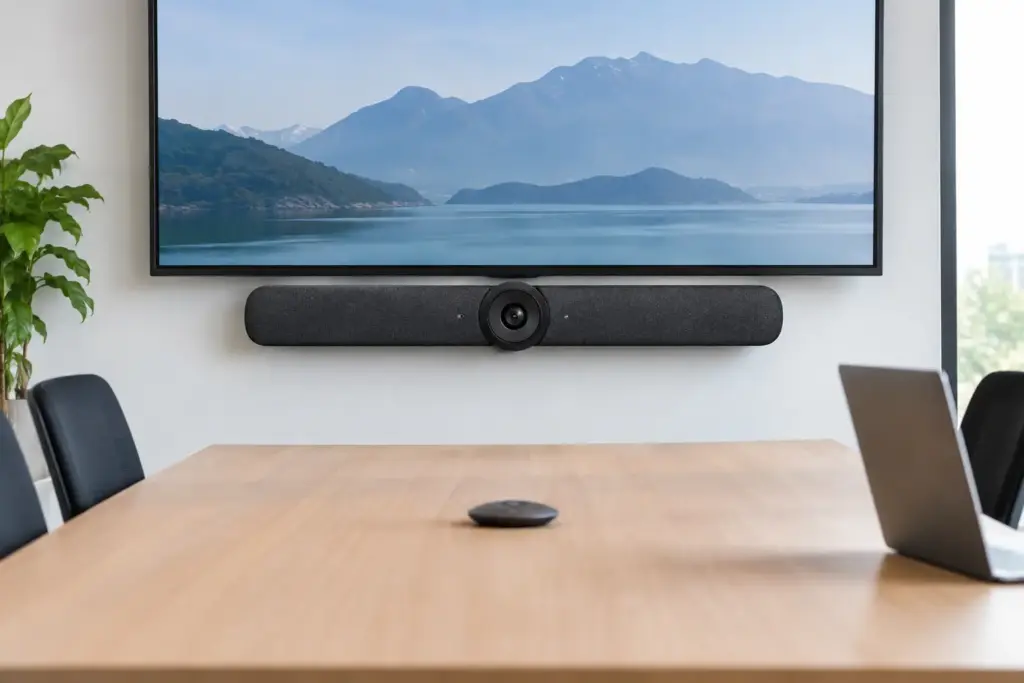
A meeting room system earns its keep when remote participants can clearly see the person at the far end of the table, hear the quiet contributor near the wall, and join without calling IT. This Logitech Rally Bar review looks at whether Logitech’s all-in-one video bar delivers that standard for business meeting rooms – and where buyers should set realistic expectations.
The Rally Bar is not a consumer webcam enlarged for the boardroom. It is a purpose-built appliance and USB conferencing peripheral designed for organizations standardizing rooms around Microsoft Teams, Zoom, and other leading meeting platforms. Its appeal is clear: a high-quality camera, speakers, microphones, compute capability, and cable management all consolidated into a single device.
For IT teams, facilities managers, and procurement buyers, that consolidation can reduce installation complexity and create a more consistent room experience. The right decision still depends on room dimensions, seating layout, acoustic conditions, control requirements, and the collaboration platform already in use.
Logitech Rally Bar Review: What It Does Best
The core strength of the Rally Bar is its ability to deliver a professional meeting experience without requiring a separate camera, speakerphone, and microphone array in a typical medium-to-large room. The motorized PTZ camera supports 4K video and up to 5x optical zoom, allowing it to frame participants more effectively than a fixed wide-angle camera when people are seated farther from the display.
Logitech’s AI Viewfinder is particularly useful in rooms where users do not sit in the same places every time. It can automatically frame active meeting participants rather than leaving large areas of empty wall or tabletop in the shot. Auto-framing is not a replacement for thoughtful camera placement, but it makes a meaningful difference in flexible meeting spaces and executive rooms with changing attendance.
Audio is another reason the Rally Bar remains a strong commercial choice. Its beamforming microphone array is designed to focus on voices while reducing surrounding noise, while the integrated speakers provide far more authority than the speakers built into most commercial displays. For standard rooms with normal ceiling heights and reasonable acoustic treatment, this combination is clean, clear, and easy to operate.
The all-in-one design also has practical value beyond appearances. Fewer exposed components can mean less cable clutter, fewer points of failure, and a faster path from installation to a usable room. That matters when rolling out multiple rooms across an office, campus, or distributed workplace.
Appliance Mode and USB Mode Give Buyers Options
The Rally Bar can operate as a dedicated room appliance or as a USB peripheral connected to an existing room computer. This flexibility is one of its strongest buying arguments, especially for organizations managing different room standards across locations.
In appliance mode, the Rally Bar runs supported video conferencing room applications directly on the device through Logitech CollabOS. For a Microsoft Teams Rooms or Zoom Rooms deployment, this can reduce the hardware footprint behind the display and eliminate the need for a dedicated Windows compute unit in some room designs. Pair it with a compatible touch controller, provision the room correctly, and users receive a familiar join-and-control experience.
USB mode suits businesses that already have a room PC, need a specific conferencing application, or prefer centralized control of the compute environment. In this configuration, the Rally Bar functions as a premium camera, microphone, and speaker system. It is also a sensible choice for spaces used with BYOD workflows, provided the organization has planned the required cabling, switching, and user access.
There is no universal winner between these modes. Appliance deployments can simplify room hardware and reduce setup time, while PC-based rooms may offer more flexibility for specialized applications, enterprise management policies, or multi-platform requirements. The best approach is the one that matches the organization’s existing room strategy rather than forcing every space into the same configuration.
Video Quality Is Strong, but Room Design Still Matters
The Rally Bar produces sharp, natural video in well-lit meeting rooms. The camera’s optical zoom gives it a major advantage over lower-cost video bars in rooms where the farthest participants sit several feet from the display. It is capable of creating a more intentional, broadcast-like view of a meeting rather than the distorted, overly wide image common with entry-level systems.
That said, even premium conferencing hardware cannot solve poor room conditions on its own. Strong backlighting from windows can still affect faces, dark walls can absorb available light, and glossy tables can create distracting reflections. A professional deployment should consider display height, camera position, window coverings, lighting, and the distance between the Rally Bar and the nearest participant.
The device is generally best suited to medium and larger meeting rooms where camera control and stronger integrated audio matter. In a small huddle room, its capabilities may be more than the space needs. Logitech’s more compact video bar options can represent better value in those environments, particularly when everyone sits close to the display.
Audio Coverage Has Limits
The integrated audio system is impressive for an all-in-one bar, but room size and acoustics should drive the final specification. A long boardroom with hard surfaces, open ceilings, heavy HVAC noise, or participants positioned beyond the intended pickup range may require expansion microphones or a more comprehensive audio design.
This is where many projects go wrong. Buyers compare video bar specifications, select the highest-rated model, and assume the room is covered. In practice, microphone coverage needs to account for the furthest chair, not just the center of the table. For larger spaces or rooms with challenging acoustics, adding the correct expansion microphones and conducting a proper site assessment is the commercially safer choice.
Setup Is Straightforward, but Enterprise Rollouts Need Planning
For a single room, the Rally Bar is relatively quick to deploy. It can be mounted above or below a display, connected to power and network, paired with the selected control interface, and configured for the chosen platform. Logitech’s device management tools also help administrators monitor status, apply updates, and manage room devices at scale.
A multi-room rollout requires more discipline. Network ports, VLAN policies, device enrollment, room accounts, touch controller placement, display control, power access, and cable pathways should be documented before installation begins. The video bar itself may be simple, but the meeting room is part of a broader technology environment.
Organizations should also decide how users will start meetings. A dedicated Teams Rooms or Zoom Rooms setup provides the most polished experience for scheduled calls. A shared USB room may offer broader compatibility but can introduce support issues when users bring different laptops, adapters, and conferencing clients. The Rally Bar supports either direction, but it cannot remove the operational trade-offs between them.
Is the Rally Bar Good Value?
The Rally Bar sits above basic USB cameras and entry-level soundbars in price, and it should be evaluated as a professional room system rather than a simple accessory. Its value comes from combining high-quality optics, intelligent framing, integrated audio, appliance capability, and centralized management in a device built for daily commercial use.
It is a strong investment when the room is client-facing, used frequently by hybrid teams, or part of a company-wide standardization plan. It can also be cost-effective when appliance mode eliminates the need for additional room compute hardware. For a lightly used, four-person room, however, a smaller solution may deliver a better return without sacrificing the user experience.
Buyers should also budget for the full room, not just the video bar. The final solution may include a commercial display, touch controller, scheduler panel, expansion microphones, mount, cabling, installation, and platform licensing. Treating these as an afterthought is how a technically capable product becomes an incomplete meeting room.
Who Should Buy the Logitech Rally Bar?
The Rally Bar is an excellent fit for businesses that need a polished, scalable conferencing experience in medium and larger rooms. It is particularly well matched to organizations standardizing on Microsoft Teams Rooms or Zoom Rooms, as well as IT teams that want the choice of appliance and USB operating modes.
It is less compelling for very small rooms, highly irregular spaces, or rooms where participants are spread across a long table beyond the integrated microphone coverage. In those cases, a compact bar, modular camera system, or expanded audio configuration may be the better technical and financial answer.
For procurement teams, the key is to buy against the room plan rather than a specification sheet. e365 SuperStore can help match the Rally Bar, mounting, control, display, and audio components to the way your teams actually meet. A well-designed room should feel invisible to users: they walk in, tap join, and the conversation starts clearly.