


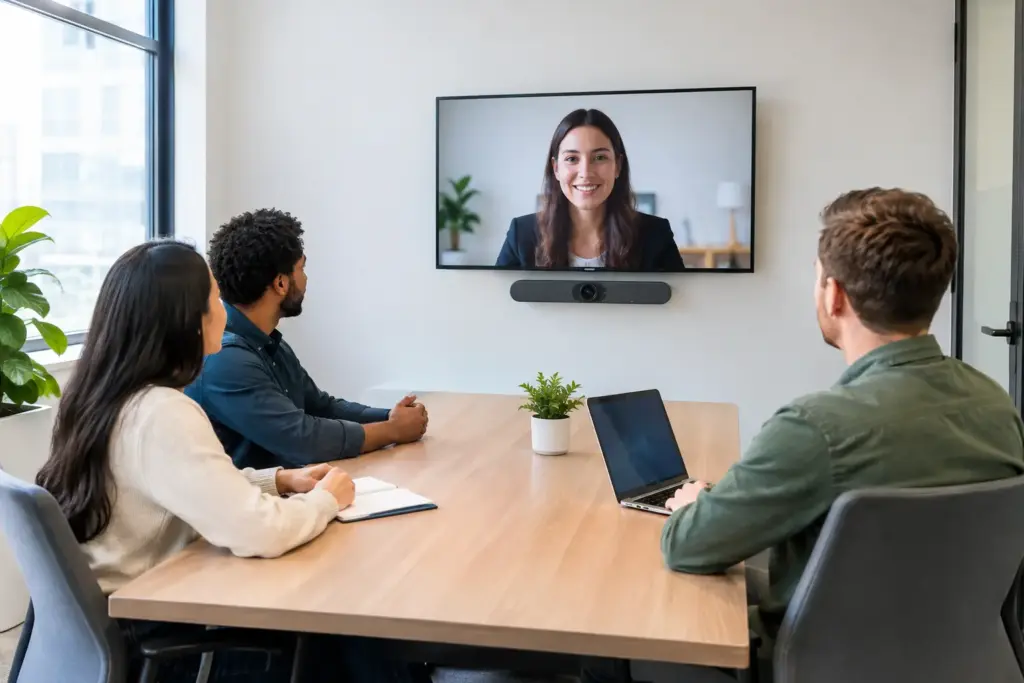
A two-person meeting should not require a laptop balanced on a table, a tangle of adapters, and five minutes of audio troubleshooting. Yealink small room solutions are designed to replace that friction with dedicated, platform-certified room technology that starts quickly, sounds clear, and gives every participant a proper seat at the virtual table.
For IT and facilities teams, the appeal is not simply a better camera. It is the ability to standardize small spaces with an appliance-based approach that is easier to support than a collection of consumer peripherals. For employees, it means the smallest meeting room can finally feel like a reliable place to meet.
Why Small Rooms Need Purpose-Built Video Systems
Small rooms are often called huddle rooms, but their use has expanded well beyond informal catch-ups. They are used for hybrid interviews, client calls, focused project sessions, one-to-one meetings, and overflow collaboration when larger rooms are booked. These are high-frequency spaces, which makes reliability more valuable than elaborate AV features that rarely get used.
A basic USB camera and speakerphone can work for an occasional call. The trade-off is that users must connect a laptop, select the correct microphone and speaker, launch the right meeting application, and hope the operating system recognizes every device. That workflow creates support tickets and inconsistent user experiences, particularly across multiple offices.
A dedicated Yealink room system gives the room its own identity on Microsoft Teams Rooms or Zoom Rooms. Users walk in, tap the controller, and join. Calendar integration, room controls, camera framing, and audio processing are managed as part of the room experience rather than by each employee’s laptop.
Choosing Yealink Small Room Solutions by Room Type
The right solution depends less on the room label and more on its dimensions, furniture layout, display position, and meeting platform. A compact enclosed room for two to four people needs different coverage from a six-person space with a long table and glass walls.
Compact focus rooms and phone booths
For the smallest enclosed spaces, an all-in-one video bar is usually the most practical option. A unit such as the Yealink MeetingBar A10 combines camera, microphones, speaker, and compute capability in one compact device. This reduces cable runs, minimizes installation time, and keeps the front of the room clean.
The key question is camera field of view. In a shallow room, a wider lens helps include people seated close to the display. Intelligent framing can also help keep active participants visible, though the room should still be arranged sensibly. No camera feature can fully compensate for chairs placed too close to the screen or participants seated outside the camera’s coverage area.
Standard huddle rooms for four to six people
In a typical huddle room, an all-in-one bar remains a strong choice, but audio pickup deserves closer attention. The built-in microphone array may be sufficient in a quiet, well-furnished room. If the room has hard surfaces, active air conditioning, or participants seated farther from the display, an expansion microphone can be a worthwhile addition.
The Yealink MeetingBar A20 is suited to organizations that need a more capable room bar for small-to-medium collaboration spaces. AI-driven framing and tracking tools can improve remote visibility, while a single integrated device keeps deployment straightforward. Buyers should still confirm certified platform compatibility, display requirements, and accessory options before standardizing a model across sites.
Rooms with flexible layouts or shared devices
Some organizations need a more modular design. A separate room PC, touch controller, camera, and audio system can make sense where the display is mounted away from the table, the room is used for multiple layouts, or a larger touch console is required. Yealink MVC systems provide this approach for Microsoft Teams Rooms deployments.
Modular systems add flexibility, but they also increase the number of components to mount, cable, manage, and replace. For a straightforward small room, the simplicity of an all-in-one bar often wins. For a room expected to change over time, modular hardware may protect the investment better.
Start With the Meeting Platform, Not the Hardware
A common procurement mistake is selecting a camera first and working backward. The smarter path is to confirm the organization’s collaboration platform, licensing model, and management standards before comparing room devices.
If Teams is the standard, select a Teams Rooms-certified configuration and confirm whether the room will run in Android appliance mode or with a dedicated Windows room PC. If Zoom is the standard, choose a Zoom Rooms-ready configuration. Organizations with mixed platforms should be especially careful: a system optimized for one native platform can still support guest content sharing, but it may not provide the same one-touch experience for every meeting service.
Content sharing is another decision point. Wired HDMI or USB-C sharing provides predictable performance and is familiar to visitors. Wireless presentation can reduce clutter and improve convenience, particularly with compatible accessories such as Yealink’s WPP30 presentation pod. In security-sensitive environments, IT should determine how guest sharing is authenticated and whether wireless sharing aligns with network policy.
What Makes a Small Room Sound Professional
Remote participants will tolerate a less-than-perfect camera image more readily than poor audio. Echo, HVAC noise, overlapping voices, and speakers positioned too far from the microphone can make a meeting exhausting even when the video looks sharp.
Place the video bar at the front of the room, centered beneath or above the display according to the mounting design. Keep it away from shelves that can create vibration and avoid placing it behind decorative objects. Soft furnishings, acoustic panels, carpet, and window treatments can materially improve call quality in rooms with glass walls and hard tables.
Yealink audio processing is built to support practical meeting conditions, but technology has limits. A six-person room with a loud ventilation system may need acoustic treatment or an additional microphone. A quiet four-person room may need nothing beyond the integrated bar. A site assessment should evaluate real conditions, not just a floor plan.
Deployment Details That Prevent Support Tickets
The most successful room rollouts are standardized before the first device is installed. Use a repeatable room design with approved displays, mounts, cabling, network settings, and naming conventions. This makes training easier and gives support teams a known baseline when users report an issue.
Network readiness matters. Room systems need stable wired connectivity, appropriate VLAN and firewall configuration, DNS access, and sufficient bandwidth for video meetings. Wi-Fi may be suitable for some peripheral functions, but a wired connection is generally the better choice for the primary room system where reliability is non-negotiable.
Do not treat power and cable management as an afterthought. Plan power outlets behind the display and beneath the table, protect cables from chair movement, and make service access possible without dismantling furniture. A clean installation is not just aesthetic. It reduces accidental disconnections and shortens maintenance time.
Remote management should also be part of the purchasing decision. IT teams need visibility into device status, software updates, and peripheral health across rooms. A system that is easy to deploy but difficult to monitor can become expensive at scale.
Build a Room Standard That Employees Will Actually Use
The best room technology is the technology people trust. Keep the experience consistent: similar controller placement, clear room names, predictable content-sharing methods, and a short set of instructions for guest presenters. If a meeting requires special steps, display them where users need them, not in a PDF buried on an intranet.
For multi-site buyers, standardization also strengthens procurement. Ordering repeatable Yealink bundles can simplify quoting, spares planning, warranty administration, and replacement cycles. It also creates better leverage when purchasing displays, mounts, network accessories, and installation services alongside the core conferencing hardware.
e365 SuperStore can assist business buyers with solution selection, commercial quotes, compatible accessories, and deployment support across Australia. That is particularly useful when a small-room program needs to scale from a pilot space to a consistent workplace standard.
Before committing to a room-wide rollout, install one representative solution in a real small room and test it with the people who will use it most. Their feedback on framing, audio, touch controls, and content sharing will reveal more than a specification sheet – and it gives your team a proven design to repeat with confidence.