


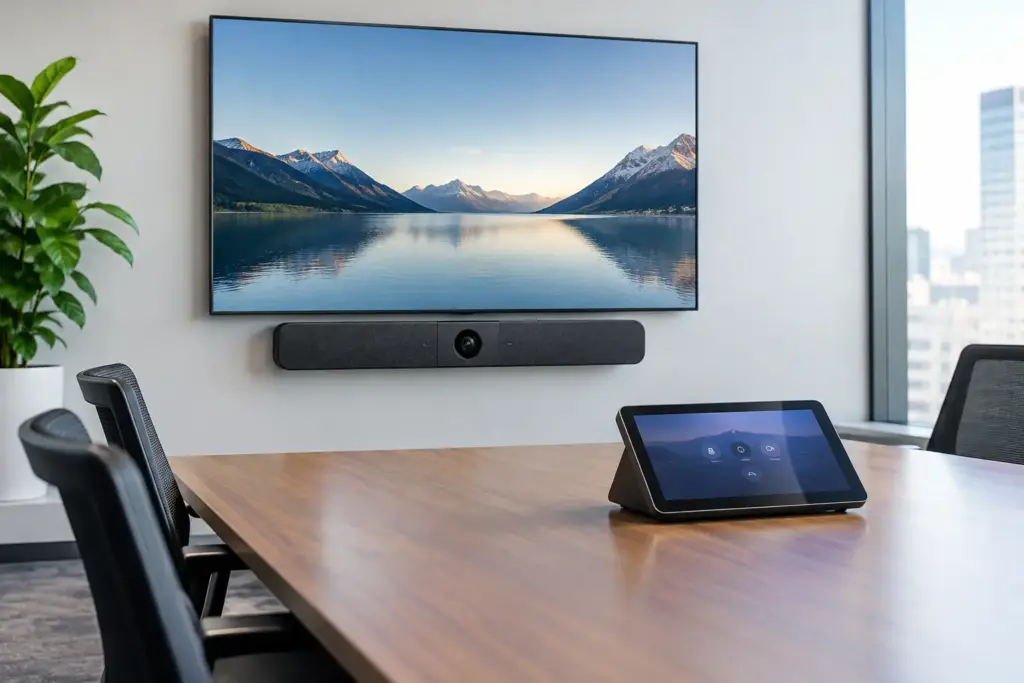
A large meeting room can expose every weakness in a video setup. Participants at the far end become difficult to see, side conversations are missed, and starting a call turns into a search for the right remote, cable, or login. The HP Poly Studio X72 + TC10 is designed to address that problem as a complete room collaboration pairing: a high-performance video bar for the front of the room and a purpose-built touch controller on the table.
For organizations standardizing executive boardrooms, training rooms, divisible spaces, and larger conference rooms, the appeal is straightforward. The Studio X72 brings intelligent video and audio into a single appliance-style platform, while the Poly TC10 gives users a familiar point of control where they need it. The result is less friction for meeting hosts and a more consistent experience across sites.
Why the HP Poly Studio X72 + TC10 Fits Larger Rooms
The Studio X72 is built for spaces where a basic USB conference camera is no longer enough. Larger rooms need broader coverage, clear speaker pickup, and camera behavior that keeps remote attendees focused on the people in the conversation rather than a wide, static view of an empty table.
Its intelligent camera technology is intended to frame the group and respond to active speakers. That matters in boardroom discussions, client presentations, and hybrid workshops where participants may be spread across a long table. Rather than requiring someone to manually pan, tilt, or zoom the camera throughout the meeting, the system can help keep people appropriately framed as the discussion changes.
Audio is equally critical. In a larger room, the problem is rarely just volume. It is intelligibility. HVAC noise, hard surfaces, keyboard noise, and participants speaking at different distances can all make remote conversation tiring. The Studio X72 is designed with advanced audio processing to help reduce distracting background noise and improve the clarity of voices in the room.
There is a practical trade-off to consider. An all-in-one video bar is often the cleanest choice for a standard large room, but it is not automatically the answer for every space. Very long boardrooms, unusually shaped rooms, rooms with movable partitions, or spaces requiring multiple camera angles may benefit from an expanded room design. A technology assessment before purchase can prevent a simple deployment from becoming an underperforming one.
TC10 Touch Control Makes Meetings Easier to Start
A premium meeting room still fails if people cannot start meetings without assistance. The Poly TC10 is the user-facing part of the solution, providing a dedicated touchscreen for meeting controls, calendar access, joining scheduled calls, sharing content, and managing the room experience.
Placed on the meeting table, the TC10 removes the need for users to walk to the display or handle a remote control. That can make a noticeable difference in shared spaces used by executives, visitors, educators, and teams who may not know the underlying room technology. The goal is simple: walk in, tap the scheduled meeting, and begin.
The TC10 can also support a cleaner room standardization strategy. When every room has a similar controller layout and meeting workflow, IT teams spend less time answering basic support requests. Users gain confidence because the experience is predictable whether they are in a small huddle room or a large conference space.
Controller and room scheduling functions should be confirmed during solution design. Requirements can vary according to the selected collaboration platform, device configuration, room licensing, and whether the organization wants a second interface outside the room for scheduling visibility.
Designed for Teams and Zoom Room Environments
For many organizations, platform alignment is the first procurement question. The HP Poly Studio X72 is designed for cloud video collaboration environments, including Microsoft Teams Rooms and Zoom Rooms deployments, depending on the selected configuration and organizational requirements.
This appliance-style approach can be attractive because it reduces dependence on a permanently installed room PC for every use case. It can simplify room design, reduce cable clutter, and give IT teams a more focused management model. For organizations already committed to a collaboration platform, standardized room appliances also make it easier to create repeatable deployment templates.
That said, the device alone is not the entire room solution. A successful deployment still requires the right display, network configuration, user licensing, mounting position, power arrangement, and content-sharing approach. If users regularly bring their own laptops or need access to multiple meeting platforms, define that workflow early. Native room meetings, guest joins, wired sharing, and wireless sharing can each require different policies or supporting hardware.
What to Confirm Before You Buy
The right conversation starts with the room, not just the product SKU. Measure the room depth and width, identify the primary seating layout, and consider where remote participants need to see presenters, whiteboards, or content. Mounting height and display position affect camera performance more than many buyers expect.
Network planning is also essential. The Studio X72 and TC10 should be installed on a business-grade network with the appropriate security policies, quality-of-service approach, and available power. The TC10 commonly relies on Ethernet connectivity and Power over Ethernet, so confirm switch capacity and cabling paths before installation day.
Ask these questions during the planning stage:
- Is this a standard large conference room, or does it have an unusual layout that needs additional microphones or cameras?
- Will the room run Microsoft Teams Rooms, Zoom Rooms, or a defined multi-platform workflow?
- Is the display already in place, and does its size suit the viewing distance for both local and remote content?
- Does the organization need table connectivity, wireless presentation, room scheduling, or centralized device management?
- Who will provision accounts, licenses, network access, and ongoing room support after installation?
These details determine whether the Studio X72 and TC10 will operate as a high-value standard room package or need to be part of a broader integrated solution.
A Better Standard for Meeting Room Rollouts
For IT and procurement teams, the strongest reason to select a matched video bar and controller is consistency. Standardizing room technology reduces the number of exceptions across the estate. It simplifies user training, creates a repeatable support process, and helps organizations forecast accessories, spares, and future expansion.
The HP Poly Studio X72 + TC10 is particularly compelling where room quality matters to the business. Executive meetings, client presentations, project steering committees, hybrid learning sessions, and cross-site operations all benefit when remote participants can hear and see the room clearly without technical distractions.
It is also a strong fit for organizations replacing aging room systems. Older codecs, legacy cameras, and consumer-grade peripherals can create inconsistent meeting experiences and fragmented support obligations. Moving to a current room platform offers an opportunity to improve usability while aligning hardware with a defined management and lifecycle plan.
Procurement and Deployment Support Matter
Commercial collaboration technology should not be treated like a consumer electronics purchase. Product compatibility, room acoustics, platform licensing, shipping schedules, and installation coordination all influence the result. The lowest upfront price can become expensive if the equipment is mismatched to the room or deployed without the required network and mounting preparation.
e365 SuperStore supports business, education, and government buyers with fast quotes, competitive commercial pricing, and assistance across meeting room hardware, displays, mounting, audio, and installation requirements. For multi-room projects, a coordinated bill of materials can help reduce compatibility gaps and make rollout scheduling more predictable.
The best next step is to assess one representative room before standardizing across every location. Confirm the actual room dimensions, collaboration platform, user workflow, display arrangement, and infrastructure requirements, then build a room package that users can operate confidently from their first meeting.