


 Notice: SPECIAL PRICE DROP valid for a limited time only or while stocks last. Pricing subject to change without notice. This pricing is online transactional only
Kandao Meeting Ultra 360° AI Conference Host with Dual Touchscreens
- All-in-one Android conferencing system
- 360° 4K HDR video with AI framing
- Dual 15.6” FHD touchscreens
- Wired and wireless screen sharing
- Multiple intelligent meeting views
Kandao Meeting Ultra 360° AI Conference Host with Dual Touchscreens
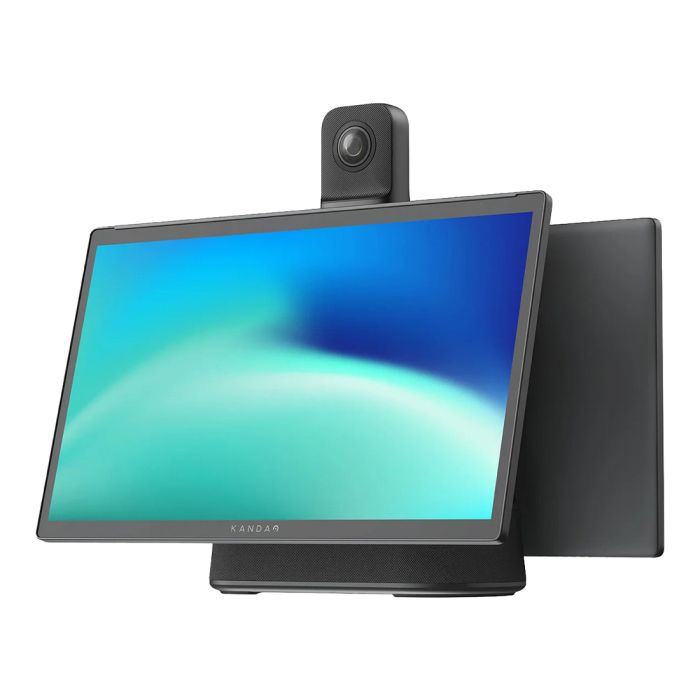
The Kandao Meeting Ultra is an all-in-one video conferencing system built for the way most meetings actually happen: around a table.
Combining a 360° 4K HDR camera, dual 15.6″ touchscreens, eight beamforming microphones, a built-in speaker and standalone Android OS, Meeting Ultra gives teams a simpler way to host high quality hybrid meetings without needing a separate room PC.
Unlike a traditional front-of-room video bar, Meeting Ultra sits in the centre of the table. That means remote participants get a more natural, face-on view of the people in the room, instead of watching side profiles from the far end of the table.
It’s especially well suited to small and medium meeting rooms, boardrooms, executive spaces and hybrid collaboration areas where most of the discussion happens around the table.
What We Love
- Centre-of-table 360° camera design gives remote participants a more natural and inclusive view of the room
- 4K HDR video at 30fps, with strong detail and dynamic range even in tricky lighting
- Standalone Android OS, so teams can run supported meeting apps such as Zoom, Microsoft Teams and Google Meet without a dedicated room PC
- Dual 15.6″ Full HD touchscreens make it easy to join, host and manage meetings directly from the device
- AI-powered speaker tracking, automatic framing and multiple meeting views for different room layouts
- Eight omnidirectional microphones with up to 5.5m voice pickup, plus built-in noise reduction and Hi-Fi speaker
- Flexible BYOD support via USB-C, so guests can use it as a premium camera, microphone and speaker from their own laptop
- Two HDMI outputs, HDMI input, wireless screen sharing, Wi-Fi 6 and Gigabit Ethernet for flexible room setups
- A stronger option than a standard video bar for table-based hybrid meetings
- Zoom Rooms Certified for seamless Zoom meeting experiences
In Detail
The Kandao Meeting Ultra is not just a conference camera. It’s a fully self-contained video conferencing system that brings the camera, microphones, speaker, displays and meeting computer into one device.
Inside, it runs an 8-core processor with a 4-core GPU, giving it the power to host meetings directly from the device. There is no need to permanently install a separate room PC, and users do not need to bring a laptop just to start a call.
Meeting Ultra runs on Android OS, so teams can install and use supported meeting apps directly on the device. With Zoom Rooms Certification and support for platforms such as Microsoft Teams and Google Meet, it gives organisations the flexibility to use the meeting platforms they already rely on. Walk in, launch the meeting app, join the call and get on with the conversation.
A Better Experience Than a Standard Video Bar
Video bars are a neat solution for very small rooms, but they are not always the best fit for real hybrid meetings.
In many meetings, most of the conversation happens around the table. Everyone says hello to the remote attendee, then the people in the room naturally turn back to each other. From the remote participant’s perspective, that can mean spending the rest of the meeting looking at the sides of people’s heads.
Meeting Ultra solves that problem by changing the camera position. Because the 360° camera sits in the middle of the table, remote participants get a much more natural, face-on view of everyone in the room. People appear closer, clearer and more present, which makes the meeting feel more balanced for everyone involved.
That is the real strength of the Kandao approach. It’s not trying to be another front-of-room video bar. It’s designed around the way people actually sit, talk and collaborate.
Dual Touchscreens for Natural Meeting Control
The two 15.6″ Full HD touchscreens are one of the biggest differences between Meeting Ultra and a standard conference camera.
They let you control the call, view participants and manage the meeting directly from the device. You do not need to keep reaching for a laptop, pass around a remote or rely on a wall-mounted display for every interaction.
The screens can also be tilted to suit the room and seating position, which makes the device feel more like a shared meeting hub than a piece of AV equipment sitting at the front of the room.
For larger spaces, Meeting Ultra can also connect to one or two external displays using its dual HDMI outputs. This gives you the option to show remote participants, shared content or meeting controls across different screens, depending on how your room is set up.
Standalone or BYOD, Your Choice
Meeting Ultra can host meetings on its own, but it’s also flexible enough for bring-your-own-device setups.
If someone wants to run the meeting from their laptop, they can connect via USB-C and use the Kandao as the room’s camera, microphone and speaker. This is ideal for guest users, mixed-platform workplaces or rooms where people regularly bring their own meeting links.
There is also HDMI input for wired content sharing, plus wireless screen mirroring through AirPlay and Miracast. Whether someone is using a Mac, iPhone, Windows laptop or Android device, there are multiple ways to get content onto the screen.
Smarter AI Meeting Views
The 360° camera and AI framing give you several ways to show the room, depending on the type of meeting.
Speaker View: Highlights the active speaker while keeping other participants visible. This is useful for presentations, leadership calls and meetings where one person is driving the discussion.
Gallery View: Uses AI to frame multiple participants evenly, giving everyone a more balanced presence on screen. It’s a great fit for team discussions and collaborative meetings.
Global View: Shows the whole room using two wide 180° panoramic views from the dual lenses. It’s simple, inclusive and useful when you want full room context.
Forum View: Designed for more formal meetings, panels and events. It gives priority to the main speakers while still showing the wider room and audience reactions.
The result is a meeting experience that feels more dynamic than a fixed wide-angle camera, without the complexity of a full multi-camera AV system.
Clearer Audio From the Middle of the Table
Audio is often where meeting rooms fall apart, and this is another area where the centre-of-table design helps.
Meeting Ultra uses eight omnidirectional microphones with up to 5.5m voice pickup. Because the microphones sit closer to the people speaking, they do not need to work as hard as microphones built into a screen-mounted video bar.
The built-in noise reduction helps reduce distractions like typing, movement and background noise, while the integrated Hi-Fi speaker is suitable for most small and medium meeting rooms.
For larger rooms, external microphones and speakers can also be connected to extend the system.
Strong Connectivity for Modern Meeting Rooms
Meeting Ultra is well covered for both wired and wireless rooms.
It includes Wi-Fi 6 for fast wireless performance, Gigabit Ethernet for reliable wired networking, USB-C for laptop connection, HDMI input for content sharing and dual HDMI outputs for external displays.
It can also work well in temporary meeting spaces, project rooms and flexible offices where you do not want to build a full fixed AV system from scratch.
Platform and Certification Notes
Kandao Meeting Ultra is Zoom Rooms Certified and supports popular conferencing platforms through its Android-based app environment, including Microsoft Teams and Google Meet.
Kandao has also provided evidence of Google Android build approval for the MT1001 production firmware. This is useful platform compliance evidence for the Android build, but it should not be described as a standalone cyber security certification.
For organisations that want meeting room simplicity without locking every room into a full fixed AV installation, Meeting Ultra offers a practical middle ground. It can run supported meeting apps directly, while still offering USB-C BYOD support when needed.
A Smarter Alternative to the Standard Video Bar
The Kandao Meeting Ultra is a smart alternative to the standard video bar, especially for meeting rooms where people actually sit around a table.
Its 360° centre-of-table camera, dual touchscreens, built-in Android OS, AI speaker tracking and strong audio setup make it feel more like a complete meeting system than a webcam with extras.
For small and medium rooms, executive meeting spaces, boardrooms and hybrid collaboration areas, it offers a more inclusive experience for remote participants and a simpler setup for the people in the room.


